
Paywall Blueprint — A Worked Example of Charging in the Sitecore Marketplace
Sitecore's Marketplace ships no commerce primitives. So I built the first publicly available worked example of charging for a Marketplace app — open-source, two swap-in seams, real Stripe Checkout.
Welcome back. This post walks through a new public reference Sitecore Marketplace project I have been building: Paywall Blueprint. The goal was simple and pointed. I wanted to prove, in a short amount of time, that you can stand up the proper foundation for a paid Sitecore Marketplace App without inventing every primitive from scratch.
The repo is public: github.com/Chris1415/Sitecore.Plugin.PaywallBlueprint.
Where the idea came from
From the moment the Sitecore Marketplace came out, people started asking the same question: "how would we actually charge for a Marketplace app?" As far as I know there is no public blueprint that walks through it, and only very recently has a single Marketplace app shipped with a paid mechanism wired in at all. So the question keeps getting asked, and the answer is always either "figure it out yourself" or "go look at that one app and squint."
That felt like an opening worth taking. I wanted to enter the battlefield with a little blueprint solution. Something small, public, runnable, that anyone with the same question could open, read, and use as a starting point. Not a launch, not a product, just a proof of concept. Small enough to fit a couple of focused afternoons, complete enough that someone reading the source code could see how every piece fits together. The point was the demonstration, not the destination.
The marketplace stays effectively free-only as long as every team rebuilds the paywall in isolation. The cheapest fix is one public example that does the boring 80%.
What it actually answers
Three questions that come up the same way every time someone tries this.
- What gets locked, and what does an editor see when they hit the gate? A complete denial-state UX library, with four hand-designed states (no-subscription, loading, blocked, error) and a freemium layout that mixes free and gated content on a single page.
- What identity do you key the subscription to? The Cloud Portal
tenant, so
marketplaceAppTenantId. It survives user sessions, reinstalls, and seat changes. For this first release the subscription is one-time, lifetime, unlimited for the tenant. Per-user seats (buy 1, 5, 15, or unlimited) are queued for the next release. - How does the payment flow get past the iframe sandbox? Real
Stripe Checkout opens in a new tab, the success page on the app's
own domain
postMessages the iframe, if the message is blocked the iframe polls, and if polling times out avisibilitychangelistener catches the tab regaining focus. Three paths to the same answer, and of course whichever fires first wins.
How it works at a high level
The whole thing is a client-side iframe app with a small
server-side surface for Stripe, no other backend. A <PaywallGate>
component wraps the gated piece of the UI, reads the tenant's
entitlement from a persistence layer, and renders either the
premium content or the matching denial state.
Internally there are two abstraction boundaries. One for the payment provider (Stripe in v1) and one for the entitlement store (Supabase in v1). Each is a single TypeScript file, and both are designed to swap. The detail of how the seams are shaped lives in the case study.
The product ships in four releases: foundation, real Stripe, visual polish, and customer portal. The first two are shipped against a live tenant already, the second two are in flight. The case study walks the sequence end-to-end.
Everything in action
Let me walk through three concrete moments end-to-end.
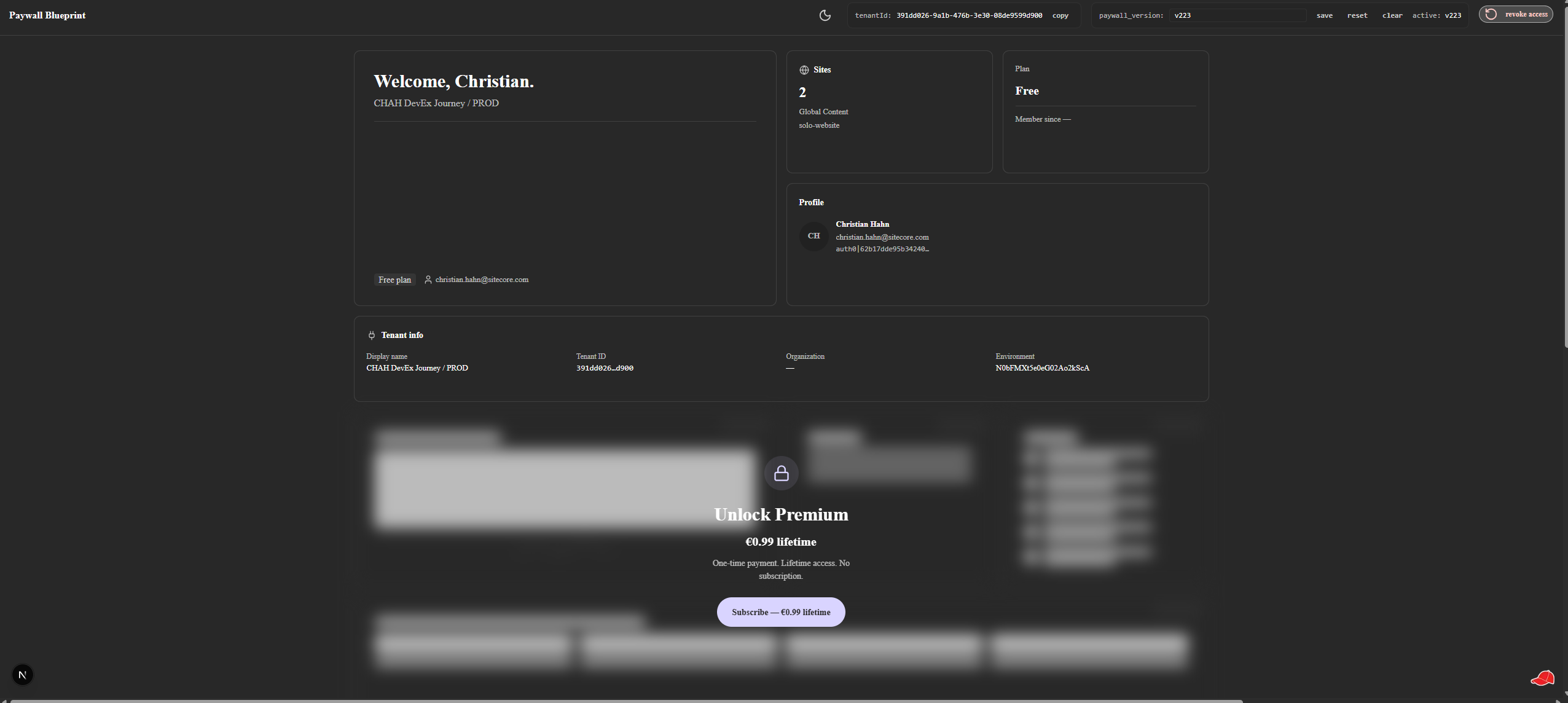
Moment 1, first install, no subscription. An adopter installs
the Paywall Blueprint app into their Cloud Portal tenant. They open
it. The Marketplace SDK initializes, the app queries the entitlement
store for their tenant, finds no record. The <PaywallGate> decides:
no-subscription state. The premium card is replaced with a friendly
denial UX ("Premium features unlock with a one-time €0.99
purchase") and a "View plans" CTA.
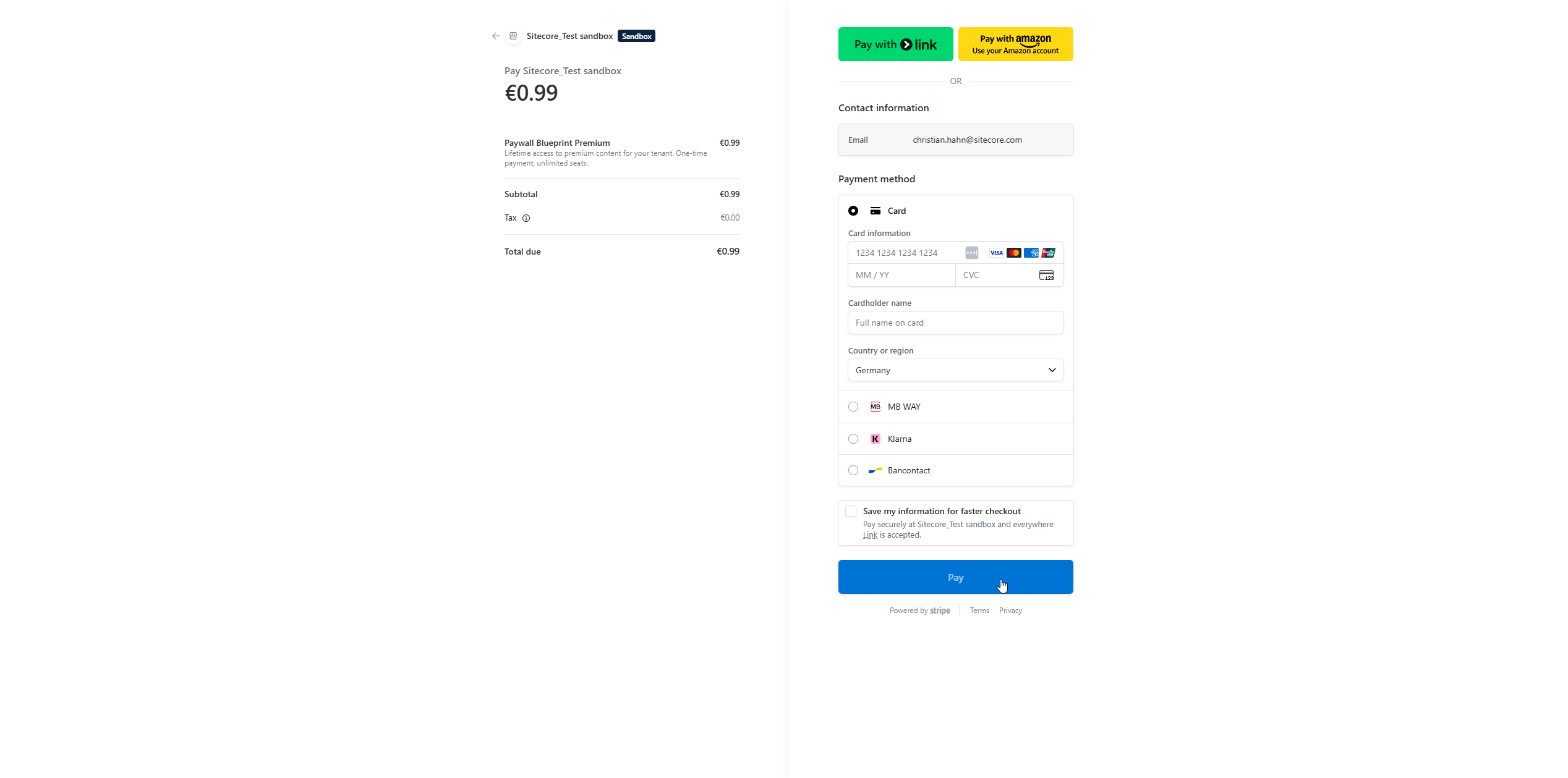
Moment 2, buying access. They click "View plans." The client
calls a server-side checkout endpoint, the server creates a real
Stripe Checkout Session, and the client opens it in a new tab.
Stripe Checkout collects the card. The user pays €0.99 (test mode is
4242 4242 4242 4242, of course). Stripe redirects to a return page
on the app's own domain, that page postMessages the iframe to
refresh and shows a "You can close this tab" message.
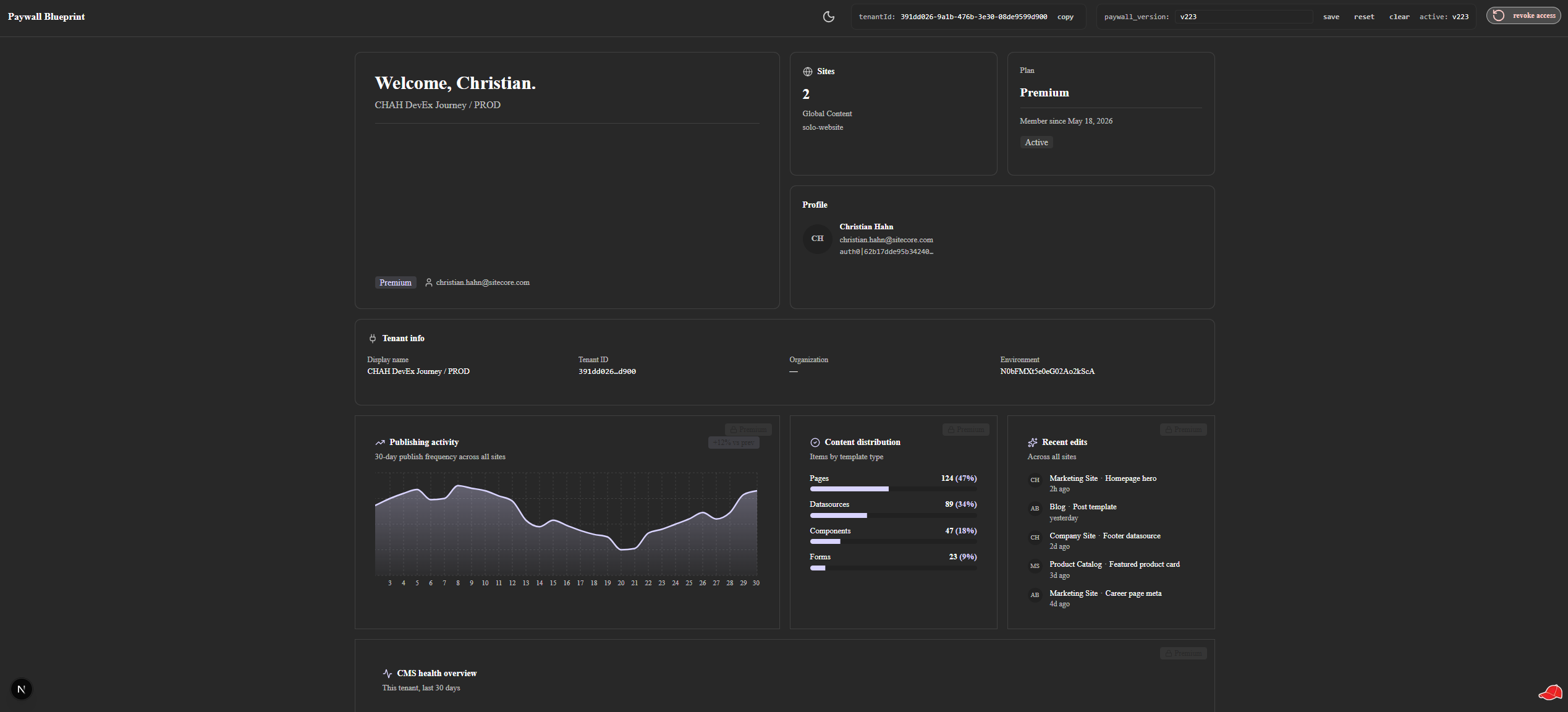
Moment 3, back inside the iframe. The iframe receives the
message and triggers a refresh. Meanwhile, Stripe fires
checkout.session.completed to a webhook endpoint. The webhook
handler verifies the signature, checks idempotency, and upserts the
entitlement record for the tenant. The iframe's refresh polls the
entitlement endpoint, sees allowed, and the <PaywallGate> swaps
the denial state for the premium content. The page reveals the
unlocked cards in a stagger-in cascade. Time elapsed from card-paid
to unlocked-iframe is roughly 3 seconds. Voila.
That is the whole flow. The first half is UI and gating, the second half is identity, payment, and reconciliation. Both halves are visible in the public repo.
The value, summarised
It proves the foundation is small.
You don’t need a fortnight of provider research, a custom auth flow, or a multi-tenant infra plan. A focused PoC stands up the gate, the UX, the persistence, and a real payment flow in a couple of afternoons.
The tenant is the right key.
Entitlement records keyed on marketplaceAppTenantId survive user sessions, reinstalls, and seat changes. That single decision unlocks a lot of architectural simplicity.
Iframe payment flows are solvable.
postMessage, polling, and a visibilitychange listener together cover every realistic return path, including the one nobody plans for, where the user closed the tab three days ago and came back.
Demo mode is the friendly default.
An env flag flips the gate between enforced and demo modes. A fresh clone runs without Stripe credentials, so the UI is playable before any billing wiring exists.
It’s public, permissively licensed, and runnable.
Open the repo, follow the README, see every decision in context. The captures and trade-offs are documented in the case study.
It builds an honest reference for the whole lifecycle.
From the freemium gate through Stripe Checkout to the customer portal, the pattern is one shape. Adopters don’t have to invent that shape; they can study it, take what fits, and discard the rest.
Where it goes next
Two more releases are queued.
Per-seat enforcement. The current subscription is one-time and
unlimited at the tenant level. The next release adds seats (buy 1, 5,
15, or unlimited) with admin-side invite and revoke, and a gate that
evaluates per-user instead of per-tenant. That release will use the
host.user SDK query the foundation deliberately left out of scope,
so the seat shape would have somewhere clean to land.
Self-service customer portal. A one-API-call wrap of Stripe Customer Portal so a tenant admin can manage cards, plans, cancellations, and invoices without a single line of UI on the Marketplace app side. Closes the loop on freemium, paid, managed.
Beyond those two, the blueprint stops growing. The point was always to demonstrate, not to corner the market.
A small invitation
This is a proof of concept. Learn from it. Read the source. Pull the patterns that fit your own product. Get inspired to push back on the "it is too complicated" default. The Marketplace stays free-only because the example does not exist, not because the problem is hard. Now the example exists.
If it helps you ship something paid, that is the win.
For all of you who want to dig a bit deeper:
- The case study, the technical breakdown of the seams, the four releases, and the Stripe + iframe captures collected during the build.
- The public repository, the source, the README, and the runnable demo mode.
- The Real-Tenant Probe methodology, the two-day spike that confirmed the tenant ID was the right entitlement key before deep planning started.
And as always, let me know what you think. Have you already tried to wire a paywall into a Marketplace app, and where did you get stuck? That is usually the place where the next blueprint comes from.
- Marketplace
- Stripe
- SitecoreAI
- Next.js