
Redirect Manager — The Marketplace App for Sitecore Redirects
Editing Redirect Maps in Sitecore is fast for a developer and miserable for everyone else. So I built a three-surface Marketplace app that puts redirects where editors actually work.
Welcome back. This post introduces a new Sitecore Marketplace app I have been shipping over the last week: Redirect Manager. It is a real, production-ready product that runs in a live SitecoreAI tenant, and it is the fifth app I have shipped through the agentic pipeline.
Redirects are manageable today, but only in Content Editor. The whole proposition of this app is to bring redirect management up onto a modern UI level by serving the right Marketplace extension points inside SitecoreAI, so the people actually doing the editing get a proper tool instead of a tree of fields.
Editor-driven redirects are still important. SEO, short links, post-rename safety nets, campaign URLs that outlive a campaign. Important enough that the editing surface should look like it was designed for the people using it.
Where the idea came from
For years, the canonical place to manage Redirect Maps in Sitecore has
been Content Editor. You navigate the tree, find the redirect maps
folder, open a map, edit the UrlMapping field as a giant URL-encoded
string of source/target pairs, save, and publish. A developer can do
this. An editor, so the person who actually knows that the campaign
URL changed yesterday because they were the one who renamed the page,
has to file a ticket.
Sitecore's newer SitecoreAI Pages editor is the place editors spend their day. And it has no built-in Redirect Map editor. So the ticket workflow stayed.
The idea, then, was simple. Put the Redirect Map editing surface inside the editor. Not as a separate web app the editor has to open, but as a Marketplace app that activates across the right extension points inside SitecoreAI itself, right next to the page being edited, on the dashboard the team starts the day with, and on a full-screen workbench when the job is bulk.
Once that was the goal, three different editor moments became three different surfaces.
The problem it solves
Every Sitecore content team I've worked with has the same three moments where a redirect needs to be created:
- "I'm editing this page and I just renamed it." The editor knows the old URL, knows the new URL, and wants to add one redirect right now without leaving the page they're working on. Today, they tab out, message a developer, and come back to keep editing.
- "I'm doing a redirect audit / cleanup pass." A content ops person needs to see every redirect map in the tenant, search them, bulk-edit, fix typos, retire stale ones, publish the result. Today, this is a Content Editor session by a developer because the URL-encoded field is unreadable in any other UI.
- "I'm wondering if anything needs attention." A content ops manager wants to glance at a dashboard and know whether redirects are healthy without opening anything. Today, this signal doesn't exist.
Redirect Manager addresses all three from a single Marketplace app installation.
How it works at a high level
The product is a client-side iframe app. The whole thing runs inside SitecoreAI's iframe sandbox in the browser, talking to Sitecore through the Marketplace SDK's bridge to the Authoring GraphQL surface.
There is no backend. No token cache. No persisted state outside the editor. An install is just an app registration in the Cloud Portal, so no infra to provision, no server to operate.
A single Marketplace app registration activates three extension points at once: Full Page, Page Builder Context Panel, and Dashboard Widget. Each surface is a different React entry point in the same Next.js app, and the shared SDK plumbing and data layer are reused across all three.
The three surfaces, in detail
Full Page, the daily workbench
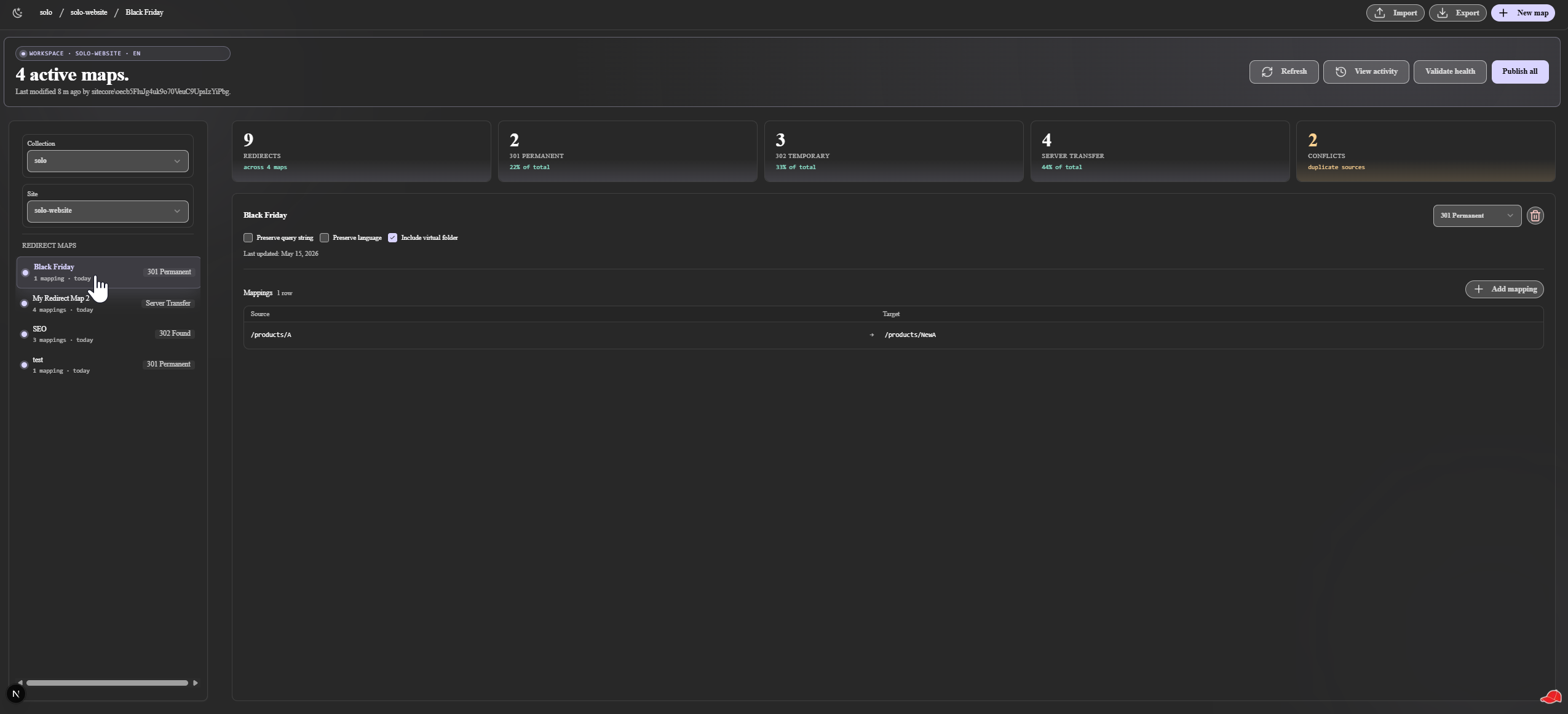
This is the surface a content ops person opens when they want to manage redirects in bulk. The route lives at the SitecoreAI Full Screen extension point, so it gets the full portal viewport.
The landing view is a virtualized list of every Redirect Map in the
tenant, backed by react-virtuoso, so a tenant with hundreds of maps
still scrolls smoothly. Each row shows the map name, the row count, and
the last-modified timestamp. Search is keyboard-driven, and the list
remembers the last selection, so a tab refresh does not lose the
user's place.
Opening a map drops the user into the map editor. Another
virtualized grid, where every row of the map is a source URL, a target
URL, and a redirect type (301, 302, or Server Transfer, which are
Sitecore's actual three values, not the four the docs sometimes list).
Inline edit, inline create, inline delete. The UrlMapping
URL-encoded contract serializes the whole pile back to Sitecore as a
single write on save.
Conflict resolution
When two mappings share a source URL, Sitecore's runtime quietly picks one. The other one is dead config. The Full Page workbench refuses to let that happen silently. A Conflicts counter sits on the stat strip at the top, and clicking it opens a focused modal that lists every duplicate source, the maps it appears in, and a direct Open map action for each side of the conflict.
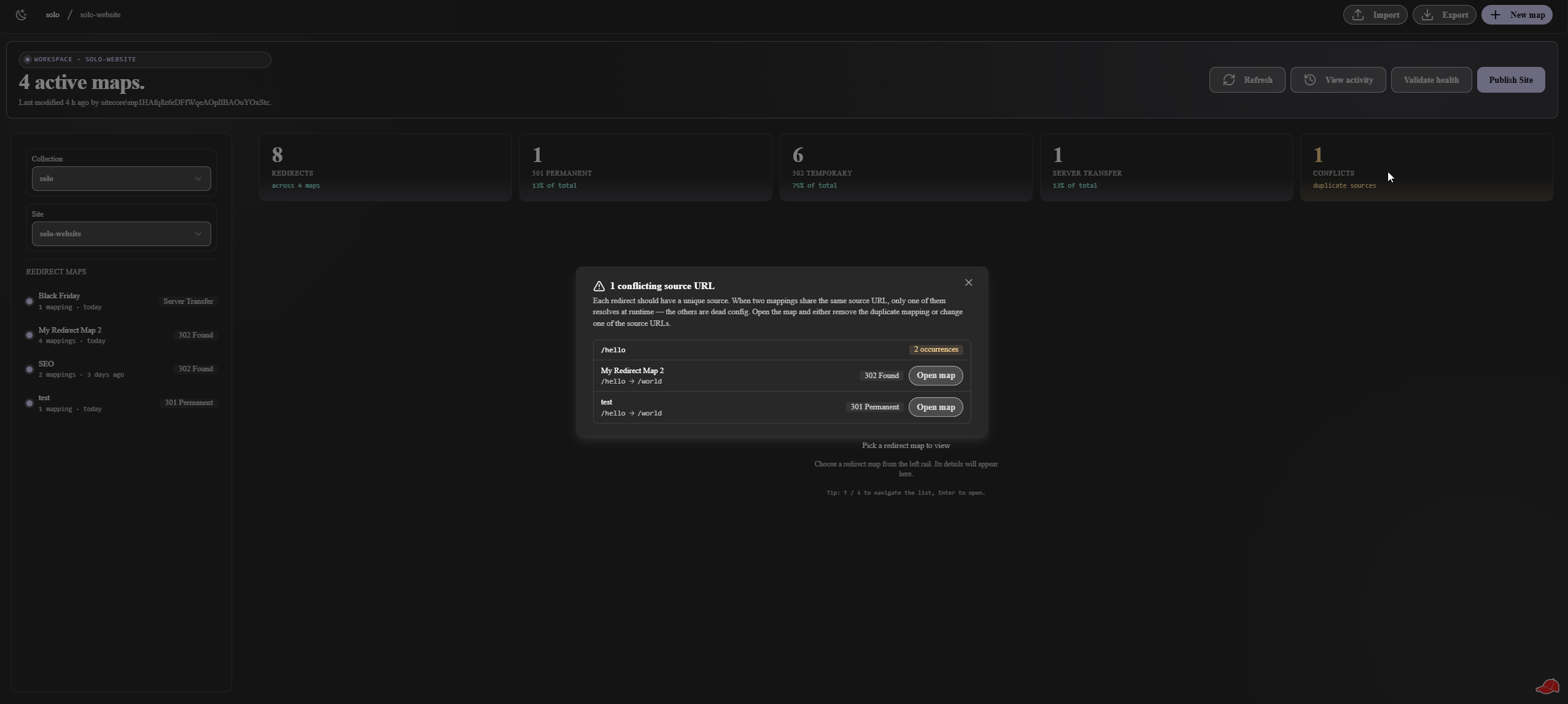
The nice part is, a content ops person does not need to audit for conflicts anymore. The workbench tells them whether any exist the moment they open it.
Export and import across environments
Most teams run more than one Sitecore environment. A staging site where the editors stage the next campaign's redirects, a production site that serves real visitors, sometimes a third tenant for QA. The need to lift a set of redirect maps from one environment and replay them on another is constant, and historically it was a copy-paste-from-Content-Editor exercise that nobody really enjoyed.
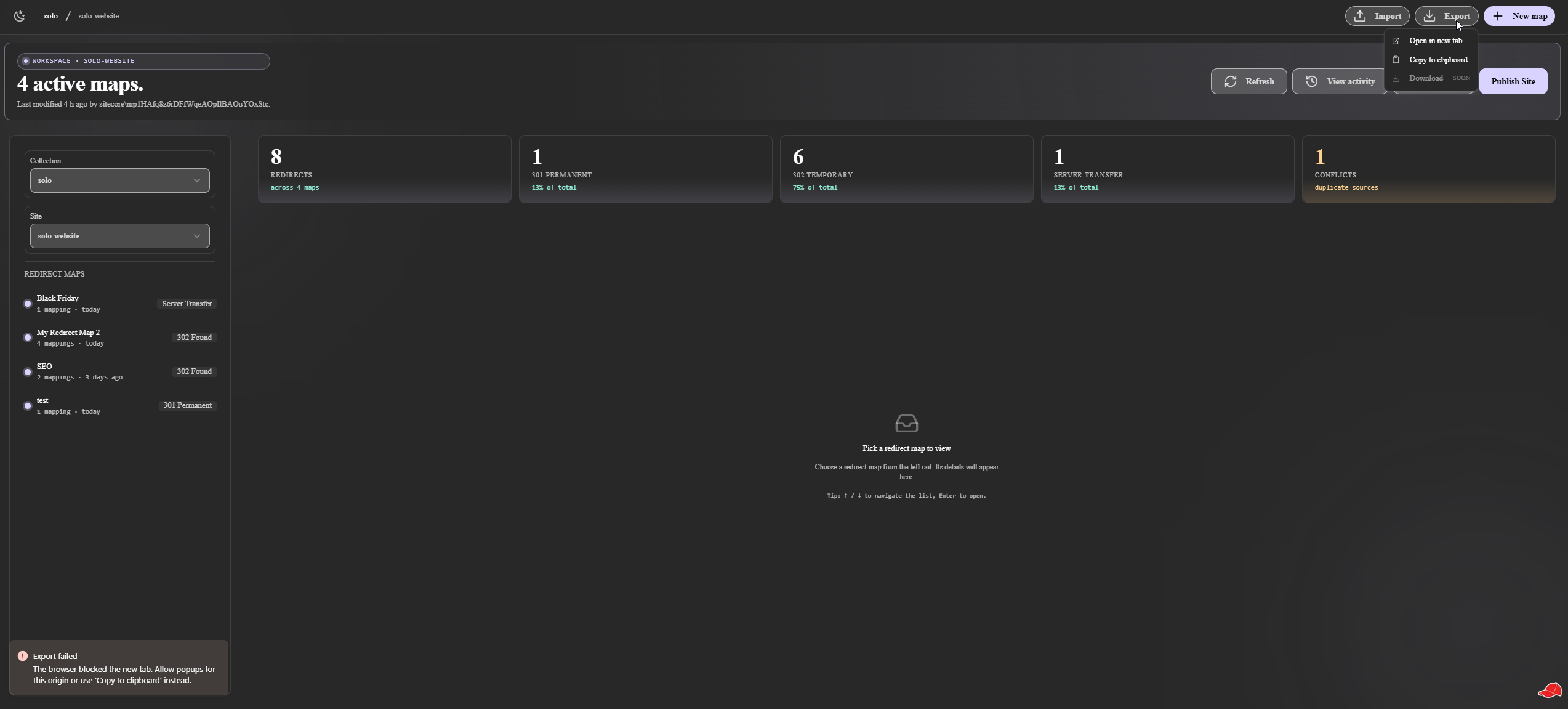
The Full Page workbench ships Export and Import as
first-class actions on the workspace header. Export produces a clean
JSON file of every map in the current site, with source/target pairs
fully decoded, so no UrlMapping URL-encoding leakage. There are
three sinks: open in a new tab, copy to clipboard, or download to
disk. Whichever fits your environment-to-environment workflow.
Import is the other half of the same shape. Pick a JSON file, or paste the JSON inline, then click Validate & preview before anything writes.
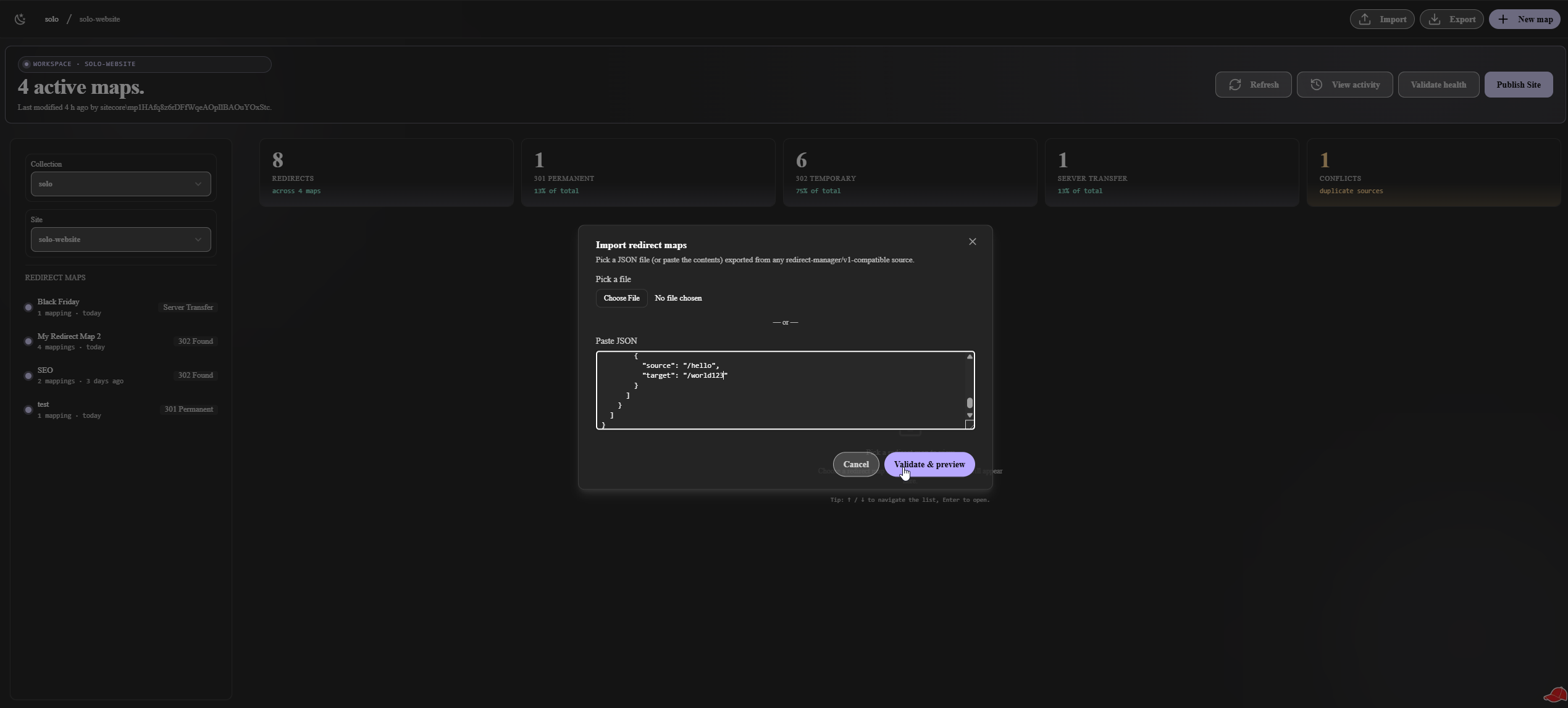
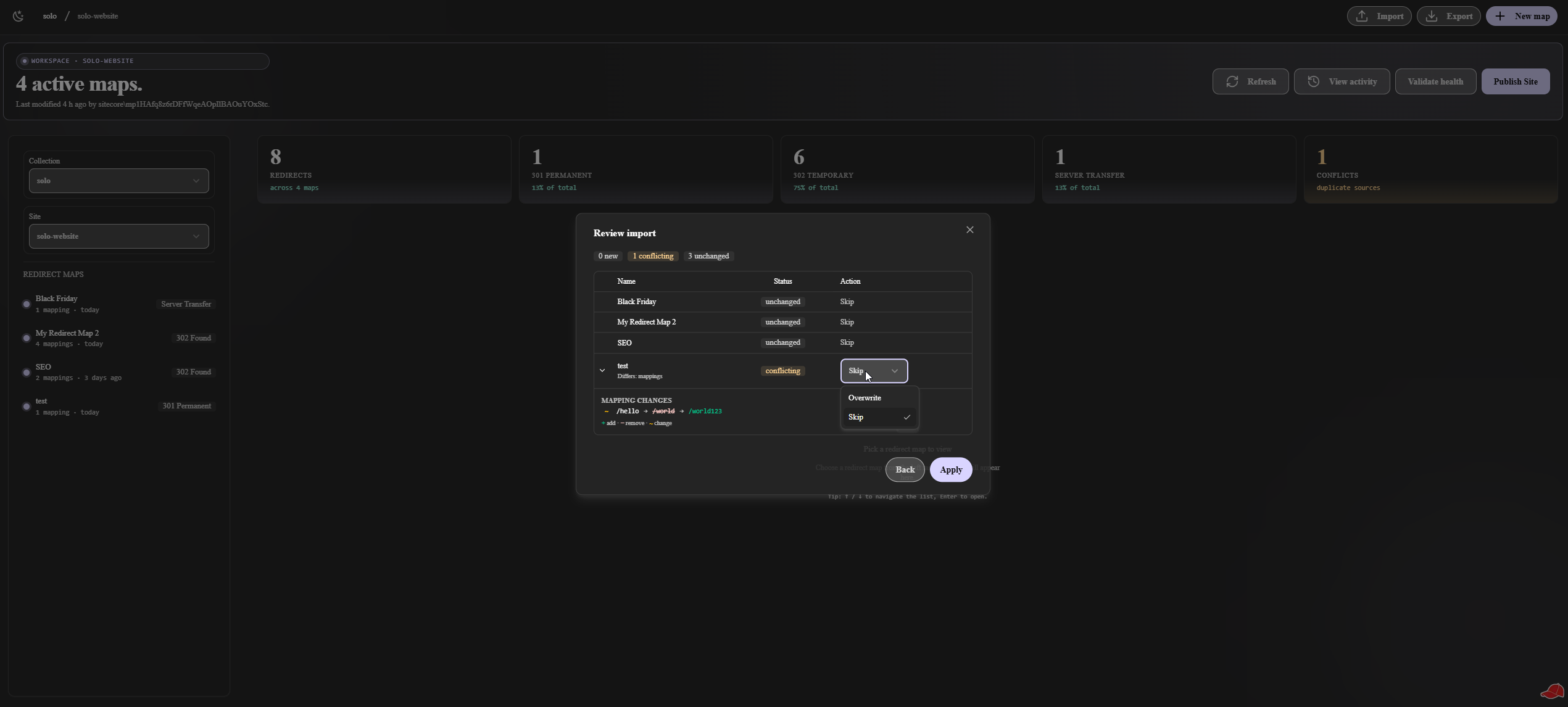
The validate step is where the import feature really earns its keep.
It diffs the incoming payload against the current tenant and shows a
per-map breakdown of new, conflicting, and unchanged maps, with a
Status column and an Action selector on every row. Conflicting maps
get an expand-row that shows the actual mapping diff (additions in
green, removals in red, changes with a ~ tilde marker) and a
per-map choice of Overwrite or Skip.
New map management
The third workspace-header action is New map. A focused dialog
asks for a name, a type (301, 302, or Server Transfer), and three
optional flags: preserve query string, preserve language, include
virtual folder. Behind the scenes the app calls createItem against
the current site's Settings/Redirects folder, and the new map
appears in the left rail without a page reload.
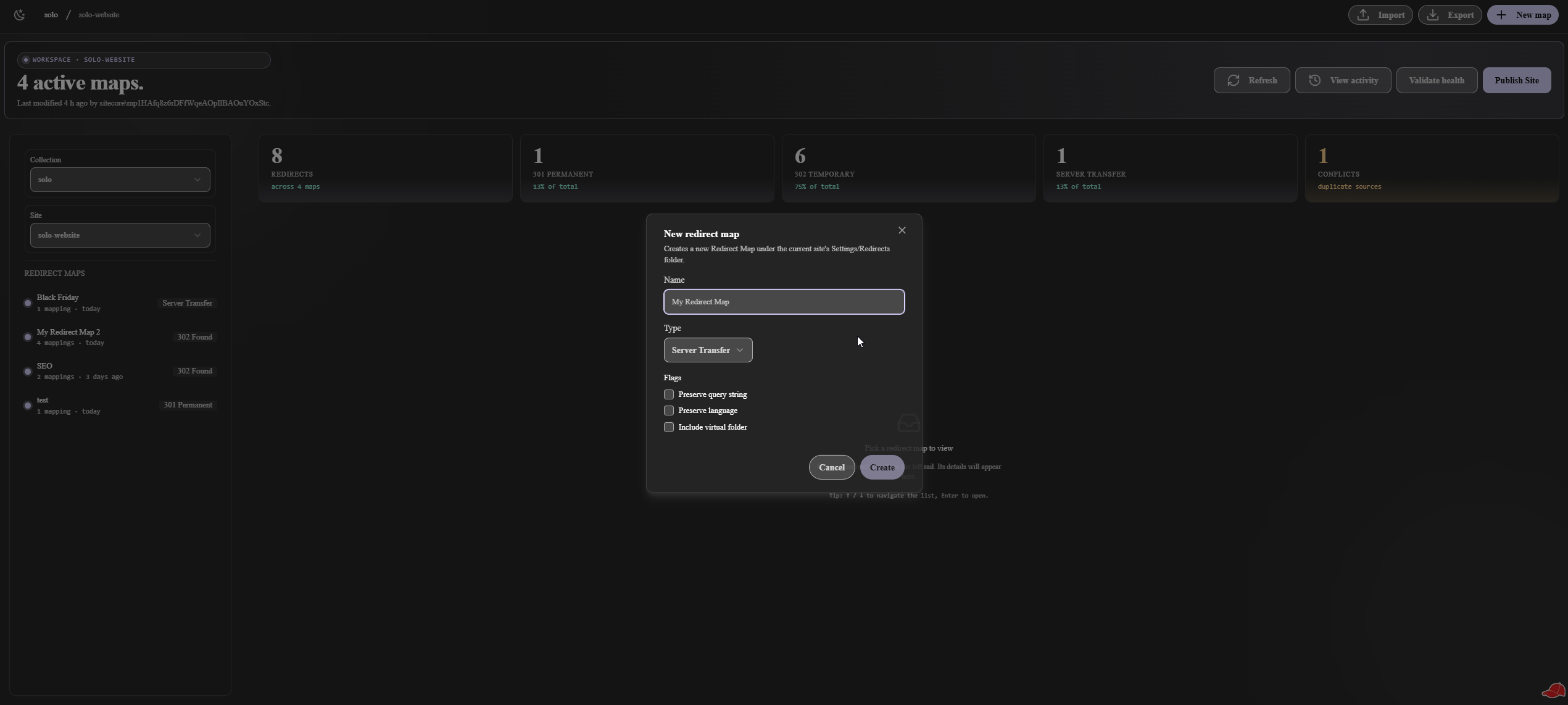
The same dialog handles the four canonical defaults Sitecore exposes on the stock template, so the resulting item is a peer of any map created through Content Editor. No special handling needed downstream.
Latest activity
The workspace header carries one more action: View activity. A dropdown that shows the most recently touched Redirect Maps across the site, each with a timestamp, the user that touched it, and the redirect type pill. Click any entry to jump straight into that map's editor.
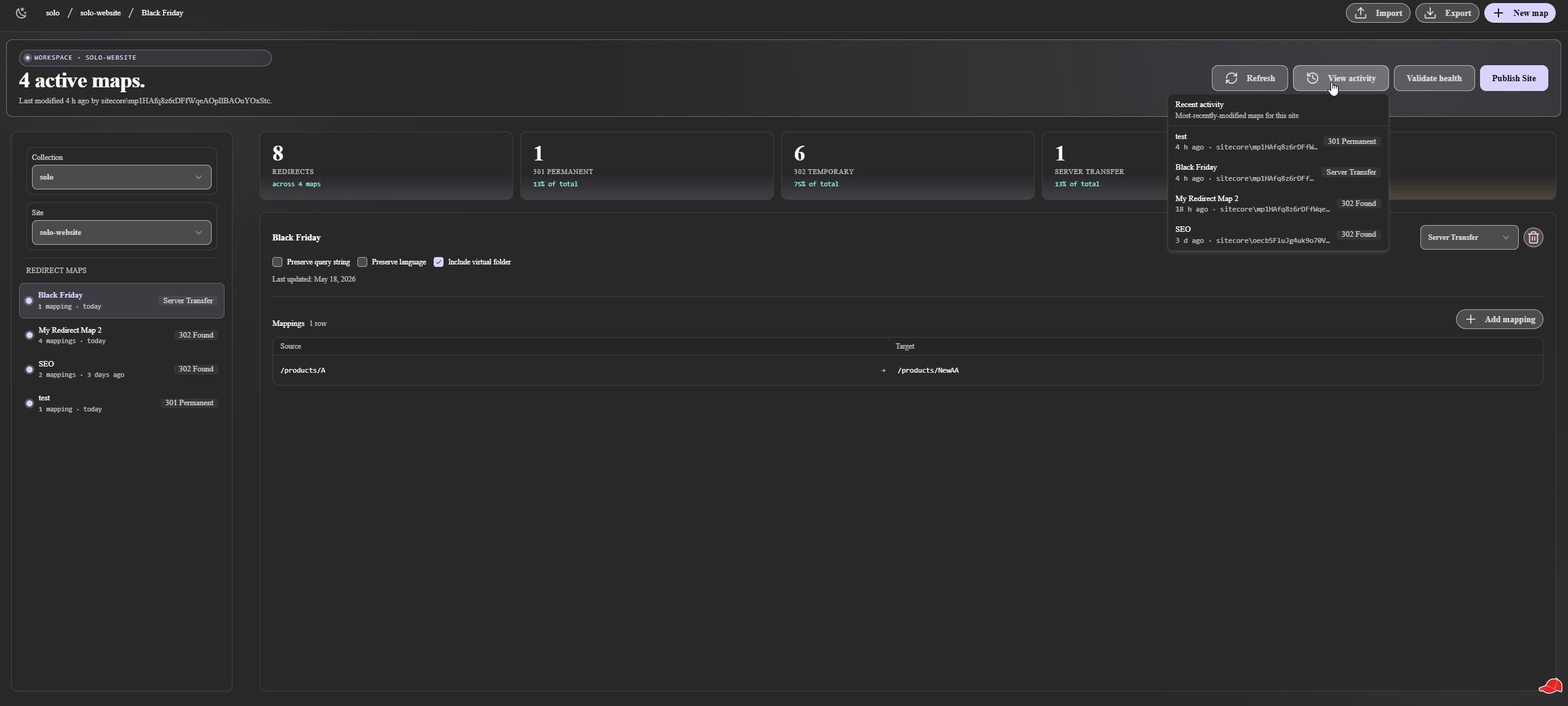
A small feature, but it really helps with team coordination. The person opening the workbench at 9am can see the maps another editor touched the previous evening before they start changing anything.
Publish Site
At the top-right of the workbench is a hero Publish Site CTA. This one is more important than it looks. Per the SitecoreAI documentation, Redirect Maps only land on the edge pool of redirects after a site publish. Saving a row, or even saving a whole new map, updates the Authoring tenant, but real visitors do not see the new behavior until the publish has propagated.
The button fires a real site publish through the SitecoreAI
Publishing v1 API at edge-platform.sitecorecloud.io, then polls the
job every 3 seconds until terminal state. The button locks while a
publish is running, a toast surfaces the result, and localStorage
persists the in-flight job ID, so a tab refresh resumes tracking
instead of losing it.
So instead of asking the editor to navigate back to a different portal screen, the publish action sits one click away from the edit that needed it. Nobody forgets to publish anymore.
Page Builder Context Panel
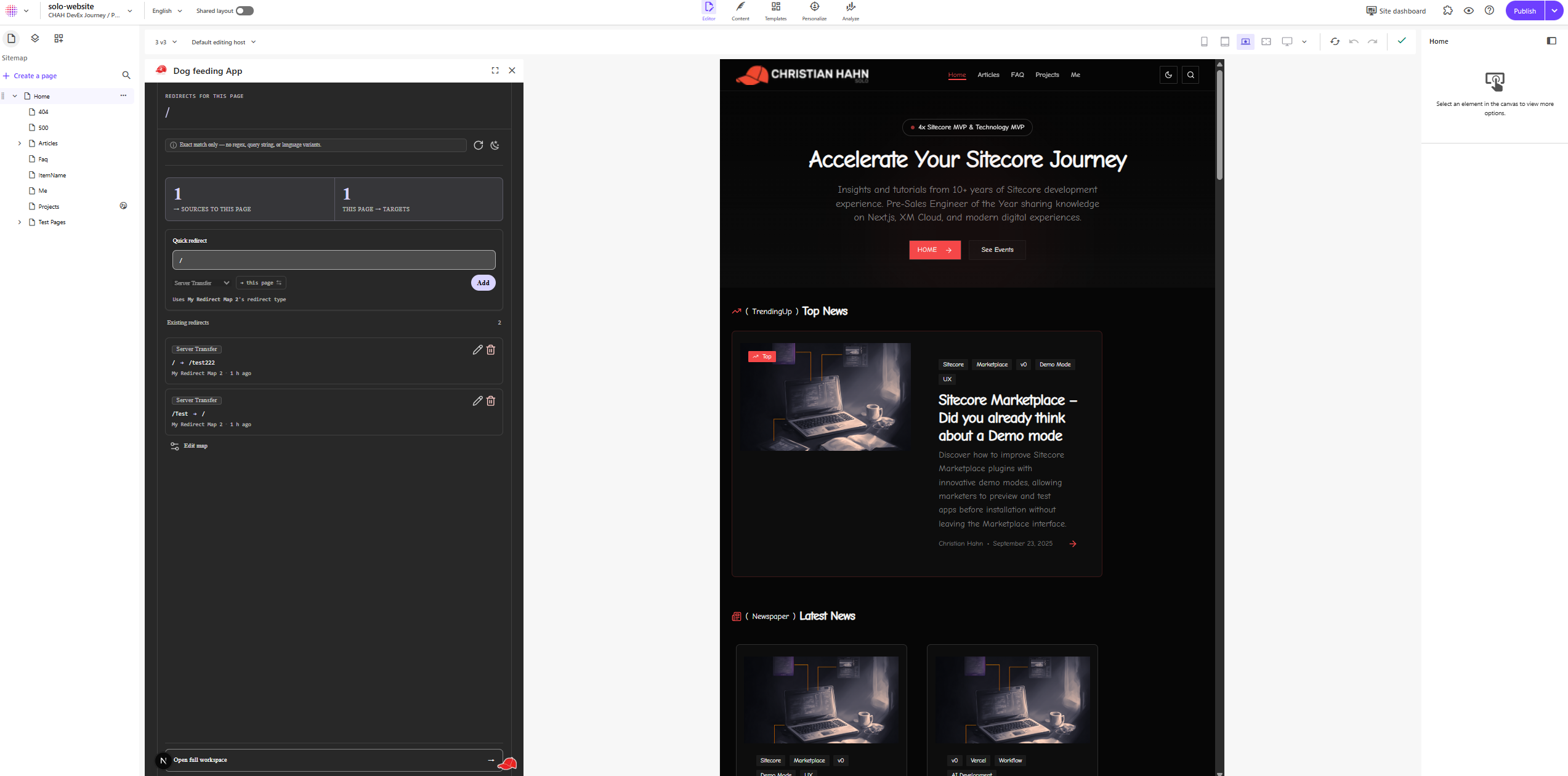
This is the surface that solves the most common editor moment: "I just renamed this page, add a redirect for the old URL."
It lives at the Page Builder Context Panel extension point, so the roughly 360 px wide side panel that sits next to the page in SitecoreAI's visual editor. The form has three fields:
- Map, a picker of every Redirect Map in the tenant, with localStorage memory of the last-used map per tenant, so the common case is one fewer click.
- From, the source URL the editor wants to redirect away from.
- To, the target URL, defaulted to the current page's URL.
Hit submit and the row lands in the chosen map. The editor's focus never leaves the page they were editing. Voila.
One little guardrail is worth mentioning. If the source URL already exists in the selected map, the form surfaces the conflict before the submit goes through, instead of silently overwriting. Three actions are offered (overwrite, edit the existing row, or pick a different map), so the editor's intent stays explicit.
Dashboard Widget
This is the surface a content ops manager opens first thing in the morning. It lives on the SitecoreAI Dashboard as a tile.
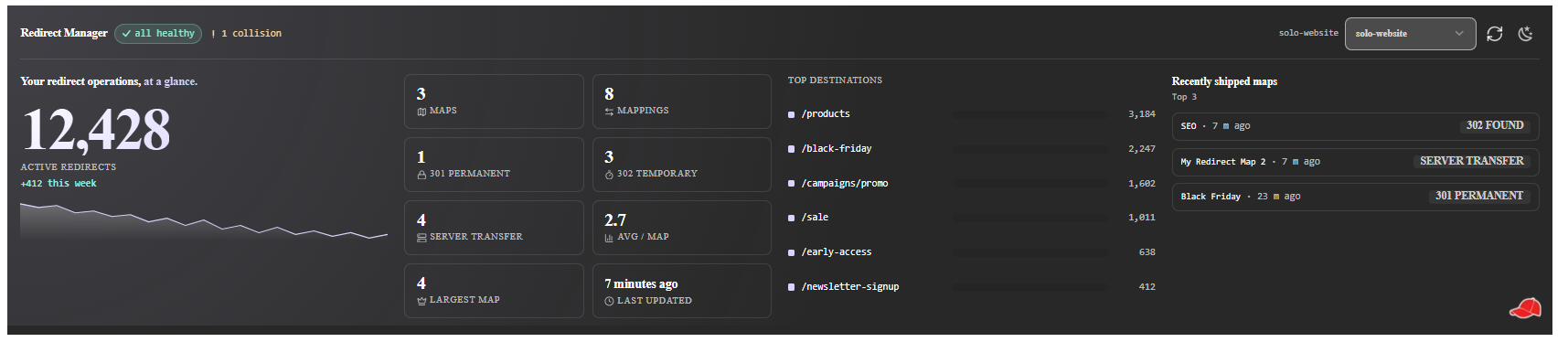
The tile shows the total redirect-map count, a sparkline of recent activity, the top destinations across the tenant (where is traffic being funneled to?), and a "recently shipped" line like "Redirects updated 4h ago by Anna." Click the tile to jump straight into the Full Page workbench, scoped to the right map if there is an obvious context.
In some places the visual chassis surfaces content that does not yet have a real data source (the analytics PRD will land per-redirect hit counts later). For those, a small "Preview data" banner makes that explicit, so operators cannot mistake mocks for live values.
Everything in action
Let me walk through three concrete user moments end-to-end.
Moment 1, adding a redirect for a renamed page. An editor is in
SitecoreAI Pages, editing the "Spring Campaign 2026" page, and they
realize the old URL /promo/spring-2025 should now redirect to the
new page. They open the Context Panel. The Redirect Manager tab is
already there from the install, the picker auto-selected last
session's map, they type /promo/spring-2025 in From, To is
already the current page URL, they click Add. Row lands. They keep
editing the page. Time elapsed: around 10 seconds.
Moment 2, a redirect audit. A content ops person opens Redirect Manager Full Page. They see a list of every map. They open the "Marketing redirects" map, scroll the 1,400 rows, spot three that point at retired campaign pages, and delete them inline. Then they click the hero publish CTA. The button locks. Three seconds later the toast fires: "Site published, 1 redirect map updated." The Edge cache now serves the cleaned-up list to real visitors.
Moment 3, a dashboard glance. A content ops manager opens the
SitecoreAI Dashboard at 9am. The Redirect Manager tile shows: 24
total maps, sparkline flat for the last week, top destination is
/products/flagship, last shipped 4h ago by Anna. They close the
tab. Nothing needs attention.
Three different moments, three different surfaces, one app install.
Why three surfaces from one app
A reasonable question, why not three separate apps?
There are three reasons.
One install, one auth. A Marketplace app registration grants the app access to a tenant's data once. Splitting into three apps means three registrations, three permission grants, and three sets of OAuth client credentials. The friction adds up before any redirect gets created.
One codebase, one update path. All three surfaces hit the same
Authoring GraphQL surface, use the same UrlMapping parse-and-write
contract, and share the same SDK conventions. A change to the GraphQL
query is a one-file change, not three. A new feature ships to all
three surfaces in one PR.
One mental model for the user. The Map picker in the Context Panel is the same map shown in the Full Page workbench. The recently shipped indicator on the dashboard reflects the publish triggered by the Full Page hero CTA. The user thinks about redirects, not about which app for which redirect task.
Bottom line: once the SDK contract is pinned, surfacing it three different ways is presentation work, not integration risk. That is the dogfood-loop takeaway I keep relearning.
A release that did not ship
Between the foundation release and the visual redesign I attempted a
fourth release: multilingual maps with per-language overrides. Two
days into implementation, a real-tenant capture probe revealed that
the stock Redirect Map template stores UrlMapping as SHARED
across languages. One value, all languages, no per-language override
path that did not involve replacing the template, which of course
would have orphaned every existing redirect map in every customer
tenant the app had ever been installed into.
So that PRD was cancelled. Two days spent, two to four weeks saved. The captured field-versioning matrix lives as a reference artefact for any future multilingual proposal.
The cancellation was actually important enough that it became its own methodology essay: The Real-Tenant Probe. The product itself proceeded straight from the foundation to the visual redesign and then to the publish action, and is now running in production.
The value, summarised
Redirects live where editing happens.
The most common moment, “I just renamed this page, add a redirect”, never leaves the editor anymore.
One install, three surfaces.
Full Page workbench, Context Panel quick-add, Dashboard tile. One Marketplace registration, one auth, one update path.
Publish is one click, with honest job tracking.
The hero CTA fires a real Sitecore site publish, the button locks while the job runs, and cross-session resume means a tab refresh does not lose state.
Scales to thousands of rows.
Virtualized lists for both the map index and the map editor. Tenant size doesn’t scare the UI.
No backend to maintain.
Pure iframe app. The tenant’s own auth pipes through the SDK; no token cache to rotate, no infra to bill.
Built against a real tenant, end-to-end.
Every shipped release ended on a real-tenant smoke pass before /ship, including a Tranche 3 scope reshape on the publish PRD that caught a Sitecore Edge quirk before it got to real users.
Where it goes next
Two releases are queued.
Regex matching and a testing tab. The current source-URL match is exact-string. The next release adds regex source matching with a live testing tab inside the workbench. Type a URL, see which map would match it, which row would win, and what the resolved target would be.
Analytics. The dashboard widget today shows recent activity. The analytics release wires real per-redirect hit counts and last-served timestamps, so the team can see which redirects are still really load-bearing and which can be retired.
Of course both releases will start with a two-day real-tenant probe against the single load-bearing assumption before any deep planning. That move is now standard practice on every release.
How to read more
For all of you who want to dig a bit deeper:
- The case study, the technical breakdown of the three surfaces, the SDK conventions, and the ADRs that pinned each decision.
- The Real-Tenant Probe methodology, why the cancelled multilingual release became the most valuable artefact of the whole product.
- The dogfood loop, the broader story of how five Marketplace apps hardened the skill set the agentic pipeline runs on.
If you run a Sitecore tenant with Redirect Maps and you have been managing them out of Content Editor, this app is for you. The editors on your team will notice immediately.
And as always, let me know what you think. Are you currently managing Redirect Maps in Content Editor? Which of these three surfaces would help you most? I am genuinely curious where the next release should go.
- Marketplace
- SitecoreAI
- Page Builder
- Next.js