Sitecore XC – Deleting sellable items programmatically might lead to SQL deadlock exceptions
Lastly while working with Sitecore XC I had the task to clear a whole catalog. This means I wanted to delete all sellable item and all categories. If you are interested in the overall situation, you
Lastly while working with Sitecore XC I had the task to clear a whole catalog. This means I wanted to delete all sellable item and all categories. If you are interested in the overall situation, you can just read one of my previous blog posts, where I described the scenario in more detail.
While implementing some custom piece of functionality, I encountered a very nasty issue. As you might imagine, a catalog can contain a massive number of sellable items. In my case the catalog had over 12k products. So when I decided to delete all of them at once, I knew it would take some time. But unfortunately it does not only take some time, it is also highly possible that the process will run in some SQL server deadlock exceptions.
Below you can see a very simple code to grab all sellable items from commerce list, which belong to the target catalog I wanted to clear. Once I got all the sellable items, I just have to iterate through all of them and call DeleteSellableItemCommand from commerce engine. This way, the entity is not only deleted, but also all possible associations are removed as well.
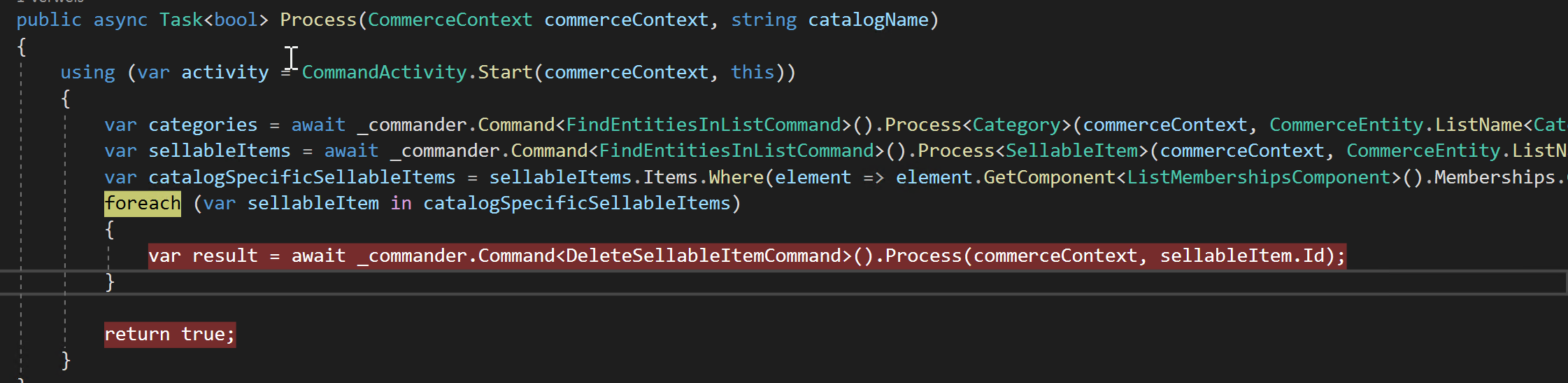
So when I now let the code run, I recognized, that the log size increased massively after some time. After short investigation I saw the following error
00034 18:52:22 ERROR SQL:block:deleteentity.Error: Message=Transaction (Process ID 91) was deadlocked on lock resources with another process and has been chosen as the deadlock victim. Rerun the transaction.|Trace= bei System.Data.SqlClient.SqlConnection.OnError(SqlException exception, Boolean breakConnection, Action`1 wrapCloseInAction)
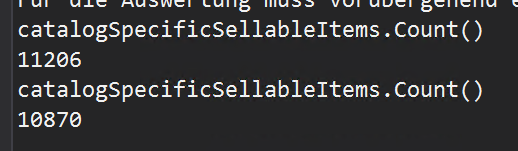
After some more investigations I also found out, that this happens, all the time I try to delete all the sellable items. In the image below you can see, that e.g. the process started with 11206 items left and the errors started when 10870 items were left. So the process ran through for around 1000 items till SQL server error started for all further tries to delete a sellable items.
Note: If you have a look at the DeleteSellableItemCommand while the errors appear in log, you can see, that the command returns successful and says the sellable item is deleted. Therefore you just see, that it was not successful, when you first have a look at the log and second let the process run again and see, that there are a lot of items left, which should already be deleted.
Because I had no idea, why this happens all the time, I decided to report that to Sitecore Support. The good news after a long Investigation was, that this behavior is not normal and is registered as bug under the ref number #394412. Also Sitecore told be, what exactly leads to that error.
Issue: Within Minion instance there are two minions PurgeCatalog and PurgeCategories minion, which run in standard setting every 5 minutes. These minions check for catalogs and categories to be deleted. While doing that, they access the same tables with the same underlying procedure, than DeleteSellableItemComman to remove entities from tables and cause the Deadlock exception in the database.
Current Solution: The only workaround currently is, that you should disable both minions, when you try to delete a massive number of sellable items.
- architecture
- dotnet
- sitecore-commerce
- sitecore-platform