Sitecore XC – How to delete a massive number of categories / sellable items?
Lastly while working with Sitecore XC I had the task to clear a whole catalog. This means I wanted to delete all sellable items together with all categories. But the scenario, which is also possible
Lastly while working with Sitecore XC I had the task to clear a whole catalog. This means I wanted to delete all sellable items together with all categories. But the scenario, which is also possible could be, that you just want to delete all sellable item from a catalog, or you just want to clear a single category, without deleting it. So there could be many different use cases, which should be covered somehow.
Because I did not find anything useful within BizFx tools to delete them all at once, and no API Call within Postman, I decided to ask some Sitecore Architect directly.
The response unfortunately was, that such a case is not covered by OOTB commerce engine functionality. Either way I could use Clear Environment, but the really everything within my environment would be deleted, and not just categories and sellable items, or I could go directly into SQL server and delete entries from the entities table.
There is also a third way to achieve a cleared catalog. Of course you can use standard BizFX delete functionalities on categories. The trick is, that you go to a first level category of your catalog and click Delete.
You are then asked if you would like to delete or just disassociate the current catalog.
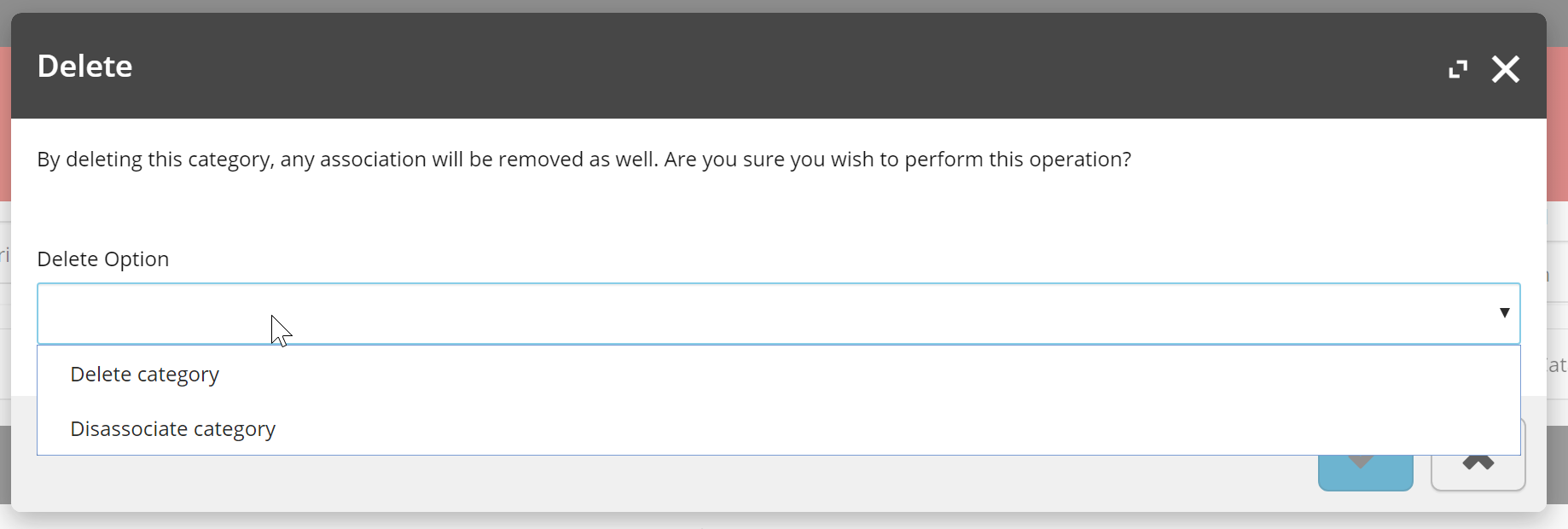
In case you really want to delete everything, you can just choose Delete category.
How deletion of categories works behind the scenes: Once you delete a category via BizFx tools, you should know, that the category is not really deleted immediately. What the authoring system does, if you click delete category is pretty simple. It just marks the category to be deleted and add it to a special commerce list. The trick now is, that the minion instances has a minion, which crawls the list in standard every 5 minutes, grabs the categories, checks if they really should be deleted and in the end delete the category. But it does even more. You know, that a category can be associated to other categories and / or sellable items. And that the number of such associations can be really massive in a complex catalog. Depending on the chosen Delete Option the process now either way grabs all associations for the current categories and just deletes the these, but keeps the entities behind them. Or grabs all the associations deletes them and iterates through every associated category recursively till it reaches the level of sellable items and starts to recursively deletes all the entities. So if you e.g. delete a first level category it does not just delete that category, but also all sub categories and all associated sellable items to this and all sub categories. Now you also should understand, why the BizFx click in the authoring engine does not directly execute the deletion process, but delegates the job to the minion instance. If you now do that on every first level category, the result is a cleared catalog. But of course that trick is only applicable , if you do not have duzend or hundreds of first level categories.
Because both proposed ways and the manual workaround were not really applicable in my situation, I decided to write some custom functionality, which achieves exactly this.
The outcome of a few hours of programming and testing were three new functionalities, which might also be useful for you at some point
- Clear Catalog
- Delete all Sellable items
- Clear Category
In the following small chapters I will describe all of the functionalities and what they do for you.
Clear catalog
First let’s have a look at a functionality, which is able to clear a catalog with one click.
Note: I would recommend to use such piece of functionality just in development or testing environments and only very wisely in production environments.
In the screenshot below you can see the very simple command.
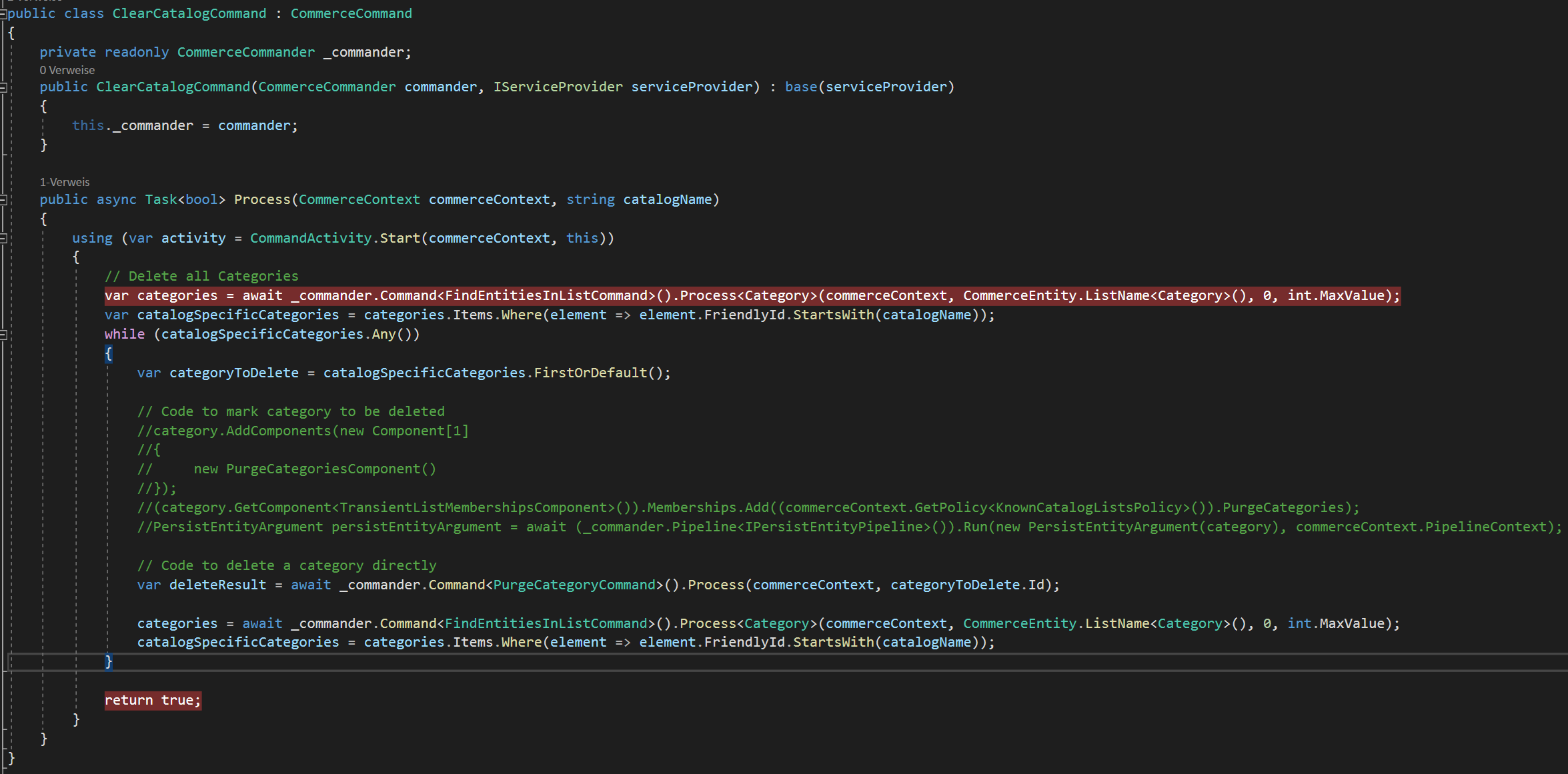
This command uses a catalog name to do the following
-
While categories exist
- grabs all categories of the current environment
- filters all categories out, which are not belonging to the current catalog
- Deletes the category
- Again grabs all the categories
- Filters again for categories of the current catalog
Deletion of categories: We use here the PurgeCategoryCommand. This command is normally used by minion to delete marked categories. Because I want categories to be deleted immediately, I skip the mark operation and wait 5 minutes, and just call the delete operation behind the scenes directly. In the commented code above you can the the piece of code to mark a category to be deleted, so that a minion can grab it afterwards. Of course you can decide on your own the way, of how you would like to delete categories.
Iteration: If we directly delete a category, like shown above, we have to be careful, that after delete operation, not only this category, but all subcategories are now deleted, like described in the beginning. This means, that the list from earlier of all categories, now is not valid anymore. Because of that we have to grab a fresh list of categories of the catalog each time we delete a category. If we still would use that list and continue iteration, we would most likely hit a lot of categories, which are already deleted and would throw various errors on processing.
Delete all Sellable items
Because you could also have the use case, that you want to delete all sellable items, but would like to keep the whole category structure with all categories and associations, I also created a piece of code to just delete all sellable items from current catalog.
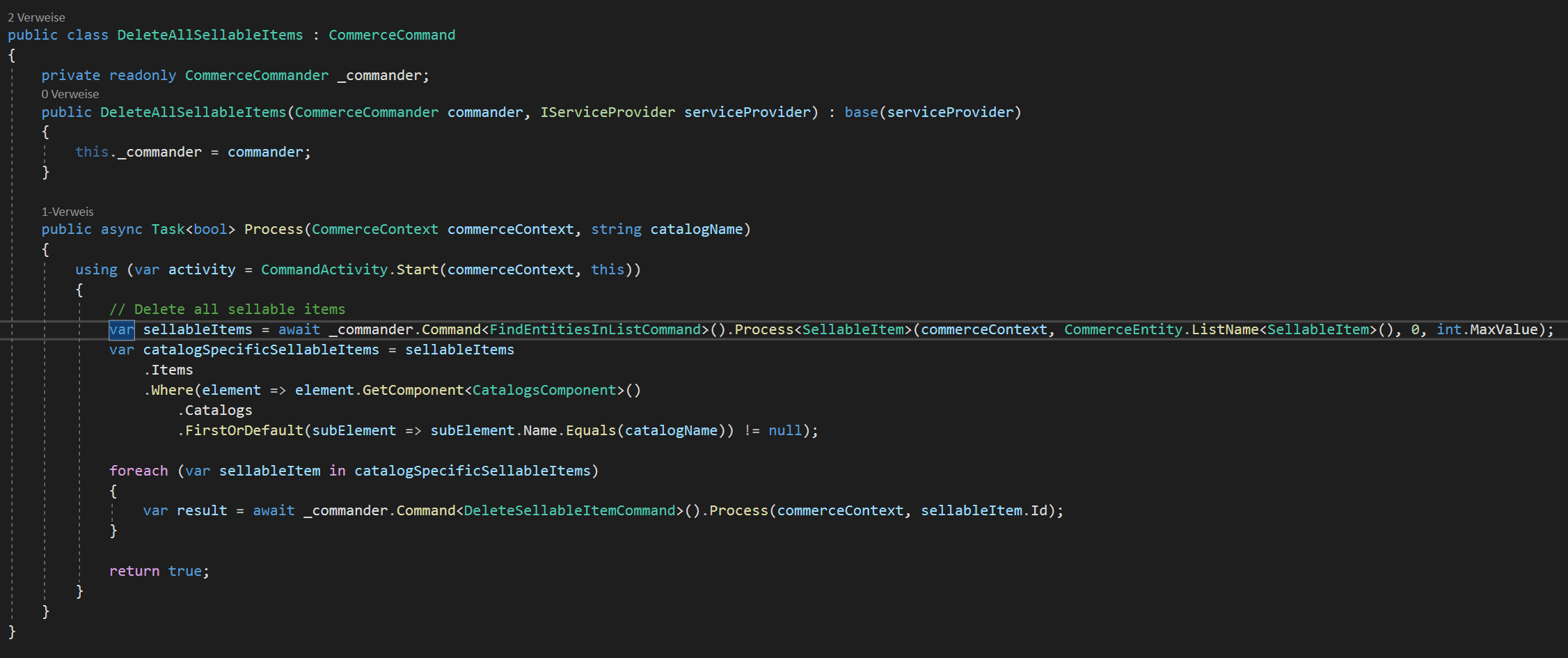
The code from the screenshot above is quiet similar to the previous code. We first grab all sellable items within the environment and filter for those belonging to the current catalog. Then we really can just iterate through all of them and use standard DeleteDellsbleItemCommand to delete one after another. This works really well for a small amount of items to be deleted. But for massive number of items to be deleted, I encountered some serious issues, which lead to a newly reported bug at Sitecore support. Read more about this here and how to work around that issue.
Clear Category
Last but not least, I also created a small helper to clear just a single category, which means to delete all sellable items associated to a specific category.
This time the code is a bit more complex. Not only because, we have to grab the associated sellable items but also, because I added here some piece of logic,which avoids accidential deletion of entities, even though they are still associated somewhere else.
But just let’s have a look at the code
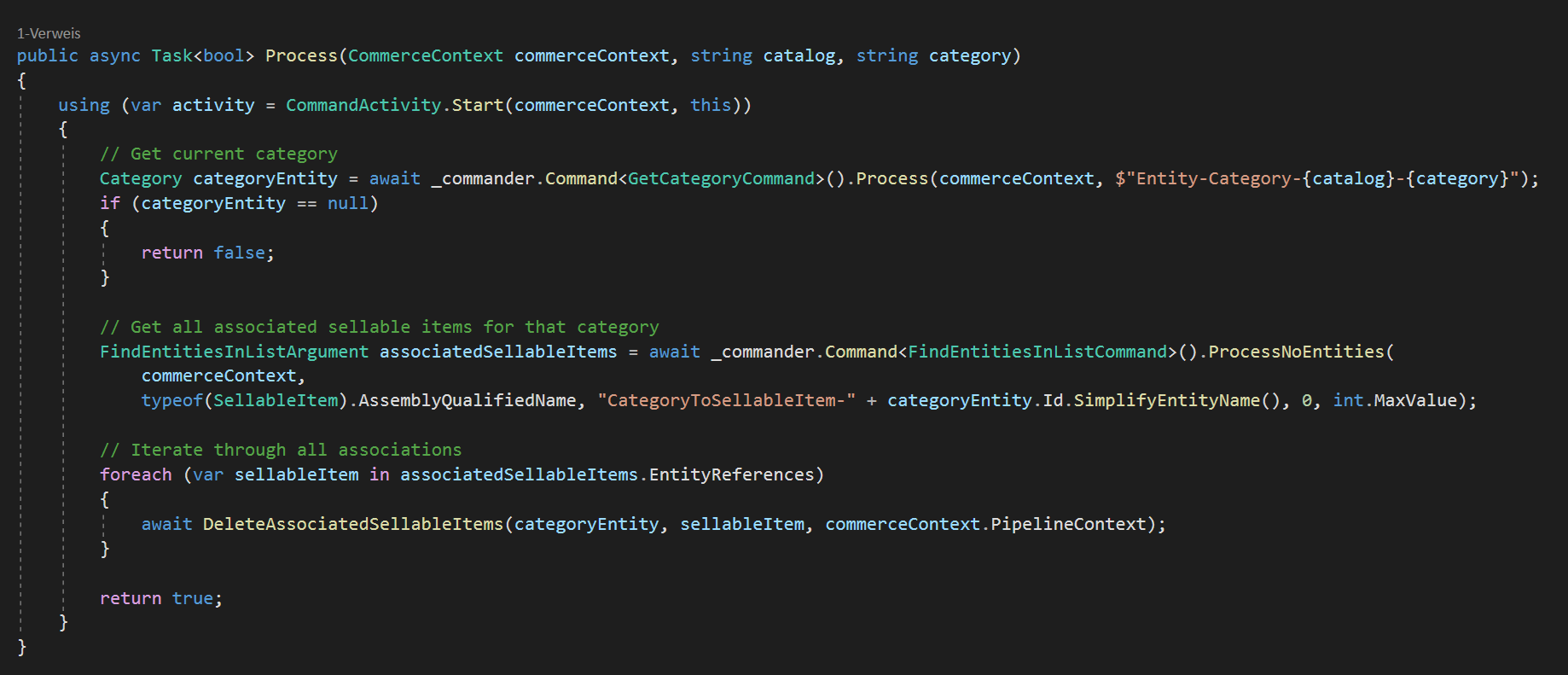
At first we grab our category to be cleared. Then we use standard functionality FindEntitiesInListCommand with special parameter to grab all associated sellable items. Then of course again we can iterate through all items.
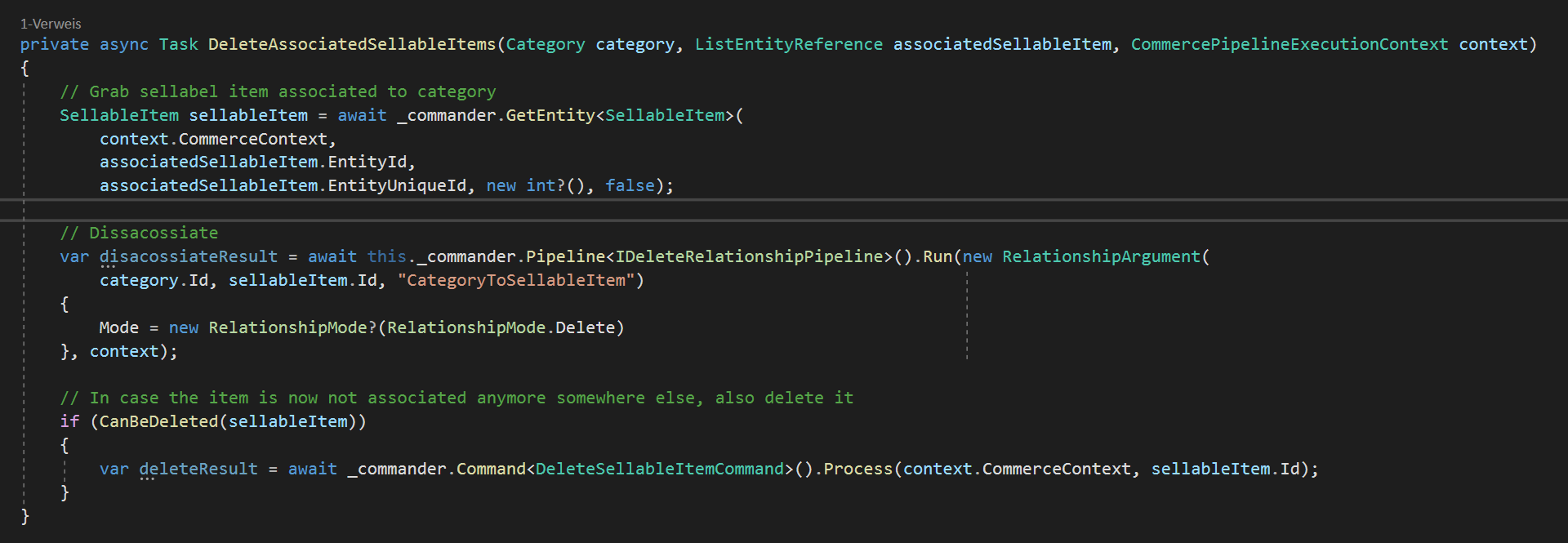
But this time, we do not just delete the sellable item, which we of course could do. This time the deletion operation is a bit more intelligent. First we just use standard IDeleteRelationshipPipeline to delete association between category and sellable item. Then before we simple delete the sellable item, we check if the item can be deleted.
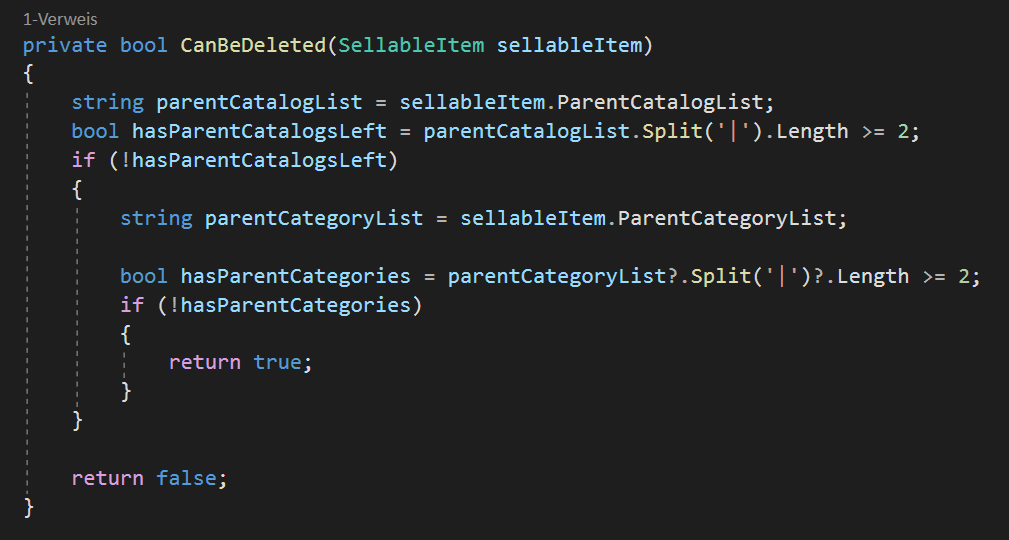
Above you can see the check if an item can be deleted. In case the current sellable item is not linked to any catalog or any other category anymore we can safely delete the sellable item. In all other cases the deletion of the sellable item would mean, that it would also disappear at various other linked places, which we might do not want.
Conclusion: So within this article we discussed some operations developer would like to execute on their local / testing catalogs to clear corrupt or broken entities to get a clean greenfield situation back. We learned how deletion of catalogs / categories and sellable items work and how to use that knowledge to extend OOTB functionality of commerce engine in a simple way.
- architecture
- dotnet
- sitecore-commerce
- sitecore-platform