Unleash the power of Sitecore – Experiences from customers diving into advanced marketing features for the very first time (Part 2)
In the last blog post I have started to tell you about the journey customer take, when they start using advanced marketing features. I tried to point out, from which status quo they started, what
In the last blog post I have started to tell you about the journey customer take, when they start using advanced marketing features. I tried to point out, from which status quo they started, what knowledge they had and if the technical base was designed and implemented in a way, advanced marketing features could be used. In the end it was quiet clear, that most of the customers use Sitecore just as a CMS and not as an Experience Platform. And based on these information the journey now started, how to help customers to understand, what advanced marketing features are in Sitecore and how easy it can be to use them.
Prepare and hold a workshop
Of course to reach a bigger number of responsibles from the various teams at the customer side it totally makes sense to make a workshop with all involved employees like, analysts, editors, stakeholder, marketeers, devs and so on. The main question now for me was:
What do you demonstrate in a workshop, so that on the one hand side customers get interested to start using these features, and on the other side they understand what could possibly be reached, when using such feature.
The answer was as clear as obvious. I did not want to show some generic examples, which you get when you search for examples in the world wide web. Of course such examples are great to learn analytics and personalization feature. But once you start trying to convince customers to use these features, it makes totally sense to give them examples within their own instance and based on their own data, so that the customer can directly see, the benefit of using advanced analytics and personalization features of Sitecore instead of having the need to abstract the demo to apply that on their use cases.
So, how did the workshop now exactly looked like?
-
Some facts from real world projects and official surveys
-
Introduction to advanced marketing features with a how to set it up
- Goals
- Campaigns
- Profiles
- Personalization of modules
-
General approach to introduce advanced marketing features (Based on approach shown in a marketing presentation)
-
Tools within Sitecore
- Experience Optimization (Mostly A/B and multivariate testing)
- Path Analyzer
- Marketing Automations
- Experience Profile
-
DEMO
The goal of that approach was now to first show the customer, that personalization is in deed important and is not something the end users refuse, but really want. Then they should see, how easy it is within Sitecore to start with advanced marketing features and that they get a step by step guide to later on read through to be able to set these things up on their own. After they now knew, where and how things can be setup within Sitecore, I thought it might sense to give them an approach how to start.
The biggest mistake at that point, would now be, that the customer just starts to e.g. create some random goals or profile cards without having first a look at their concept, like persona or their data or their own content.
Therefore I wanted to show a general approach of how to start using such advanced marketing features. While preparing myself for the workshop, I watched a marketing video “Rules-Based Personalization for Web Experience Management” by Michelle White. Within that presentation an approach was presented, which generally consisted of the following steps
- Identity the WHO and WHY
- Configure Profiles
- Configure Profile Cards and Persona
- Profile Content
- Configure predefined visitor patterns
- Create Personalization based patterns
- Adjust and optimize
If you follow such an approach and write down the outcome of all that e.g. in a structured csv file and then start creating all the goals, profiles and rules within sitecore, you will the very quick, if all these things you start doing have an effect; either way positive or negative. And you can then adjust, extend or remove whatever you want in later review cycles. Otherwise it would be quiet hard to keep track of all the things. And then you would most probably end up in the situation, where you do not know, if things have an effect, why you do what and worst case you are disappointed in a way, that you stop using advanced marketing features.
Of course after I showed, how things are maintained in Sitecore and showed a general appraoch of starting with those features, I thought it also make sense, to show all the applications, the customer can use. From the survey I already knew, that they just using Conent and Experience Editor. But Sitecore XP is much more. So in the next part of the workshop I showed them all these applications.
Lastly after all the theory part, to have a look at all features and applications I previously described, I made a DEMO. And of course this demo was prepared in one of the customer testing instances with their modules, pages and content. So the use case of the demo was, that I created 2 landing pages, one with a contest form, one with special content about a topic they are already presenting in a special way e.g. in searches or detail pages. I added some basic goals and applied them on the landing pages and of course on the target page after submitting the contest form to be able to track usage of the contest form. I also added some campaigns, like “Social Media”, “Newsletter” and “Flyer” to showcase, that we are able to track the traffic from various channels online AND offline to see, which channels perform best for our landing pages. Lastly I also tagged some content with proper profile cards to be able to later on classify our end users to a specific type of user. So in the end, I just showed, some prepared customer journey and afterwards showed, what data were collected before applying all the advanced marketing features and what data were collected after applying advanced marketing features. This of course lead to the “aha” moment I wanted to get on customer side. So at this point they starting to realize two tings
- Sitecore is capable of collection various data apart of the OOTB ones (visits, clicks etc.)
- Advanced marketing features of Sitecore XP are no sorcery and can be added and edited by nearly everyone working in Sitecore
One interesting first outcome of using Sitecore XP marketing feature was a bit funny and eye opeing at the same time. When we had a look at the existing analyitcs data and wanted to see top entry and exit pages, one results was really not expected.
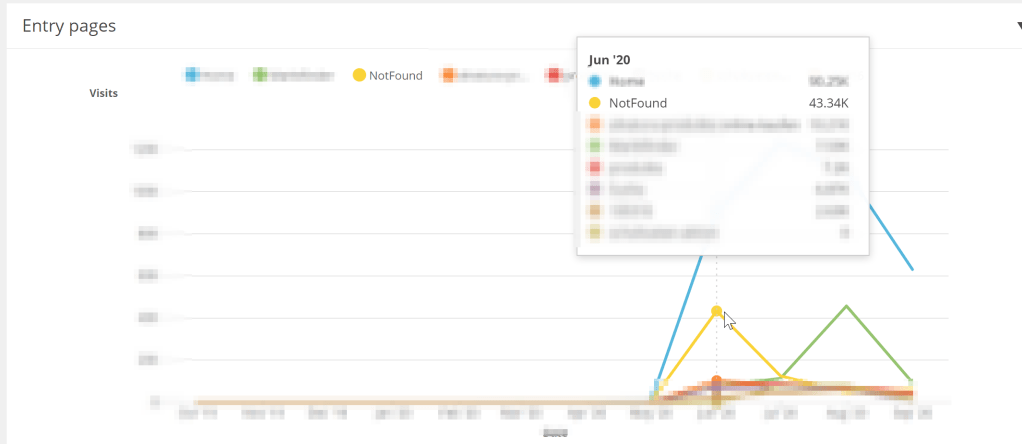
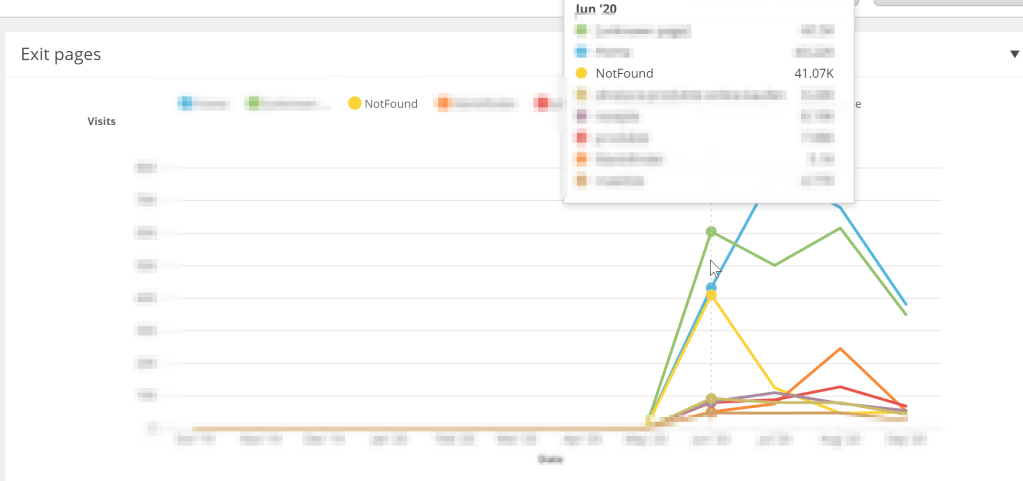
So based in the data, which can be seen in the images above one of the most used entry & exist page is the 404 page. This is a clear indicator, that on the one hand site some indexing of search engines like google might have old incorrect urls, which directly lead to 404 page. And on the other site, that there are customer journey, which end on the 404 page, so most likely clicked on invalid and broken links. So from that point on, the customer should now definitely have a closer look e.g. with path analyzer to see the whole customer journeys, which start or end with 404 page to find out, what might be the reason for that to fix it. But in my opinion already a great outcome if you just have a look at the collected analytics data of sitecore xp
Survey after workshop
As you might remember from Part 1 of that blog post, I created a small survey to find out, where the customer is right now regarding use of Sitecore and marketing features. What was now interesting for me is, to see, if some of the answers have changed after the workshop. And most interesting for me were the last two questions. And in deed they really changed.
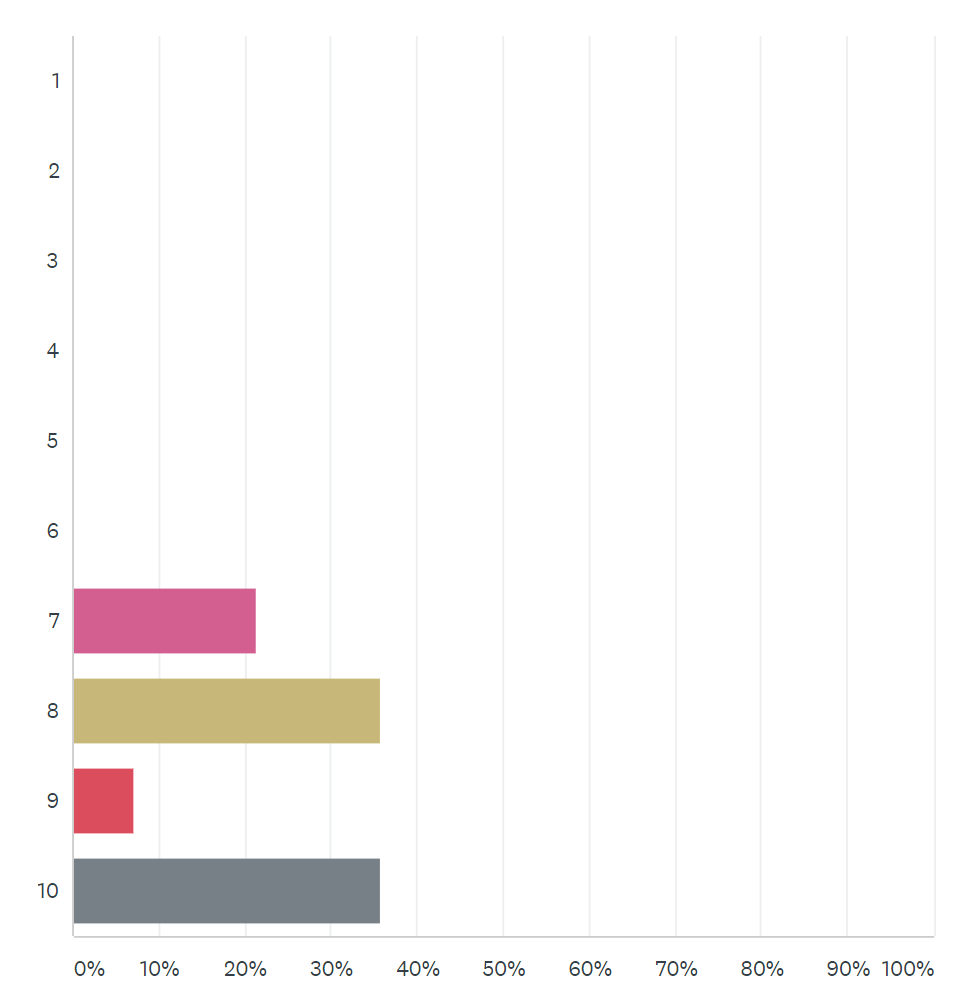
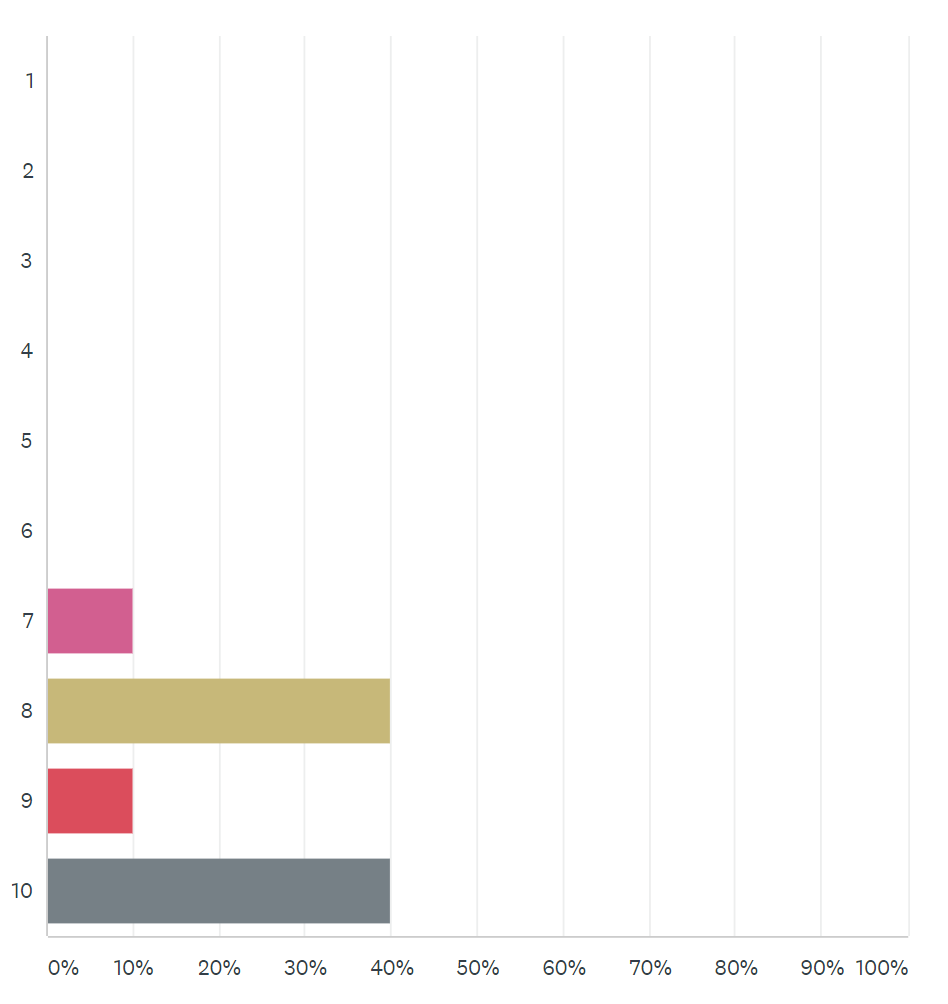
If you compare now the answers from before and after the workshop you can see, that more people now thing, that it really is important to use personalization to customize customer journey.
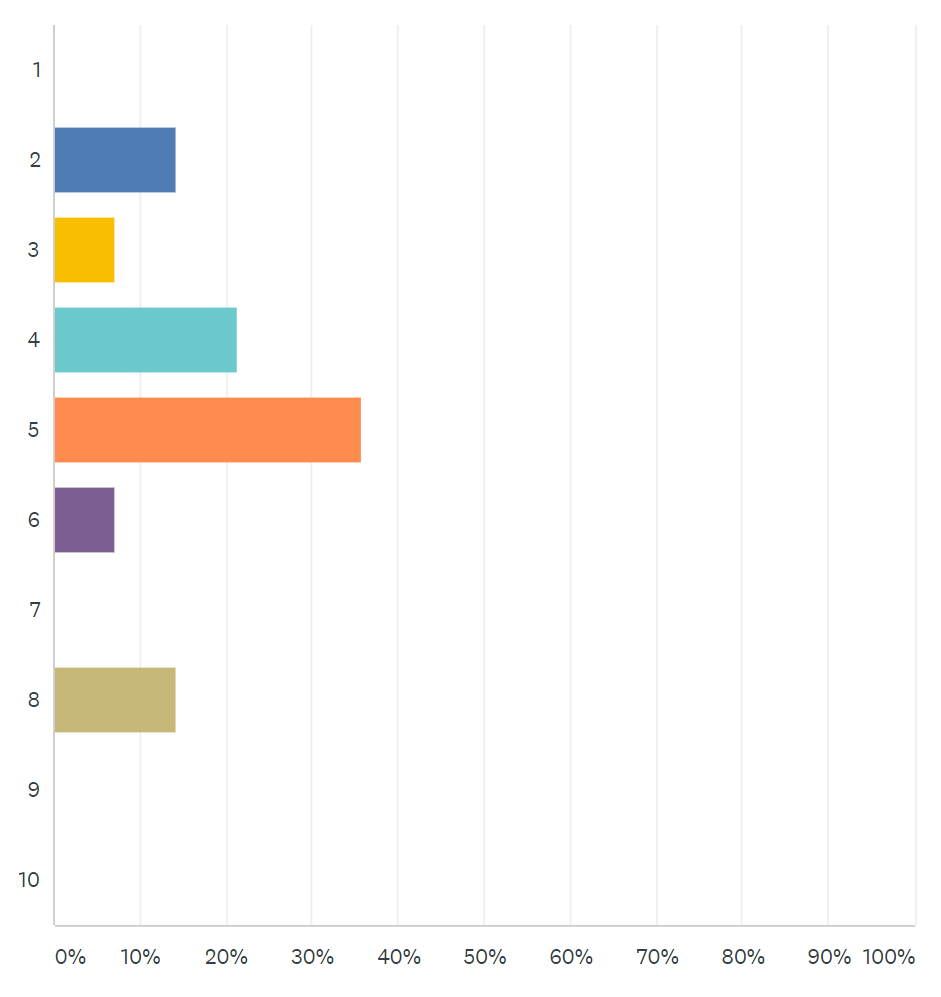
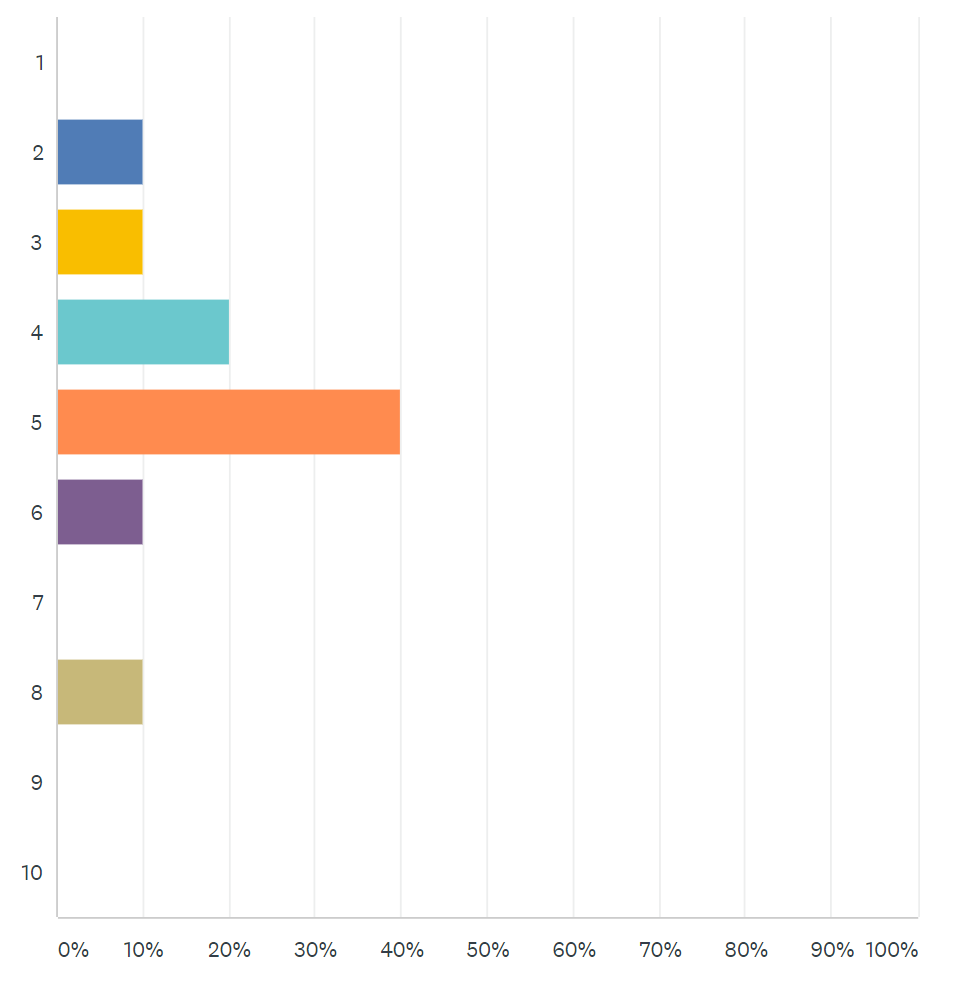
And here you can see, that now the results, if personalization is a complex task in Sitecore stabilized at about 5 out of 10. Which means, even after they had deep insight into everything, they do not think its a complex task and doable for them, which is really great.
Next steps
Of course after such a workshop, the question is, what are the next steps? The answer is quiet clear. Get an idea, what you want to achieve with personalization and what targets and goals you would like to reach. To do so, you definitely need time and some people to discuss about that topic and to maintain all that within Sitecore.
My recommendation at that point was, to really start with small pieces. So e.g. take the use case of newsletter registration. Start grabbing information, if the newsletter registration small or big (rendering variants used for different cases) is more successful. Then start replacing the newsletter registration module with some other content module via personalization, in case the current user already registered to the newsletter. Then take more and more use cases and more and more features of Sitecore into mind and get more complex over time. So do not start using directly everything just randomly. And I am glad to accompany the customer on that journey in the future.
Conclusion
Within this blog post I tried to demonstrate an approach of how a customer can start using advanced marketing features. I tried to first get an idea of where the customer is from the information and development point of view. Then I prepared a customer specific workshop to demonstrate all the functionalities the customer is not using at the moment and how easy it is to use all of them. Of course together with a technically introduction, I tried to give the customer also a guideline of how personalization can be introduced in theory. Finally I prepared and showed a demo with really customer specific content, pages and modules, so that the customer really gets an idea, what might be possible with his / her data.
- migrated