
Sitecore Marketplace – Did you already think about a Demo mode?
Welcome back to another blog post this time focusing on Sitecore Marketplace, which was released recently. I would like to dig a bit deeper into some of the use cases I am experimenting with. My
Welcome back to another blog post this time focusing on Sitecore Marketplace, which was released recently. I would like to dig a bit deeper into some of the use cases I am experimenting with. My focus will be the ease of use and creation of Marketplace plugins and how v0 can drastically boost your productivity on that journey.
While building my last plugin the REDIRECT MANAGER I ended up in the situation where I added two new concepts more by accident, but personally I liked them so much, I would love to present them here.
So stay tuned for an article talking about a few things. Demonstrating new Sitecore Marketplace with a brand new app idea, v0 development flows as Copilot and implementation buddy and even some interesting new concepts and ideas for Sitecore Marketplace plugins, so Marketers life might be much easier.
The Redirect Manager idea
What about the underlying app idea. I guess everyone, who is working with XM/XP and XM Cloud will understand, why we need a nice, catchy UI for Redirect Management. And not only that. Even one step further a nice, catchy UI, which is context aware, like Page Builder page context. Let us start with one screen how you would usually manage your redirects as of now.
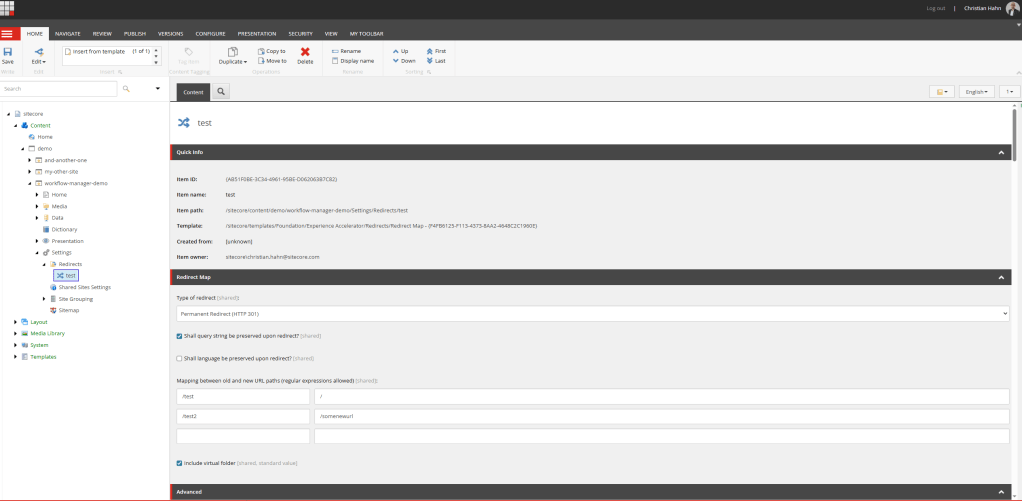
Above you see the screen of the Content Editor in the site settings, where you are able to easily manage all your redirect maps, which basically contain your redirects. They are pretty easy to create and maintain. But still, it is Content Editor. And in todays times it feels like, we should provide a nicer UI for Redirect Management. This idea way out there already for long time, but with the recent release of Marketplace capabilities of Sitecore we are not really able to easily create custom UI that easily.
So welcome the first design scribbles for a Redirect Manager. I do not really go into details of Marketplace Plugins and Extensions Points, as I assume you are by now familiar with those. If not I strongly recommend reading the official docs as they explain all that amazingly easy. https://doc.sitecore.com/mp/en/developers/marketplace/introduction-to-sitecore-marketplace.html
See below the first scribbles for all the currently considered Extension Points. See those more as examples to think about the endless capabilities and possibilities of Marketplace Plugins
Full Page
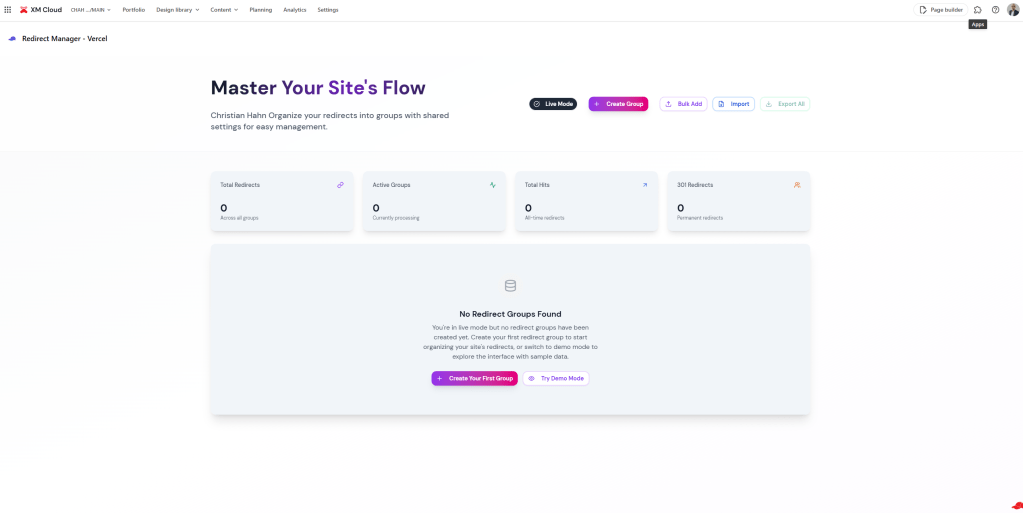
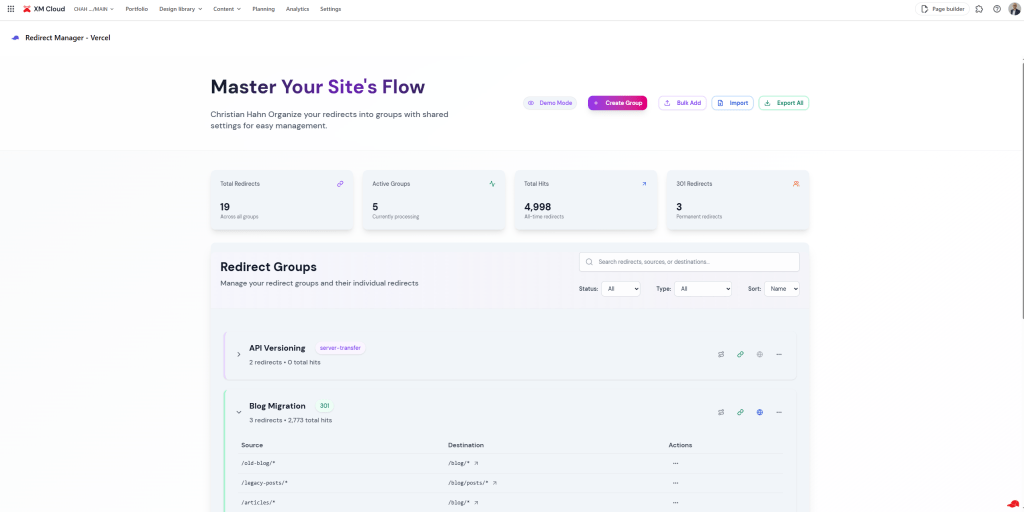
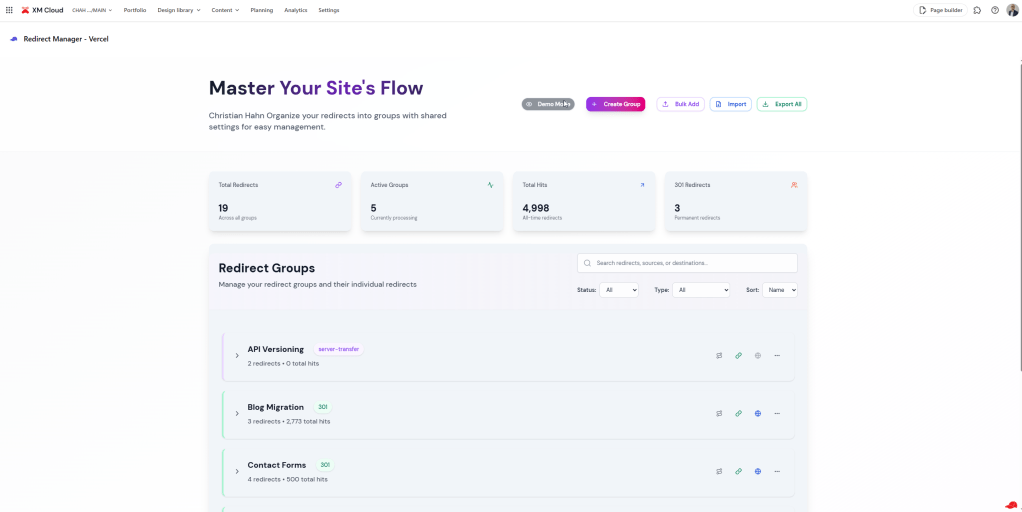
This Extension Point should give you a comprehensive overview of all the Redirects in your system. You should be easily able to create / update / delete redirects as well whole redirect maps. See key stats like number of redirects, number of hits of those redirects as well as active redirect groups vs. inactive ones immediately. There is even an Import / Export considered AND FULLY WORKING, with which you can easily do scenarios like bulk update, or transfer from one system to another one.
All of this together combined in an easy-to-use, state-of-the-art, modern UI. If you ask me, this is already a huge step into the right direction of seamless content management.
Sites Dashboard
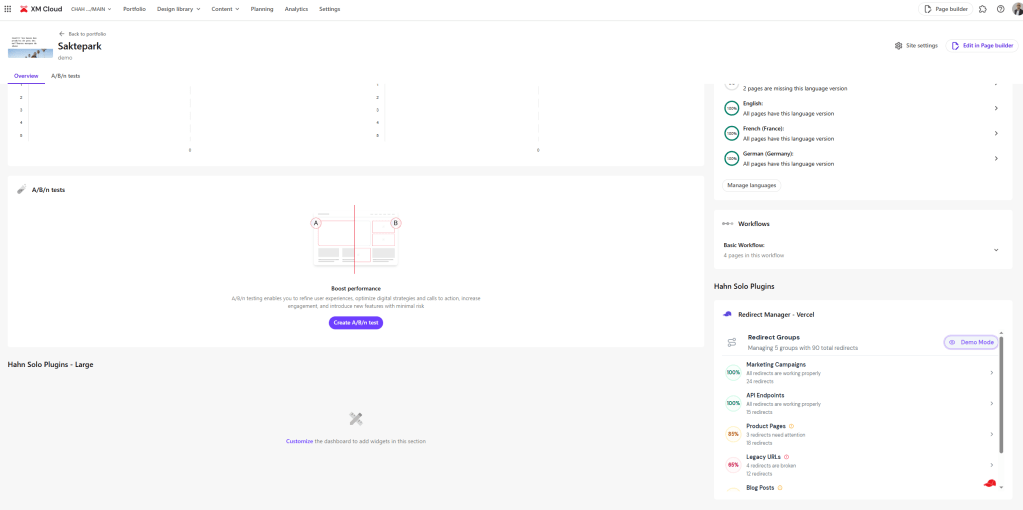
Next Extension Point is the Sites Dashboard one. I see this more like a sites specific stats overview page with less interactions, but more informative purpose. Thats why I designed it pretty similar to the language overview provided natively by Sitecore. You see all your redirect groups with redirects for this specific site and even more important how healthy all of those are. Healthiness here means, if the targets are existing and reachable or run into something like 404 or 5XX errors. So if you open a specific site you immediately get all the needed information about your redirects to act accordingly.
Page Builder Context
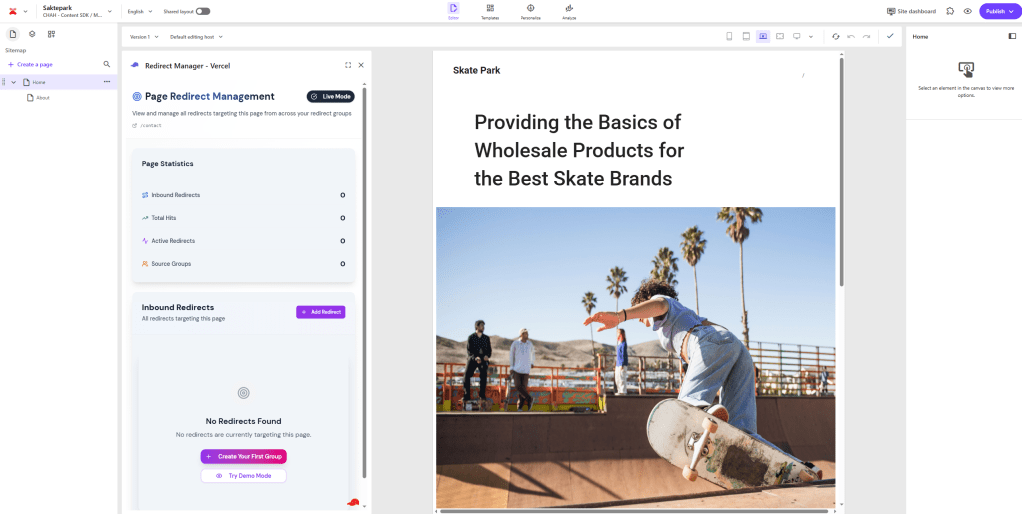
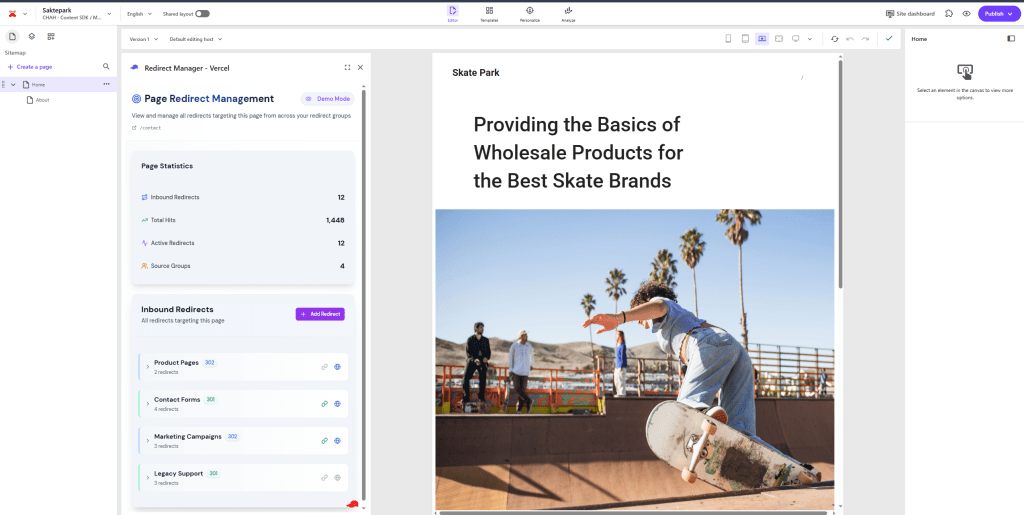
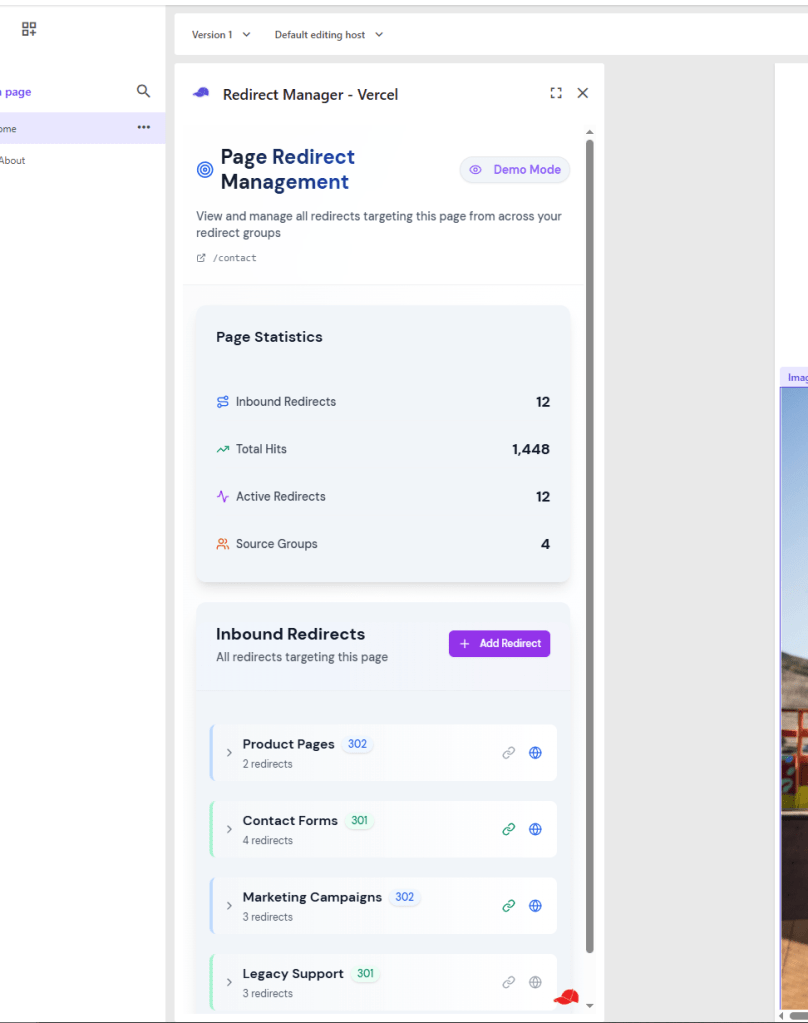
Last but not least a very interesting Extension Point, the Page Builder Context one. This one drill down the context of your redirect even more down to the current page. This mean if you open a page and look at the context panel you will only get relevant redirects, which target the current page, together with all the drilled down stats to those redirects. This give a pretty good overview, how many redirects point to this page and where they all come from, including the important metrics like how often are they hit.
So you see with Marketplace Plugins and Extension Points you can already do a lot to improve the Editor experience within Sitecore. This Redirect Manager example especially should just act as an example to demonstrate the limitless possibilities. And I did not even demonstrated all the Extension Points, which are available as of now. If you want to see the others as well, have a look here https://doc.sitecore.com/mp/en/developers/marketplace/extension-points.html.
How did v0 support my development flow?
Now the question is, how did v0 support me here? How did I leverage its built in capabilities for this project? The answer is pretty simple.
Do you think I can build a Design like this on my own?
Obviously not. So v0 was my design buddy, which came up with some really interesting and stunning results. As you can see above. I am not lying to you. It took a bit of time and some back and forth to come there. But I guess thats exactly what is important to understand. When working like this Prompt-Engineering is key. Let v0 understand, what you have in mind and express you self in a way that v0 produces such outstanding results.
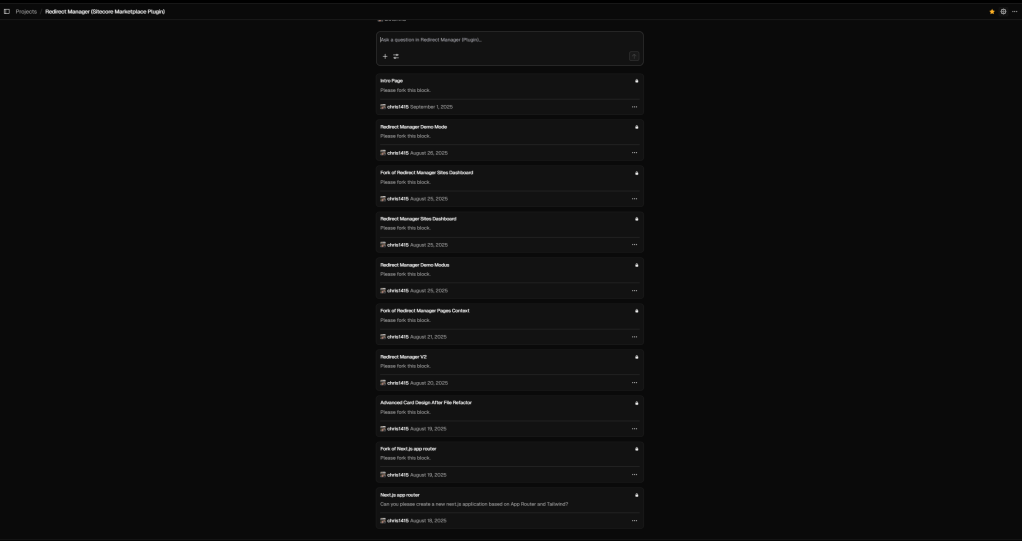
I admit I am still in the process of learning how to best leverage tools like this and integrate into my day to day work. Above you see, that it took a bit and some new chats, each with some versions to come to the results. But thats also key. For each larger feature I decided to “save” and fork to a new chat to keep the context clean and understandable.
Another thing worth to mention is, that this time I started my development from v0. This means I let v0 create the repo and do the initial setup based on my wishes. This ended in something like this
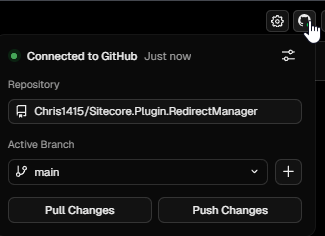
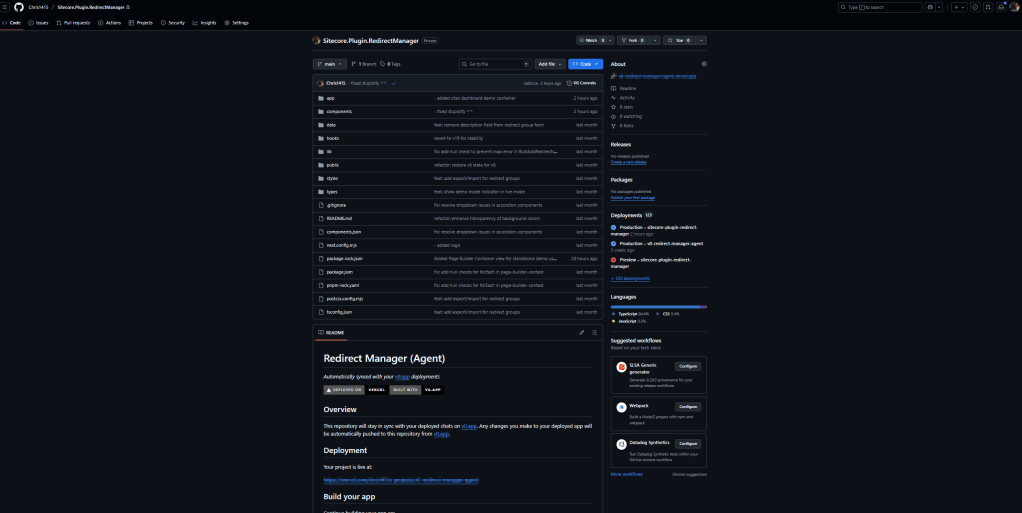
You see, that my v0 is connected to my repository and to its main branch (I know a bit risky ;-)). Special thing to note, I am a fan of being in full control when something will be pushed or pulled, so I immediate set this to be manual. Other than that I have to say the work went on pretty smooth. I was able to rapidly generate some impressive results. Whenever I needed to validate something or wanted to implement on my own, I just checked out locally, made my changes pushed and continued with v0 via pull and further prompts.
My personal learning especially while building this. Do not try to keep multiple chats open and active at the same time. You will overwrite your own stuff constantly 😀 Stick to one chat and if needed fork another one.
Wait, did I end up having an empty home page?
What do I mean with this headline? This is simple. When I started my development, I started having a home page. And traditionally this home page was the implementation of the first Extension Point. So far so good. But as soon as I added more extension points, I also added more folders like /page-builder or /sites-dashboard. This lead to the funny situation, that my home page served the full-page extension point and the rest as named in the folders. To be honest, I really did not like that as my inner Monk was screaming, so I refactored and moved the home page under /full-page folder. Luckily Marketplace App Management allows us to individually decide the routes of our Extension Point implementations. So this is how my final configuration looks like now.
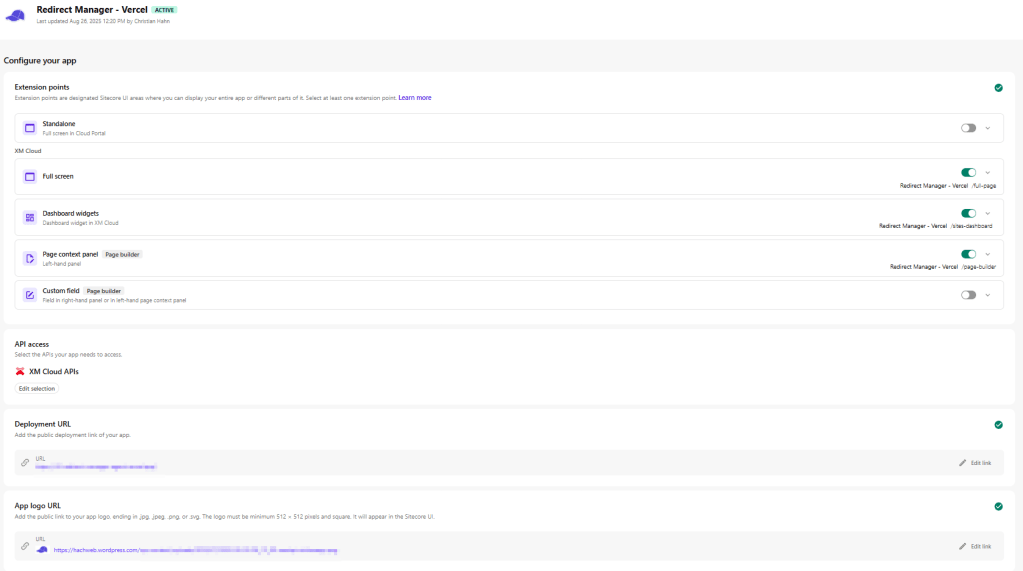
Finally inner piece again. But wait…. Now I have a totally empty even not existing home page. And again something deeply inside me was screaming.
While thinking about, what I could do with this page, I had an idea and let v0 help me realizing this idea. My idea was, why not using this home page to give a short but comprehensive overview over the plugin, like what it is, what it does, some key facts like, version, author, extension points and a nice visually supported overview of what each extension point serves. Again v0 was amazing in generating a nice design based on my ideas.
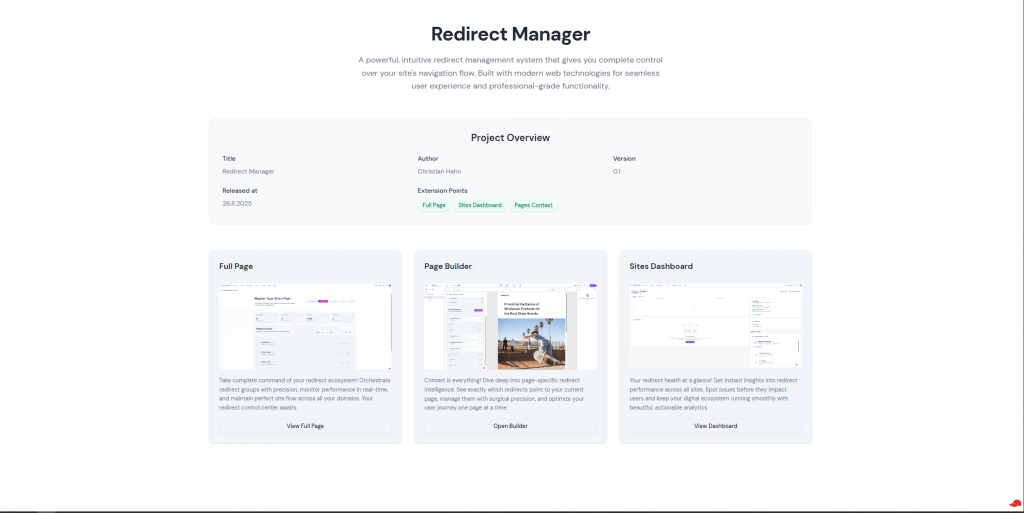
This is the current version of my SUMMARY HOME PAGE. Imagine you are a Marketer browsing through the future Marketplace looking for plugins. These kind of information should massively help you identifying if this plugin is really helpful or not, therefore if you should install it or not. You could even use this view as a thumbnail (generate and distribute together with your plugin), which is displayed in the marketplace, and can be extended for better readability.
Keep in mind this is just an idea as of now, which demonstrates something I call thinking-outside-the-box. If you had a look at some of my previous blogpost you might have already seen similar in the past. Think of possible solutions, which might bring a potential value to the customer. And I would say, the more I am thinking about this, this might bring lot of value in the future. But let me know if you think otherwise or even have more ideas on top of this.
Want to try out a plugin in advance? No problem, here is the demo mode!
Cool so far so good. Now another cool new feature I was thinking of, but which made it more accidentally into the solution. Whenever I am building designs I also let v0 (or other tools ;-)) generate demo data so I can quickly see, how it looks like. While doing this as well in this case I came up at the situation, when I connected everything to Marketplace SDK, that no results are displayed anymore. And this totally makes sense. In v0 or “standalone” mode, there is no real connection to the Sitecore Host. The connection only exists, when you open one of the host applications like Sites, Page Builder etc.
So what I ended up was telling it to keep the demo data with a toggle. And I immediately realized, that this also might be a great idea to be baked in into the app as real feature. Be able to toggle between Demo Mode and Live Mode.
What does this bring? When thinking further about this feature you can now do pretty amazing stuff.
Use Demo Mode in standalone use case
Imagine again you are a Marketer looking for a new Plugin. The Marketplace offers this amazingly looking Redirect Manager. We know, based on our home page thumbnail thingy the Marketer already gets a pretty decent understanding of, what the plugin is about.
But we all know Marketers. Wouldn’t it be great, if we could easily try it out, without the need to install it to Sitecore? Yes of course, and with the newly introduced Demo Mode, this is also possible.
To demonstrate let us simply have a look at the possible Marketer “journey”. Imagine a Marketer browses through the Marketplace and clicks some kind of “eye” icon to open the preview. This preview leads to the home page of your demo app.
Now the Marketer has the possibility to try out each of the supported Extension Points one after another if wanted.
First the Full Page Extension Point. Remember that you can easily create / update and delete your Redirect Groups as well individual redirects. See above the screen the marketer gets when clicking on the first link (Left Column)
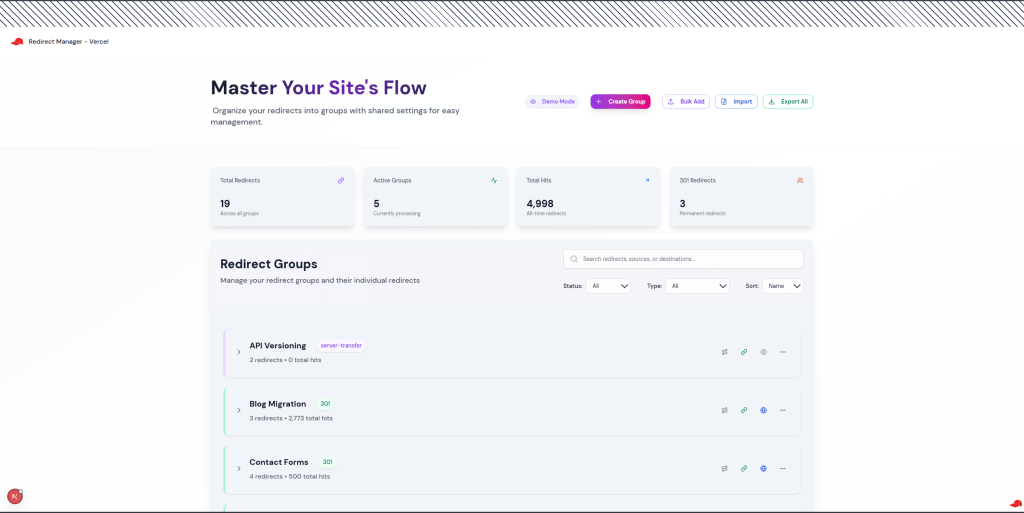
The Marketer immediately sees how the plugin would look like, if executed in Sitecore. Not only with some demo data, but also from the UI perspective. I mean in the full page variant it is not that obvious, but you might already see it. Let us compare the demo standalone view with the actual Sitecore view.
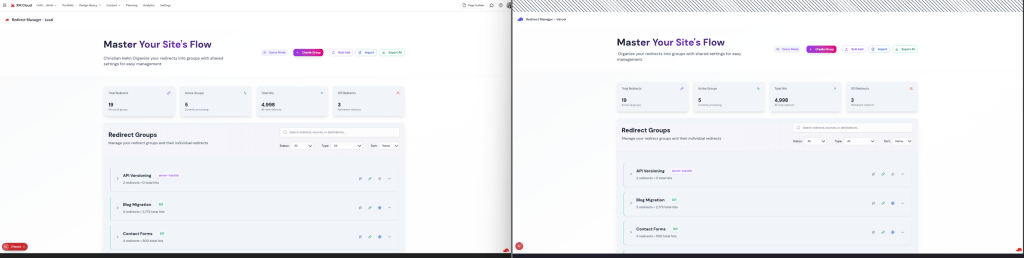
Based on this it should be pretty obvious, what I tried to achieve in the standalone demo mode. And lets face it; The full page app is pretty simple. Which leads to the next extension point, the page builder.
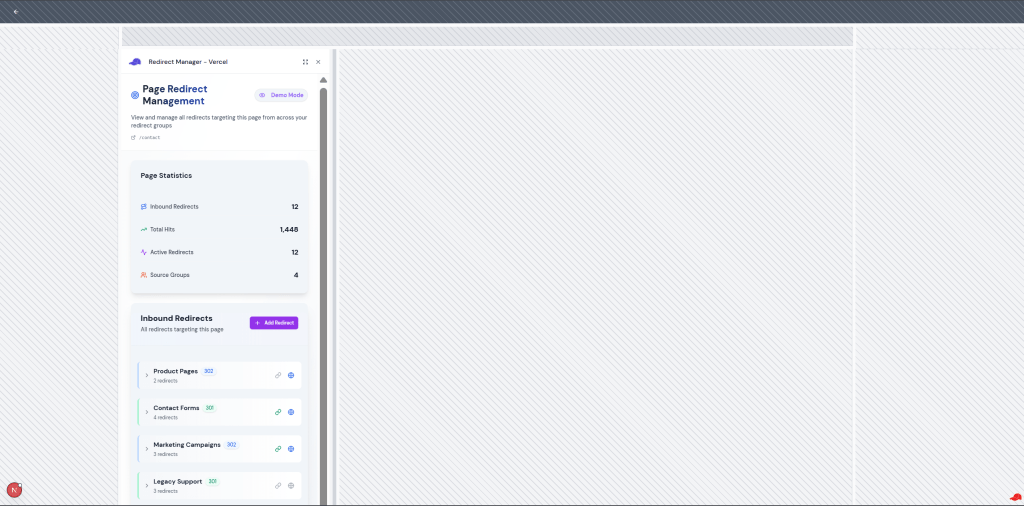
Here we can already see much better, what I tried to achieve with the hatched areas. Initially I had the issue, that the demo mode from data point of view worked perfectly fine, but was always displayed full screen. Where in full page extension point it did not matter much, in page builder extension point and obviously sites dashboard it really matters as it completely changes the look and feel.
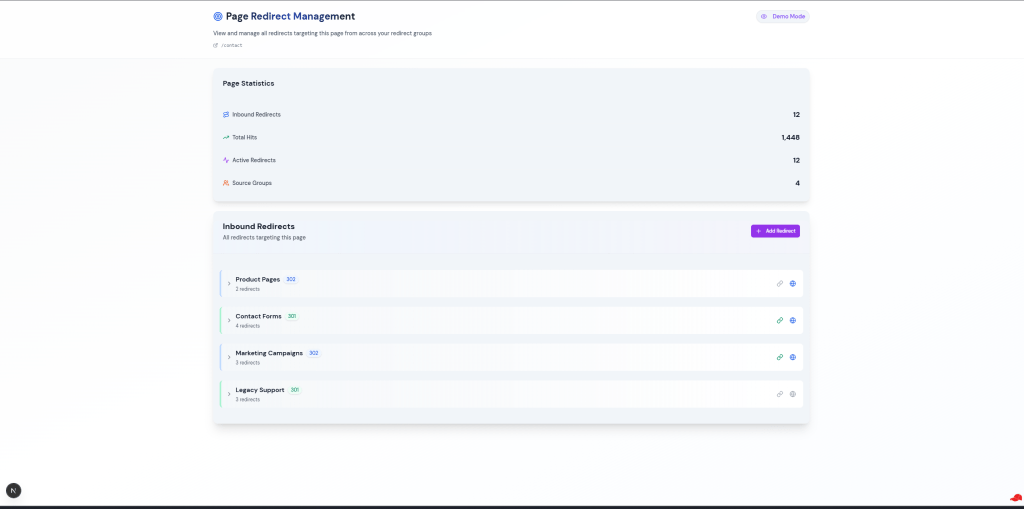
So what I tried now, was to also replicate somehow the UI around the demo mode data stuff, so that you get some dummy data and it also feels like you are using it in Sitecore integrated mode. So you really get a feeling how it would work in Page Builder for instance. You can even resize the display area or hide the left side bar as you can do in Page Builder app. See above the direct comparison. And to be honest I think as first approach it is already pretty close and makes the demo mode even cooler.
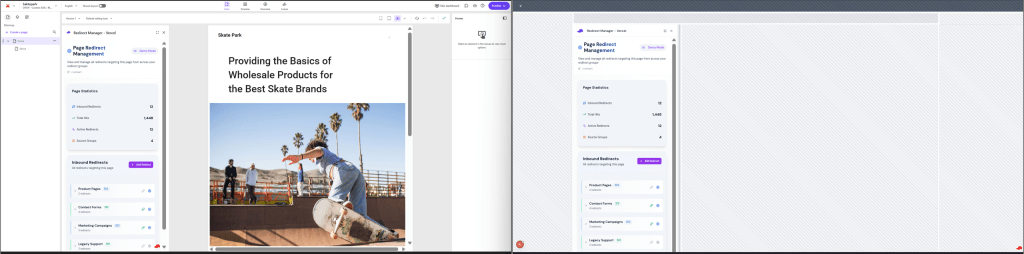
Last but not least the sites dashboard extension point. Same as above, just even more important as the sites dashboard has a very specific UI representation. First see, how it would look like, if there is not strict UI, but it takes the full page.
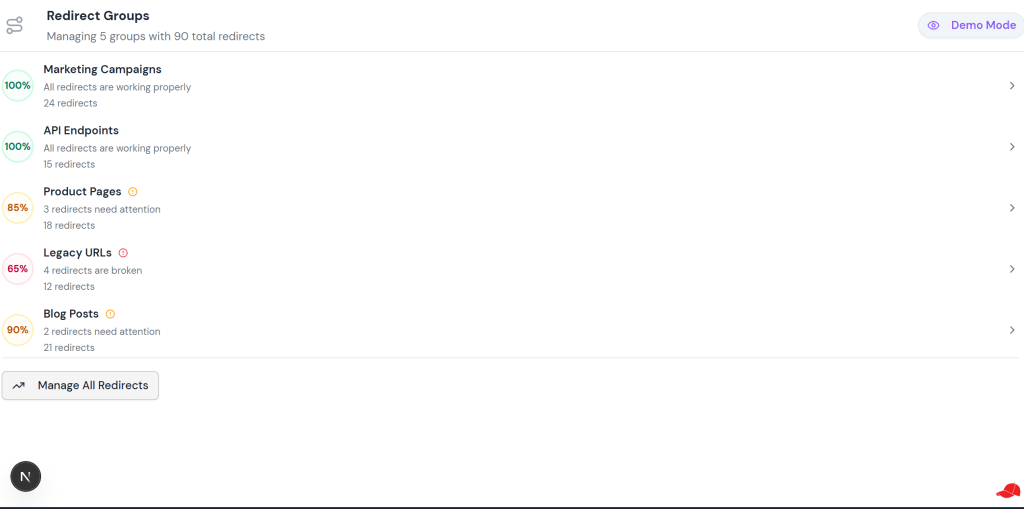
I mean, you get what it should represant. But it is pretty difficult to guess how it would look like in the dashboard view. So let us bring in the dashboard view to help the Marketers. The special situation with dashboard view is, that it might be added to the left or right hand side. I tried to provide also the option to decide, where the demo should be placed. See below both options.


Now bringing this together in the direct comparison with the view a Marketer would have in Sitecore.
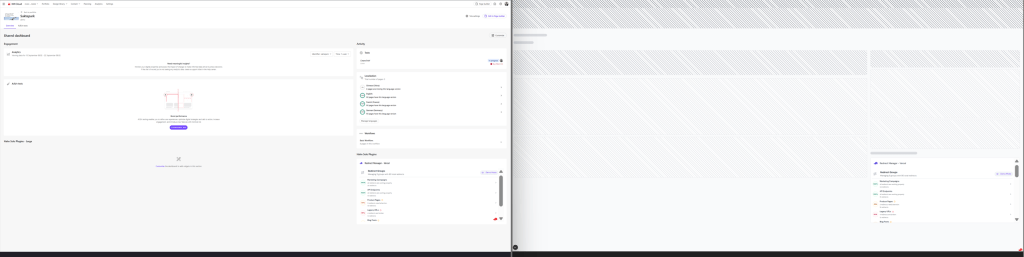
I would say with this direct comparison it becomes pretty clear how important this is for a Marketer to better understand the context of the extension point.
Closing this topic I would like to highlight, that this is a pretty early attempt of a demo mode from data, but also UI perspective. You can easily replace the hatched areas with some demo data tiles, dummy images, or blurry areas. Again the possibilities are limitless. The goal should be to give the Marketer the best possible preview capability to try out your app without the need to really install it.
Use Demo Mode inside Sitecore
But not only this, you can even think of the use case to leverage demo mode inside the Sitecore installed app. In the case of the Redirect Manager, the below represents the state after app installation
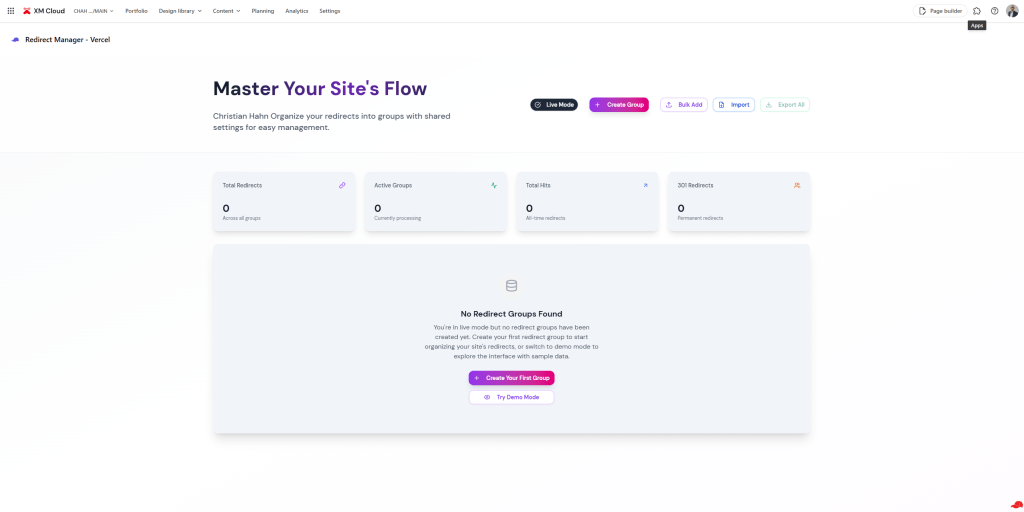
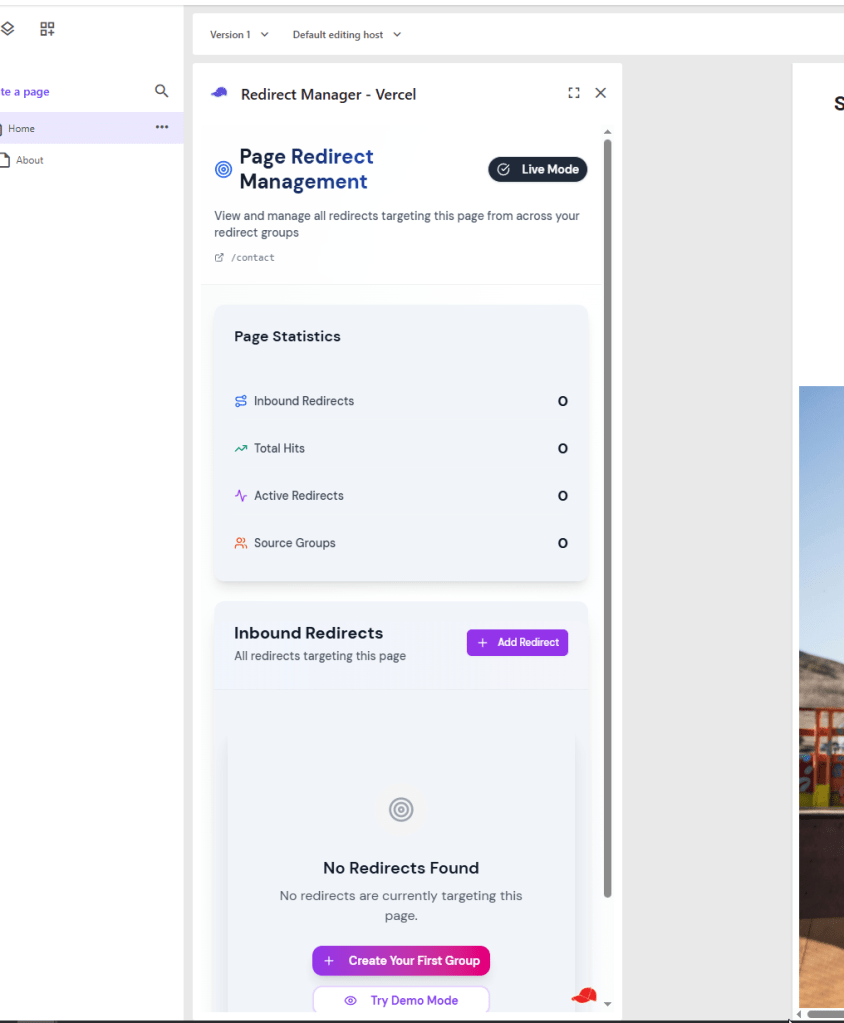
Yes, it is totally empty. I mean, you can now start managing your redirects and fill it. But what if you just want to demonstrate quickly something. I can imagine of several situations, where the quick availability of demo data inside Sitecore makes totally sense. So, what if you have now the switch to quickly switch from Live Mode to Demo Mode, seamlessly in seconds.
This way you do not need to create all the demo data by yourself. Just leverage this and you are done.
Note: Of course you should be very careful in offering this in a production or even staging environment ;-). It might be more something for a dev environment.
Everything live and in action
After you have seen so many screenshots and read so many text I am sure you also want to see everything live and in action. No problem. See below a gif, where I open the app standalone without Sitecore context. I navigate to the individual extension points, so you get a pretty good understanding of what the Marketer experience will be, if such an approach is used. You can see that you basically get all the available functionality to try it out and what might be more important in the viewport, which matches the extension point
Conclusion
Coming to the end with a short summary of what you learned here. I talked about a cool new Marketplace App idea, the Redirect Manager. I slightly explained, why this might bring value to marketers and which capabilities such a tool might have. I highlighted how v0 was able to drastically boost my efficiency creating the first versions of the app. Last but not least I explained two new concepts or ideas I had in mind and tried out around Marketplace apps. First is a special usage of the home page. You can easily offer a nice overview of your app with some key information. Second is even more important, the Demo Mode. Imagine a Marketer browses through the Marketplace and wants to know if a plugin should be installed or not. Let us help the Marketer to make an educated decision by offering a full blown Demo Mode meaning, offer the implementations of the extension points with some demo data and embedded into the page as if they would be executed by Sitecore directly. This ensures the Marketer experiences the real look and feel and can securely try out the app before making any installation.
Just let me know, what you think; do you like it? Should I provide some more helper around this? Let’s talk about Sitecore Marketplace and some real cool outside-the-box features, which make Sitecore’s new Marketplace even fancier.
- devex
- nextjs
- sitecore-marketplace
- sitecore-platform
- vercel
- xm-cloud