
Stripped Down, Amped Up: The New XM Cloud Starter Kit and Content SDK for Developers
Welcome back to another blog post about XM Cloud. This time I would like to spend some minutes on a great developer experience improvement, which we initiated already some time ago and is now
Welcome back to another blog post about XM Cloud. This time I would like to spend some minutes on a great developer experience improvement, which we initiated already some time ago and is now available. The following content was presented at SUGCON Europe 2025 in front of a broad audience.
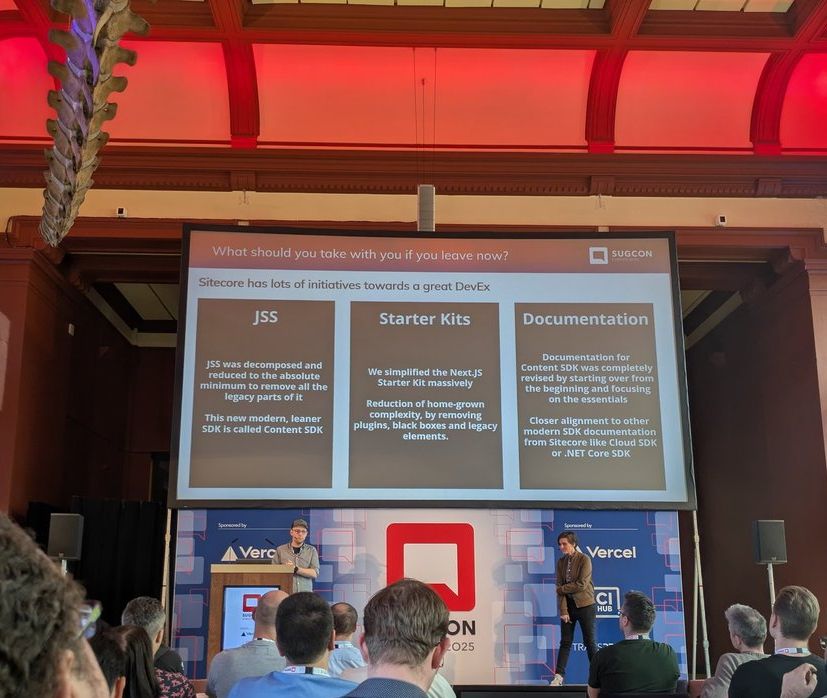
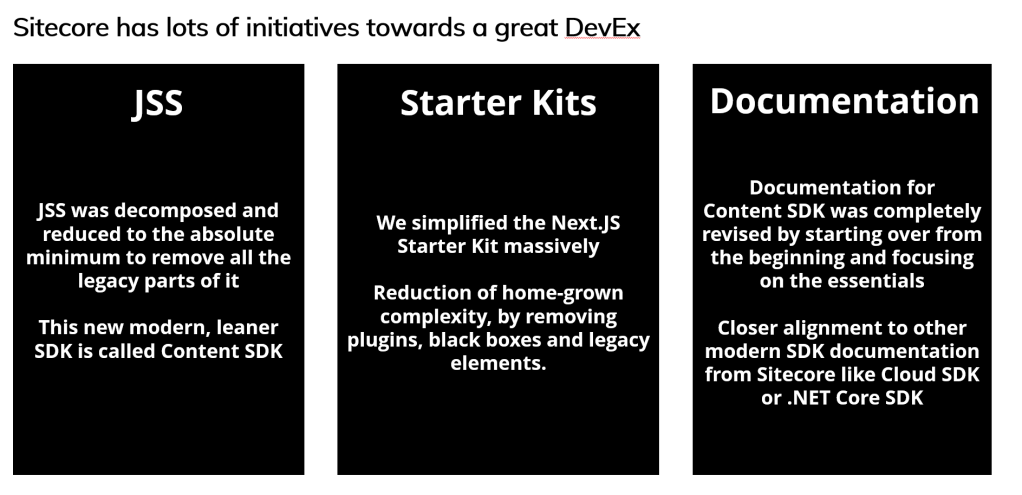
In general, we focused on 3 major areas, where we made significant improvements:
- Starter Kit solution
- JSS SDK (Content SDK)
- Documentation
In the following chapters I would like to deep-dive into each area and demonstrate what actual improvements we made, so you get a solid understanding of what and especially, how YOU can benefit from this in your day-to-day job.
JSS SDK (Content SDK)
JSS is there since Sitecore started offering headless development. It has gained a lot of maturity over the last 8 years. Its main responsibility is to serve headless content for XM / XP AND XM Cloud (XMC) while supporting What-You-See-Is-What-You-Get editing in the visual builders.
All this is great as it supports Sitecore XM/XP and XM Cloud at the same time. But on the other side it carries some extra weight.
Think of the following. As this SDK needs to support XM / XP and XMC there are quite a few packages in JSS which are exclusively used by XM/XP and have no relation to XMC.
Releasing new features in the SDK was dependent on XM/XP major releases. This dependency raised complexity in release management and makes proper semantic versioning impossible.
Making it work for all solutions (XM/XP and XMC) at the same time increased testing efforts quite significantly, even for minor changes.
The solution to it has a name: Content-SDK.
XM/XP’s and XM Cloud’s codebase have drifted further and further apart over time e.g. in its feature set, recommendations and support. That’s why it was a logical step to also split the SDKs. Taking the JSS SDK as a basis and removing all the non-XMC related functionality resulted in a new and clean Content-SDK for XM Cloud only.
Note: With that said JSS SDK will remain, will be managed and developed further for using Sitecore XM/XP. We just decided to extract XM Cloud out of it and put it into a separate SDK. Following we’ll go through the amazing benefits.
Benefits of the Content SDK
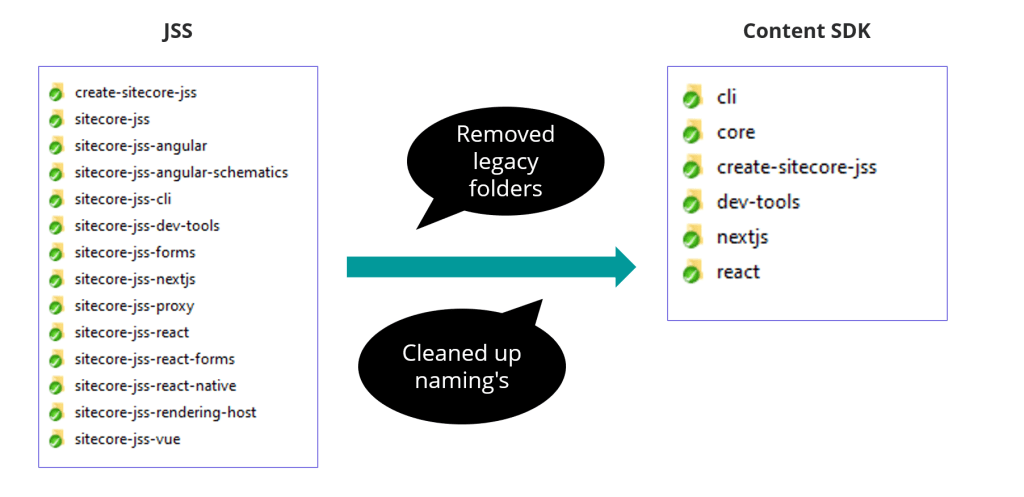
The new Content SDK is much cleaner without all the XM/XP specific packages. Also, we removed the “Sitecore-jss” in front of package name. The underlying core package (sitecore-jss) was now properly renamed to core.
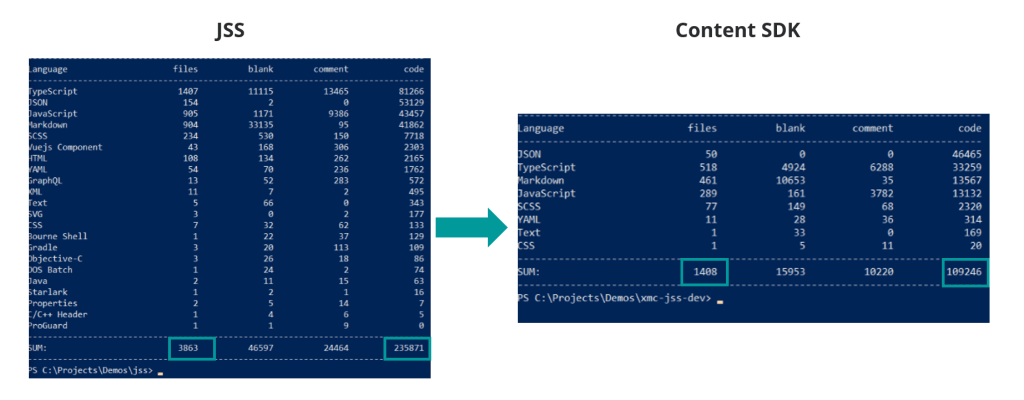
This cleanup, focusing on XM Cloud resulted in a 65% decrease of files and a 54% decrease of lines of code.
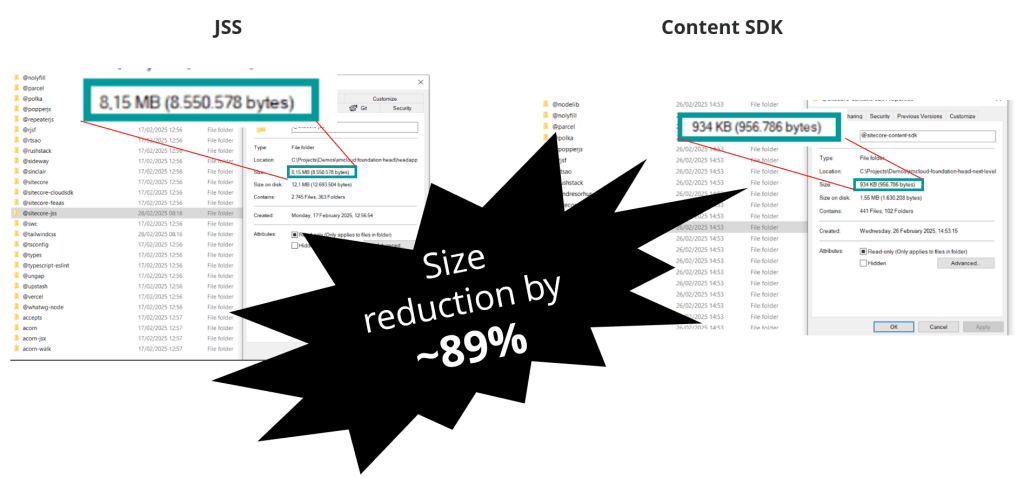
The size on disk reduced from 8,15 MB to under 1MB, a reduction by 89%.
Using the bundle analyzer of next.js (https://nextjs.org/docs/app/building-your-application/optimizing/package-bundling) we saw a 50% size reduction.
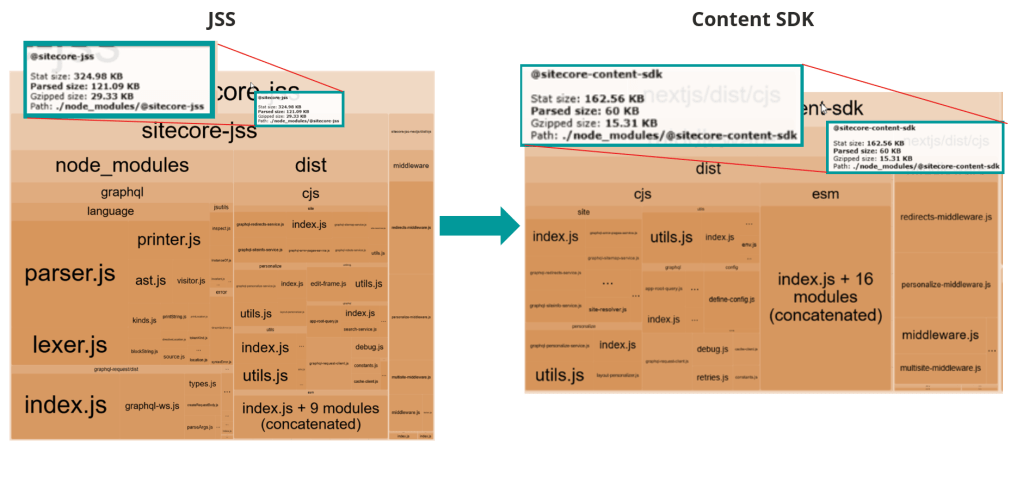
All the reductions were just achieved by removing non-relevant overhead. None of the XM Cloud related features were touched on to this point.
Features
In a second step we’ve streamlined the Content SDK to support the most modern, cloud-native development patterns—leaving behind legacy dependencies to give teams a cleaner, more focused experience that aligns with the future of XM Cloud.
Metadata only
The first and maybe most impactful change is that Content SDK supports Metadata-Mode only. This said, removed support for Chromes-Mode. If you don’t know about Chromes-/ Metadata -Modes by now, I highly recommend reading my series about this:
- Metadata Eding Mode for Pages – Part 1
- Metadata Editing Mode for Pages – Part 2
- Metadata Editing Mode for Pages – Part 3
In essence the older Chromes-Mode was used by Experience Editor. However, Experience Editor is currently NOT able to work with Metadata-Mode. Metadata-Mode is only supported by Page Builder (WYSIWYG Editor) in XM Cloud. This means, Content SDK does not support Experience Editor. In XM Cloud, the Page Builder is the modern and performant page building experience for marketers and content editors that replaces Experience Editor completely.
GraphQL only
Given the strong adoption of GraphQL in XM Cloud solutions, we’ve streamlined support for the Layout Service to focus solely on the GraphQL API—offering better performance, flexibility, and alignment with modern development standards.
If your current implementation relies on the REST-based Layout Service—despite GraphQL being the recommended approach—we suggest refactoring to GraphQL before adopting the new Content SDK. This ensures compatibility and positions your solution for long-term alignment with XM Cloud best practices.
Summary
To summarize the recent activities building the Content SDK:
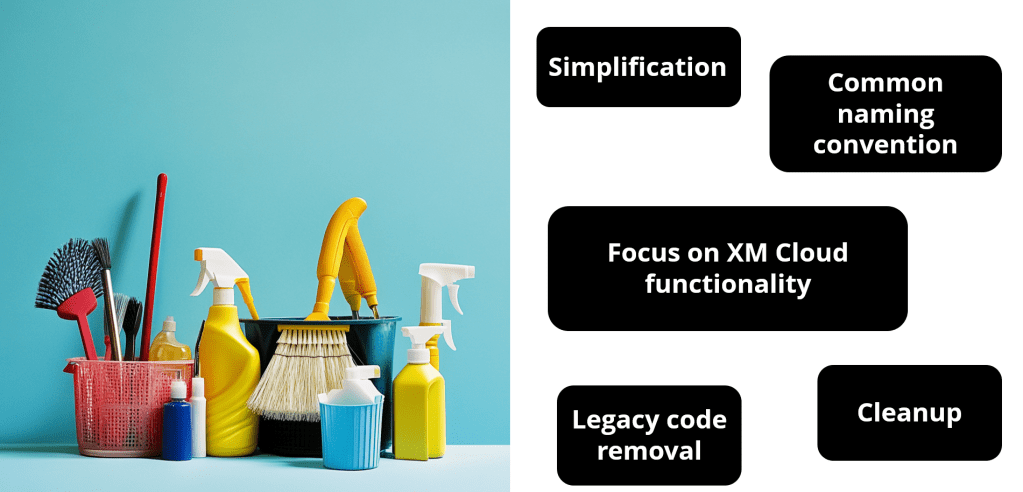
- The Content SDK is exclusive to XM Cloud and therefore much leaner and faster. The JSS SDK stays untouched supporting XM/XP and XM Cloud.
- We streamlined existing features in the Content SDK to support the most modern and performant approaches.
You find the Content SDK here: https://github.com/Sitecore/content-sdk.
Important note: This SDK as of now is in beta version 0.1.0. We are working on delivering a stable version 1.0.0 pretty soon.
Documentation
We made significant improvements in the documentation. The JSS documentation is very comprehensive, and it can be overwhelming seeing it for the first time.
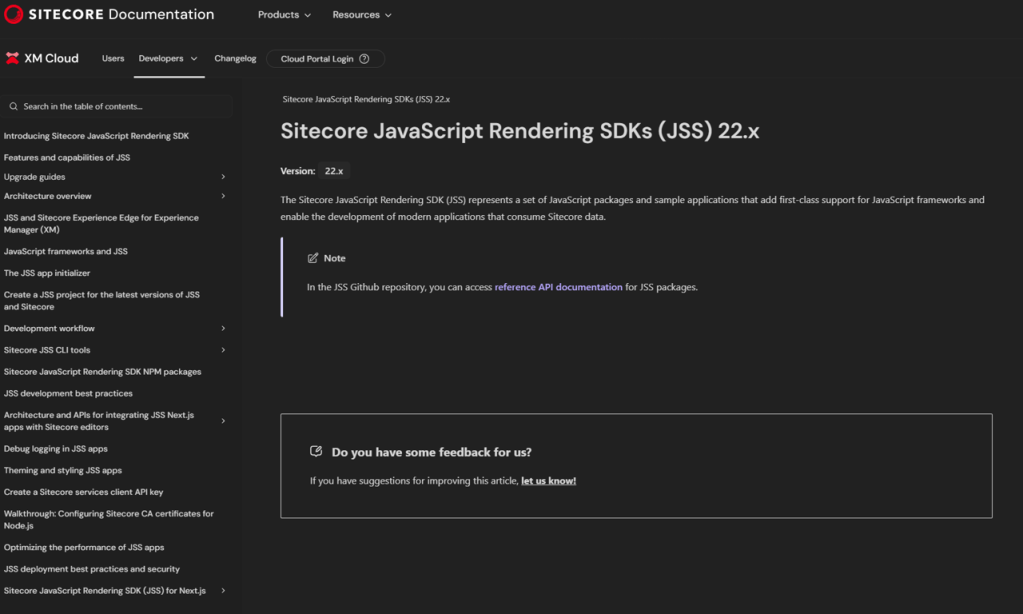
When creating the documentation for Content SDK we wanted to focus on:
- Easy to access first level navigation
- Simplify the navigation and content
- Consistency between documentations
We found good examples looking at Cloud SDK or .NET Core SDK documentation.
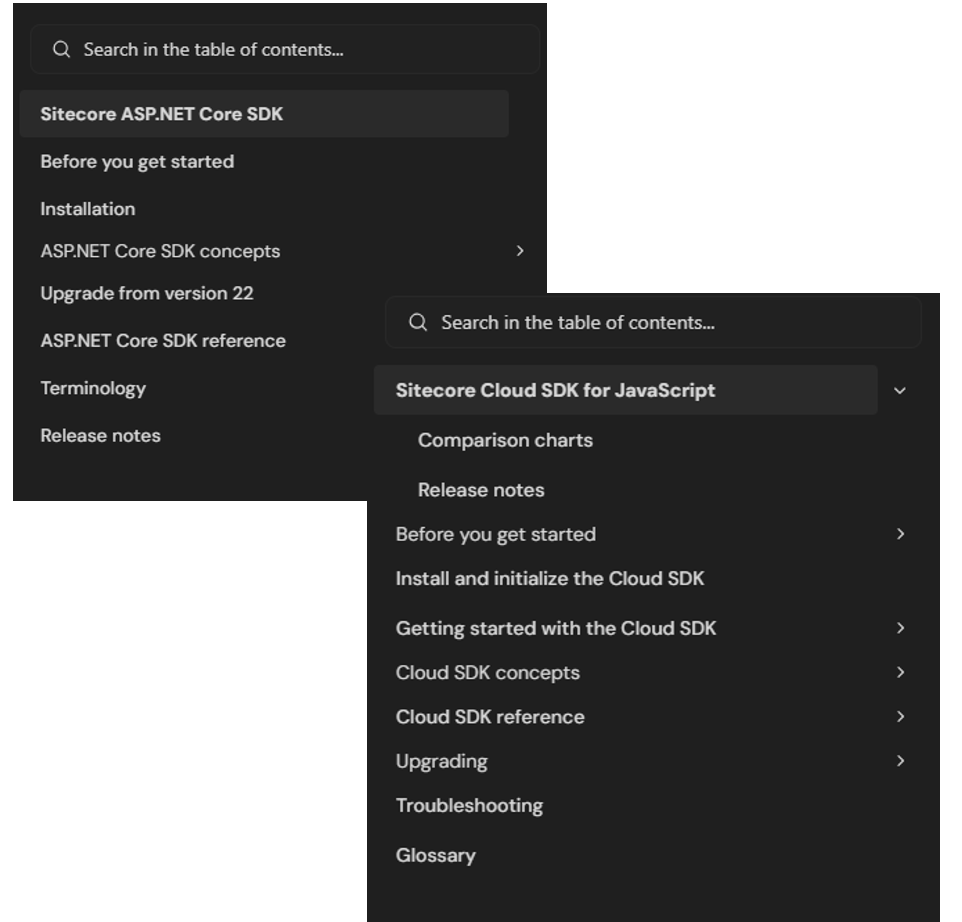
By looking at those you immediately see the documentation team structures content in a way it becomes easy to navigate and find your content. Those two documentations follow already the same structure and approach, which makes it even easier to find content across SDK documentations.
So let us bring all this together and start building the new Content SDK documentation.
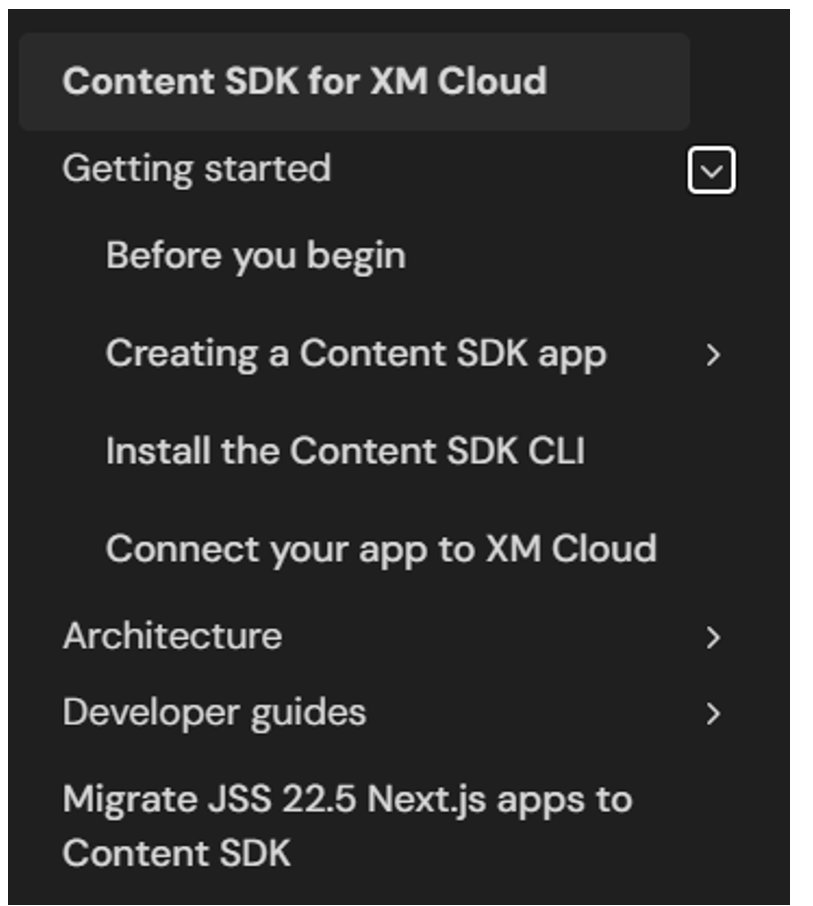
The Content SDK documentation has been thoughtfully written from the ground up, it’s not just a copy of the JSS SDK docs. It follows the same clean, modern structure as our other SDKs, making it easier for developers to find what they need and get started quickly with XM Cloud.
https://doc.sitecore.com/xmc/en/developers/content-sdk/sitecore-content-sdk-for-xm-cloud.html.
While the Content SDK, and its documentation, are still in an early stage, both will continue to evolve and improve over time. That said, even in its current form, the documentation already feels noticeably slimmer, cleaner, and more readable. It fits seamlessly into Sitecore’s modern SDK documentation approach.
Starter Kit solution
Last but not least, another big initiative to improve the developer experience: we’ve invested significant effort into refining our Starter Kit—now leaner, more focused, and fully aligned with the new Content SDK.
Current State
Let’s begin by taking a closer look at the current state of the starter kit and some of the key challenges developers have been facing.
- The configuration file, located in the temp folder, was automatically generated during the build process. However, its creation was somewhat unclear – developers were often unsure of its contents, purpose, or the logic behind its generation.
- The temp folder contained a large number of files, many of which likely went unnoticed and were rarely, if ever, reviewed in detail.
- Similarly, the lib folder became bloated due to the plugin architecture and other factors, leading to a sizable, cumbersome structure.
- While the plugin architecture seemed like a promising approach, it ultimately introduced a level of complexity that many developers struggled to adapt to, ultimately hindering the developer experience rather than improving it.
We’ll explore more of these challenges when comparing the “before” and “after” states directly.
Improvements
But let us start with some hard facts again. What did a cleanup of the starter kit bring us.
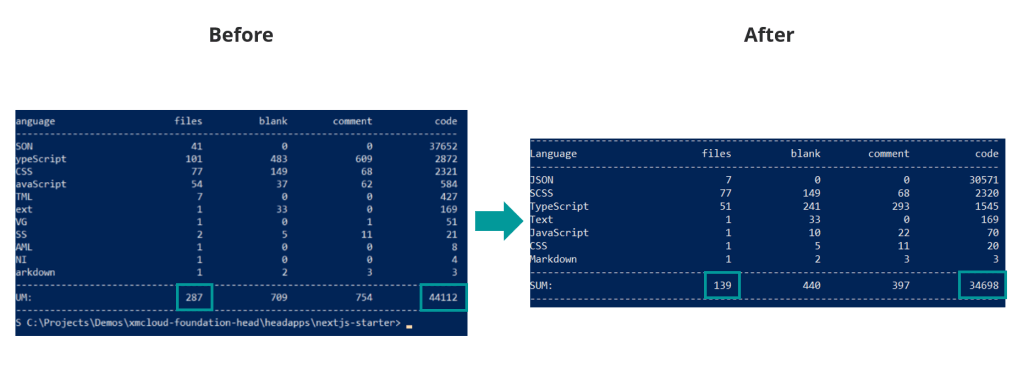
From a pure files and line of code numbers we can already see an improved by up to 51% percent on files level and roughly 22% on lines of code level.
We were able to reduce the number of files by 51% percent and decrease the lines of code by 22%.
Compared to the SDK the Starter Kit was completely rearchitected. Rewriting it based on best practices and industry standards we could see a significant lighthouse score improvement. To get these figures we ran the report a few times and took the average.
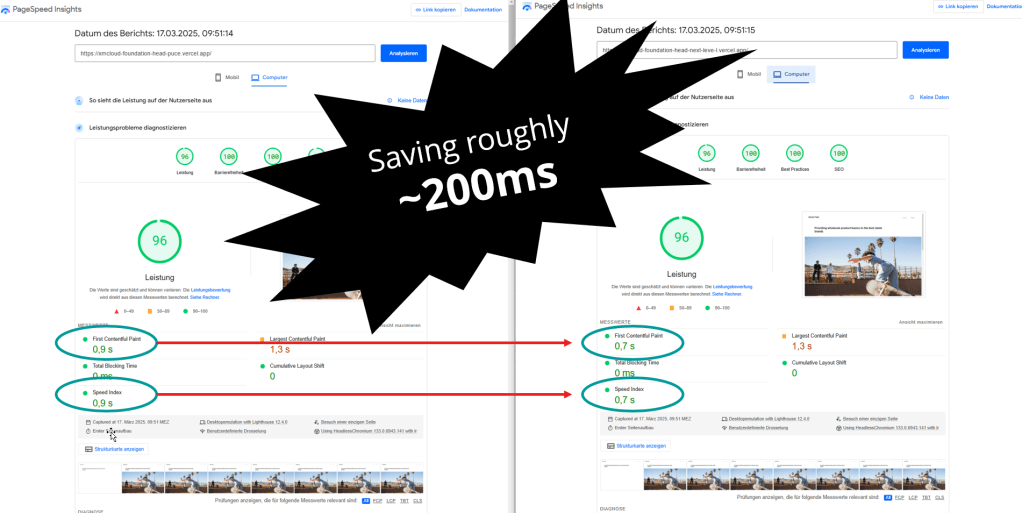
While most of the report looks exactly the same before and after, we were able to see some general improvement of TTFB and Speed Index of roughly 200ms in average. All this is based on our standard starter kit demo website.
Now what did we specifically do to improve the starter kit?
- (Nearly) Empty temp folder
- (Nearly) Empty lib folder
- Reworked CLI
- The one-stop-for-all client
- Pipeable Middleware functions
- Simplified next.config.js
- No code blackboxes
- Central configuration file
- No Plugins at all anymore
All of these points were covered and improved / simplified to create a much better developer experience.
Detailed comparison
Configuration
Let us start with the config file. During the build, the config.js file was generated in the temp folder. This was based on a “pipeline” with some plugins including several fallbacks. The result was saved in this file and inconsistently used among the starter kit. In some cases, also the ENV variables were used directly.
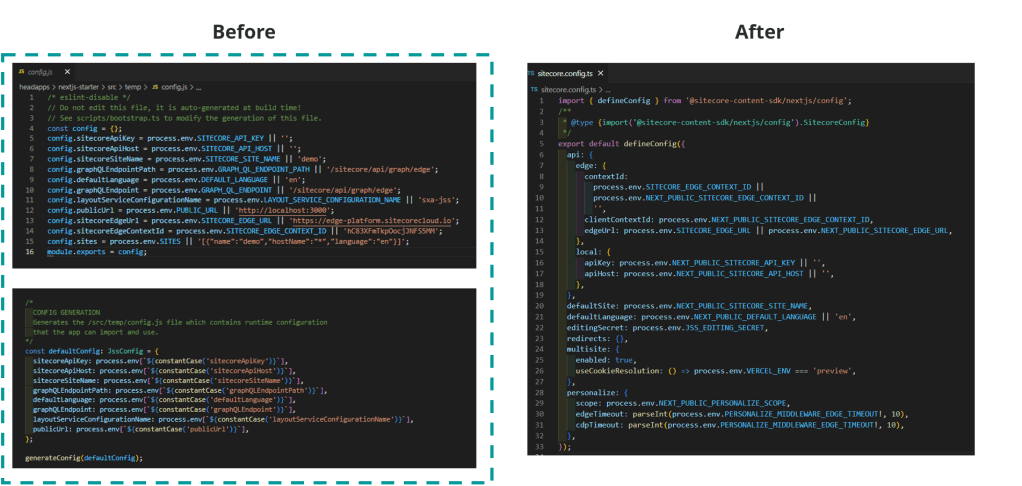
By changing this approach, we ensure consistency. The new approach is a new file called sitecore.config.ts which holds ALL the needed configurations. Endpoints, languages, sites, and even middleware settings. It is a one-stop configuration file. No build process. You immediately see what you get. The example above shows a fully managed config file. This lets developers gain even more control over this file to make you project specific overrides, whilst not breaking Sitecore’s fallbacks. The fallbacks are mostly and soon will be all handled in the SDK, and you can focus on your specific overrides.
Temp folder
The second topic was about the massive temp folder which is used to hold various files.
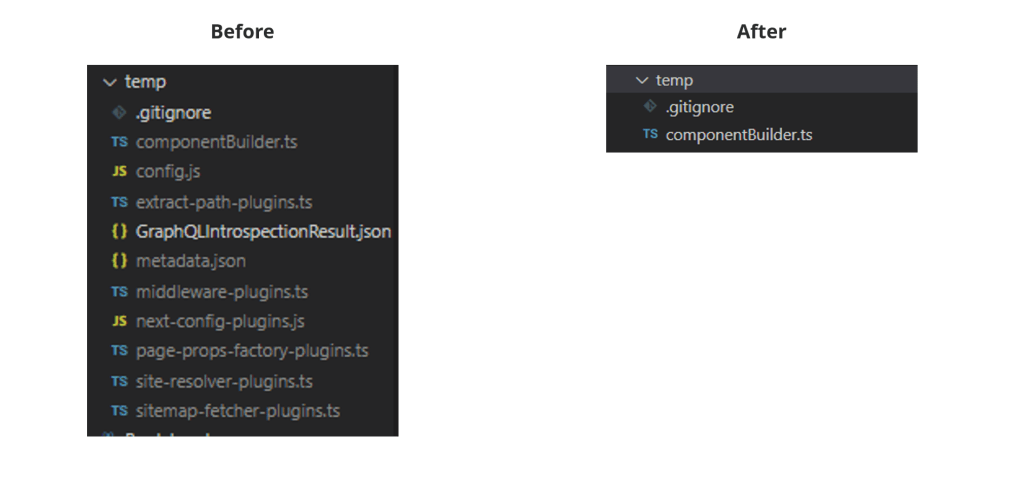
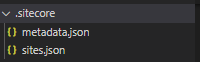
We’ve streamlined the process by eliminating the need to store temporary files in the previous location. Files that still need to be saved are now organized in clearly named directories. For example, the metadata.json and sites.json files have been moved to a more meaningful .sitecore folder, while most of the other files are no longer necessary.
Lib Folder
Next we cleaned up the lib folder. You can see that it mostly held plugins as well as helpers.
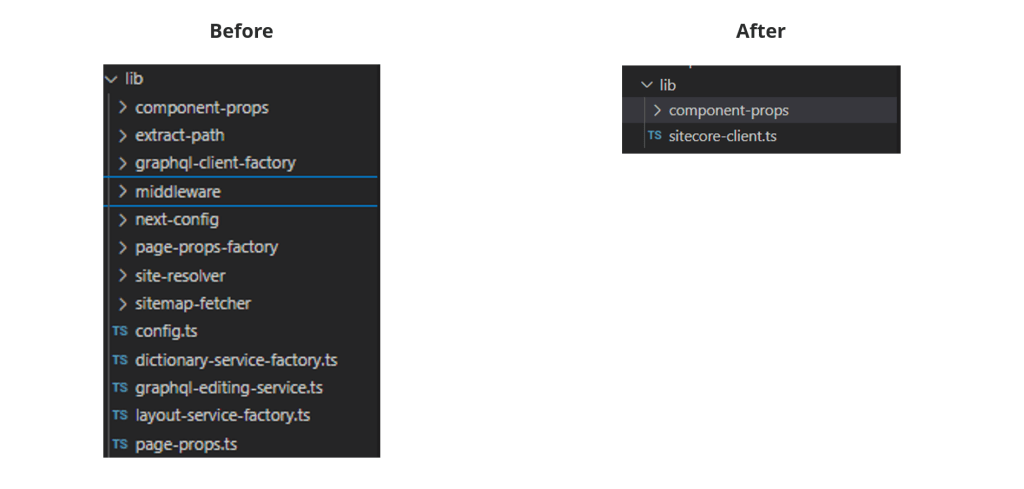
As we removed the plugin architecture at all, those files were not needed anymore. In addition all those helpers are also not needed anymore. You can see a new concept of a sitecore-client in lib. This is the one-stop for all kind of Sitecore interactions. Whenever you need to communicate with Sitecore you simply use this client which holds all the needed services and functions including any needed helpers.
Scripts Folder
Last but not least the scripts folder. This one consisted mostly of helpers to achieve specific goals.
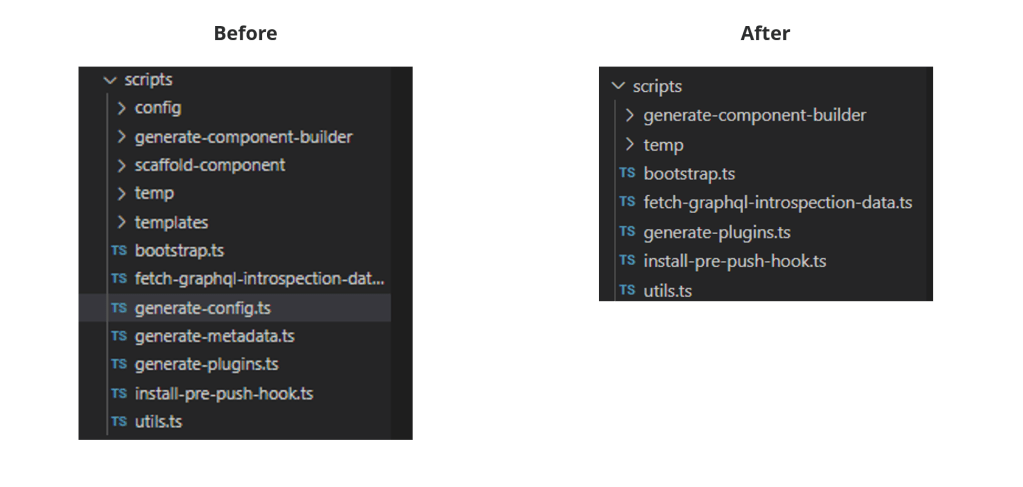
We can see that even those were partially not needed anymore or were dragged into SDK level, where they belong.
Middleware
Next, we added our custom middleware functions. Our approach was to build a small plugin system, so that a developer could easily add custom plugins to enhance the middleware logic. This general approach was used several times across the starter kit. While this approach was functional, it became clear that it required significant effort to fully understand and leverage effectively. For example, developers had to navigate into each plugin individually to determine its execution timing, which added complexity when deciding where to integrate new plugins.
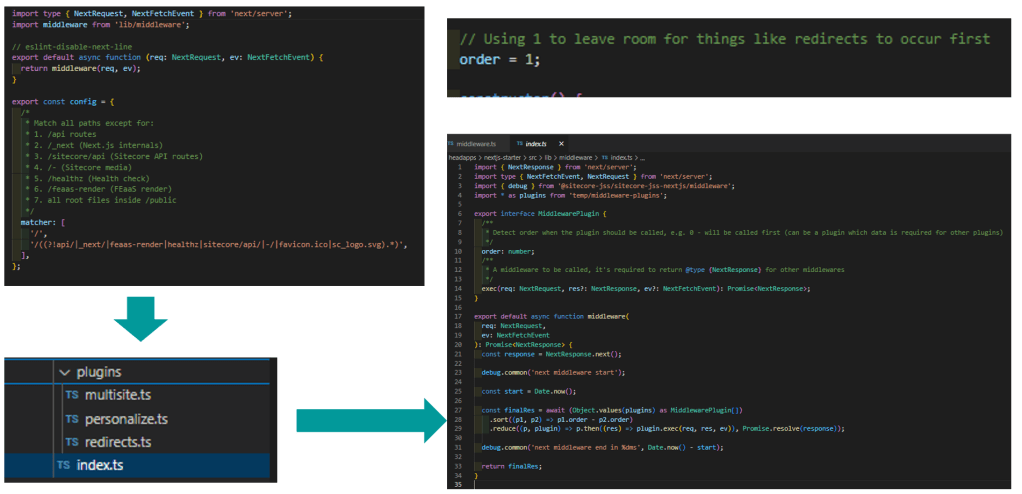
The new approach got rid of all plugins and uses a more obvious approach.
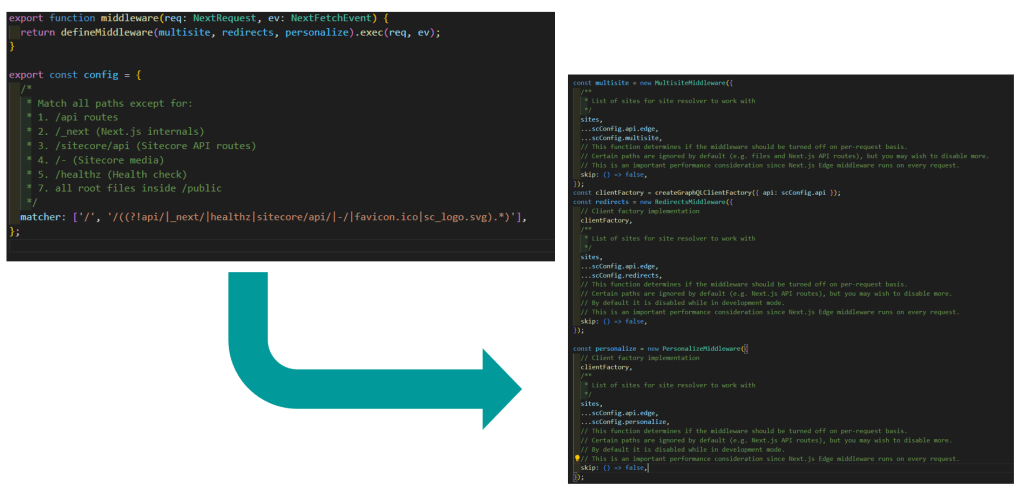
Now, you have a single function that allows you to seamlessly integrate your custom functions. The order of execution is clear, and you can easily add your own functions into the flow without significant effort.
Black Boxes
Especially the pagePropsFactory was quite a huge black box as it just called the create function and came back with a context filled with props. To find out what is actually happening you have to analyze each plugin. And if you wanted to create custom logic you have to find out where exactly to hook in. For those who never needed to interact with it, everything worked smoothly. However, when it was necessary to engage with it, many found the process to be quite complex.
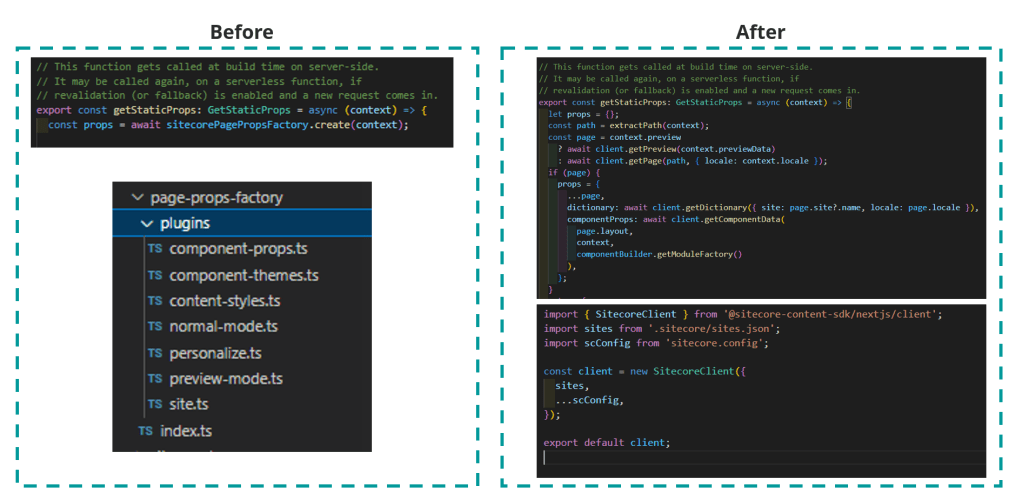
Thats why we made this transparent by doing two things:
First was to introduce the new Sitecore Client.
Secondly, we clearly explain and demonstrate each step within getStaticProps. This approach makes it much easier for developers to understand the process and, importantly, to customize or modify it at any stage. While it may increase the code volume slightly, it significantly enhances the developer experience and simplifies usage.
Conclusion
As we reach the end of a blog post: This one should give you a good overview about our current DevEx initiatives in the areas of SDKs, Starter Kits and Docs in form of a SUGCON 2025 presentation recap.
If you have any issues / concerns feedback or just want to talk, let me know as we are always eager for feedback.
- architecture
- devex
- devops
- frontend
- nextjs
- sitecore-platform
- xm-cloud