
XM Cloud – Welcome the brand new Metadata Editing Mode for Pages (Part 1)
In this detailed post, the new enhancement in XM Cloud’s Pages functionality is discussed. The upgrade streamlines page editing, improves performance, and allows for a simpler architecture. Two major
Welcome to another in-depth discussion on XM Cloud. In this post, I will delve into a significant recent enhancement made specifically within the Pages functionality of XM Cloud. This advancement represents a pivotal step forward in streamlining the underlying architecture associated with page editing, ultimately leading to a more efficient and accelerated editing process. Notably, this improvement is available out-of-the-box (OOTB), requiring only an update to the latest foundation.head to access JSS Version 22.1 or higher. This upgrade is designed to enhance your development experience by simplifying processes and improving performance.
This blog post is just the first one of a little series talking about
- What is this new feature (and which improvements does it contain) from high-level down to architectural deeper dive including overall benefits you gain from it
- How can YOU get this in YOUR solution? Step by step guide how to upgrade including testing if the new way of working is active or not, including changes which might affect your solution
- Finally we will examine with the example of my solution, what specifically has changed, how do you see that, what concrete benefits are there, as well diving deep into the code by describing, what has changed in foundation.head but also a bit in JSS for a better overall understanding.
Introduction
In this blog post we will start by first understanding, what these new features specifically are, how they work and what benefits you get more on a high level.
NOTE: All these features and improvements are exclusively for Pages Editor and do/will not work in Experience Editor. Experience Editor is a legacy Editor, which should not be used anymore, if not really needed.
The Metadata Editing Mode
This chapter will examine the new feature of Pages in more detail. It will give first a high-level overview, will deep dive into the architecture and finalizes with the given benefits of using that new feature. You can read more about those topics in the official documentation. (https://doc.sitecore.com/xmc/en/developers/jss/22/jss-xmc/architecture-and-apis-for-integrating-jss-next-js-apps-with-sitecore-editors.html#understanding-data-editing-in-jss-nextjs)
Because this new mode comes actually with two major changes, which work together hand in hand, I will describe both changes individually, what they mean, and which individual benefits you gain by using them. But in the end they are both working together under the term Metadata Mode.
Change in Editing Integration
The initial architectural modification, the Editing Integration Change, fundamentally reassigns the responsibility for page rendering from the Content Management (CM) Role to the Rendering Host. This adjustment aligns with the intended architecture by placing the rendering duties where they inherently belong, within the Rendering Host.
Introduction
To understand what this means, we first have to understand what the currently used approach of Editing Integration is.
Basically, to render a specific page Pages editor contacted the CM Role, which took over the responsibility to render and deliver the page by running through all kind of internal pipelines and processors and doing its magic. Pages just used that output and displayed it in an IFrame. Such an approach comes from times, where we used Experience Editor, which was not a stand-alone application, but part of the CM Role. Pages is just leveraging the same approach and endpoints to render the sites.
We can now all imagine that using a legacy approach like this, which was designed for Experience Editor, might not perform as good as possible in a scenario, where we have a standalone application like Pages. So, there is space to improve the overall architecture of how Pages works and gets data. And exactly this is the brand new approach we are talking right now about. Pages now, instead of calling the CM Role, calls the Rendering Host directly. The rendering host knows, with some new pieces of logic in the JSS SDK, how to process that direct request Pages. The responsibility now is on the Rendering Host to grab additional data e.g. from CM Role Preview API to render the sites and returns everything to back to Pages.
Architecture
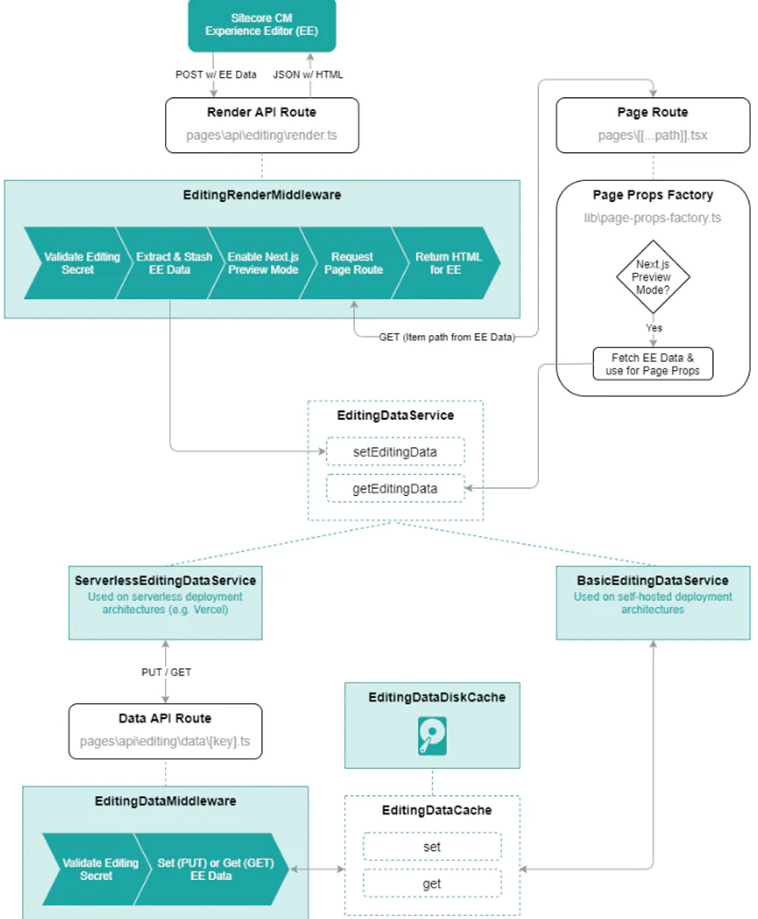
For the architectural overview we again start with the old way how Experience Editor and initially Pages worked. You can already see that the diagram is quite complex involving many pieces of logic and temporary storage. We will not deep dive into the specifics of this diagram as with this release we see it as “the legacy” approach. We are just using it to compare the complexity against the new approach.
See below the new, modern architecture, where the Pages Editor directly calls the Rendering Host to ask for the markup of the site. By having the Rendering Host as the responsible part for rendering, which decides how to render things and knows how to as CM Role preview API for data to combine everything together, the resulting architecture became incredibly simple. Of course we will deep dive a bit more into the specifics of this new way in the following posts.
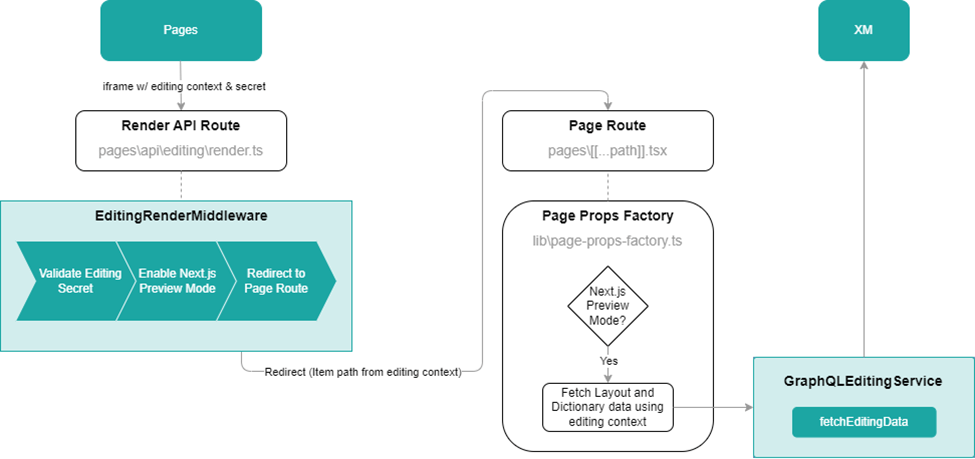
https://doc.sitecore.com/xmc/en/developers/jss/22/jss-xmc/editor-integration-using-metadata.html
Benefits
- By following this approach, the resulting architecture becomes much simpler
- By just switching to this new approach, we already speed up the Pages rendering speed.
- The IFrame of the Pages Editor now points to the Rendering Host directly not to the CM Role. This results in the fact, that relative paths are working much smoother and future improvements can be introduced more easily
- Now, that Pages directly points to the Rendering Host we can easily add any other Rendering Host as target up to the point, that we can point to our locally hosted Rendering Host (http://localhost:3000) without spinning up a full blown XMC environment, but just a rendering host instance
Metadata Editing
The second change is the actual Metadata editing. This feature is dependent on the new Editing Integration change mentioned previously, so both can be seen as combined features, which will used together and therefore I am overall speaking of Metadata Editing Mode as THE new feature within this blog post series. But nevertheless in my opinion it makes totally sense to understand all the underlying changes individually to better understand the benefits of the overall change.
Introduction
Again, to understand what this Metadata editing means, we should first have a look, how it was before to understand the difference.
The old way of data retrieval was called chromes. Chromes or Metadata are basically additional information, in a code block, which were rendered together with the usual markup of the website. Those additional data were used by Experience Editor or Pages to support all the WYSIWYG editing features. Chromes are more or less a big chunk of data per field, rendering, placeholder etc. which was added by the CM Role to the output. You can now imagine that adding so many additional data to the response, that this response very quickly blows up and becomes very big. This has obviously a negative impact on the rendering time as the API call becomes slower and slower the bigger the site becomes.
The idea of Metadata based approach is to massively reduce that amount of data. This was done by letting the Rendering Host add the most necessary metadata to the rendered elements. The amount of those data is significantly smaller than with the legacy chromes approach. As soon as the Rendering Host returns the markup to pages, the site can already be fully rendered. So, here you see, that this specific feature and the benefits of using it is highly dependent on the fact, that Rendering Host is asked by Pages and not CM Role.
But because we still need more data from the chromes-based approach the trick is to make an additional asynchronous request from Pages to CM Role like in the legacy-based approach. The only difference now is that Pages initially is not dependent on the result of that call, which might take longer. Pages is smart enough to deal with the Metadata retrieved from Rendering Host and rehydrate that with the response from the chromes call from the CM Role in the background.
Architecture
Let’s start with a high level and simplified overview of the two approaches.
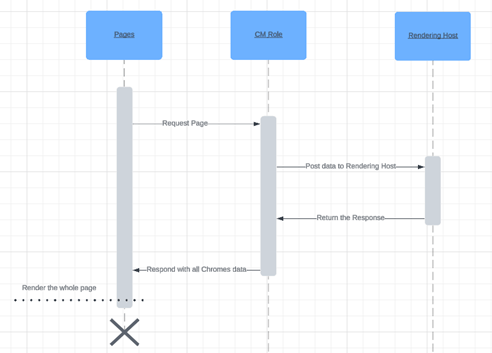
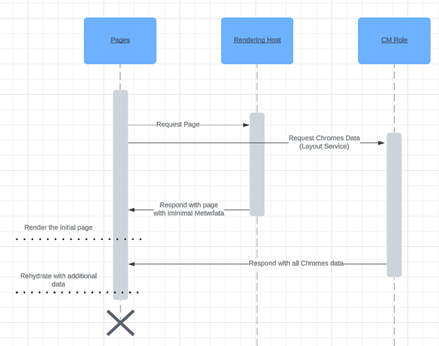
From an architectural perspective if you compare those two you can clearly see, that with the legacy approach were you fully rely on the response of the CM Server. Pages can render the page as soon as the CM Role returns all the markup. With the Metadata approach the benefit is, that you can execute two asynchronous calls at the same time. One to retrieve the basic page with minimal Metadata and one for all the necessary rest of the data. The advantage of this approach is that Pages can start rendering once the first call responds. Even if the second call takes longer the rehydration is done in the background and has no visible effect or disadvantage. That way the Pages editor can achieve potentially much faster rendering times.
Benefits
- The initial response, which is needed to render the page in Pages is potentially much faster
- A page can now also contain of much more renderings without negative performance impact as each individual rendering does not blow up the initial response that much anymore
Conclusion
From this blog post you can see, that this newly introduced overall feature / architectural change of Metadata based Integration might turn out to become a real game changer in modern Pages Editing in terms of speed and architectural simplification.
In the forthcoming blog post, we will provide a detailed, step-by-step guide on how to upgrade your solution, along with a thorough explanation of how to verify the correct functionality of the updates. This will ensure that your system is operating as expected after the changes are implemented. Following that, in the third post, we will explore the practical benefits of this approach, showcasing them in action through a live demonstration of my solution.
- architecture
- sitecore-platform
- xm-cloud