
XM Cloud – Welcome the brand new Metadata Editing Mode for Pages (Part 3)
The final part of the blog post series on the latest Pages Editor enhancements reveals significant improvements. The update simplifies the architecture, resulting in a faster and optimized
Welcome back to the final part of the blog post series about the latest Pages Editor enhancements. For all of you, who did not read part 1 and/or 2 I would highly recommend to go back and take a second to read through them to get a bit more context. This post assumes you are already familiar with the features and how to upgrade and test your solution. If not see here part 1 and 2
Now after reading Part 1 and 2 I am pretty sure you all want to know:
What do we now get from all of that?
And the answer is simple and clear: A lot. You get a simpler architecture, cleaned up, optimized and faster than ever. You don’t believe me? Let’s have a look together
Metadata Editing Mode – Live and in action
Within this chapter we will deep dive into the outcome when moving to the new Metadata Editing Mode including the editing integration flip and the actual Metadata rendering. We will see under the hood what exactly has changed. Because from a marketer point of view best case nothing has changed. The Pages should work the same way from a Marketer point of view as before. There were just made changes behind the scenes which optimize Pages and how rendering is done.
Numbers and sizes of the innovative approach
Let us examine what it means when we can make API call directly towards the render API of the Rendering Host, which then returns markup with Metadata rather than the full-blown Chromes data the CM returns.
I am using the home page of my demo as “reference” with quite a few modules placed on it. Both approaches properly render a page like this in pages (Of course in editing view). The screen above should only give you an idea how large the site is and how many renderings are placed on it. Let us first investigate side-by-side how long the pages need to load and what happens on load.

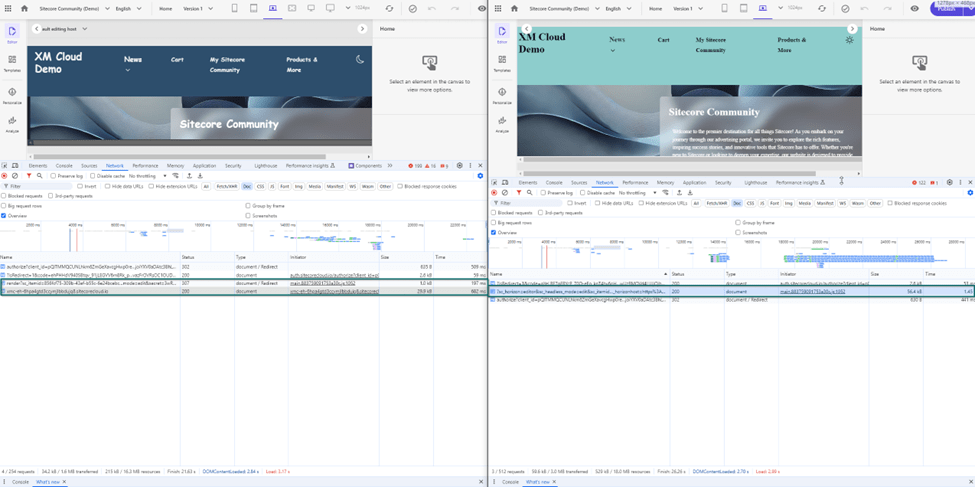
On the left-hand side, you can see the new rendering mode, where first a call to the render API of Rendering Host is done. Internally it returns with a redirect to the actual page, but with all the initial parameters it renders the page in preview mode (with all the editing) stuff. All that in total takes around 800ms
On the right-hand-side you see the legacy approach, where Pages just calls CM servers layout service. The CM needs to run through various pipelines and processors to answers finally with a full-blown markup. This process takes around 1,45s.
Note: I have repeated this test a few times and landed all the time around these numbers.
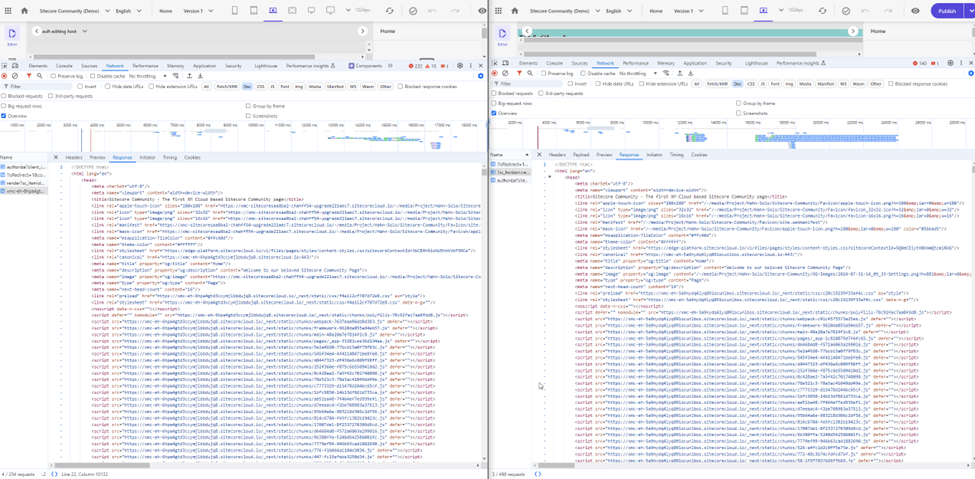
As you can see the result is mostly the same from an html point of view. It is the current site in editing mode. But when we now compare the raw size of the returned markup of both approaches, we already see massive difference.
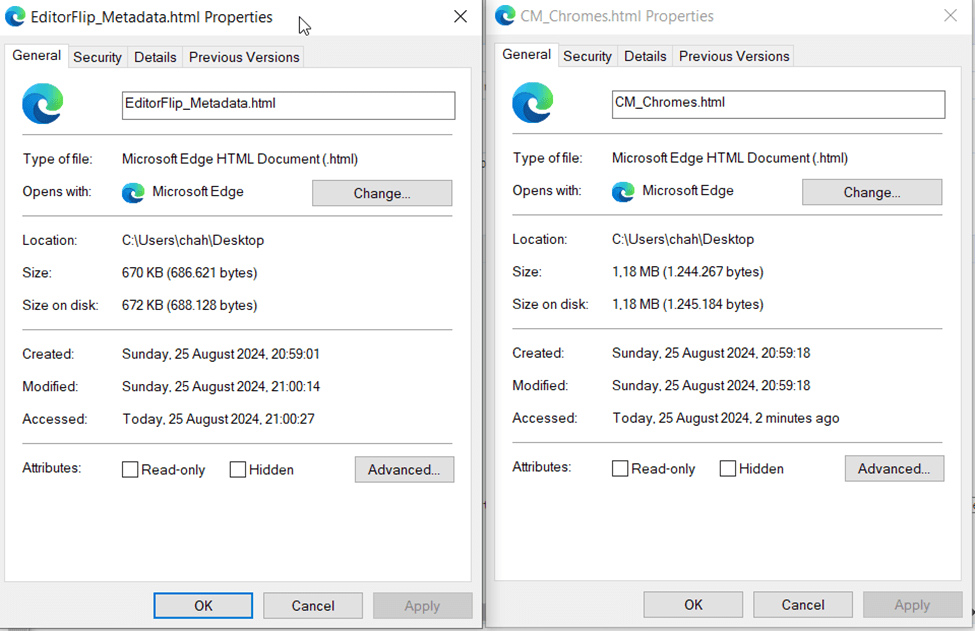
With legacy approach the site has 1.18MB. This is because the returned markup is blown up with all the chromes data from CM server. The new metadata-based approach has just 670KB. This also makes sense because this approach just sends over the most necessary data to Pages to render the page in edit mode. This way the Pages editor can display the page fast than before. All the other additional data, which might be needed as well are loaded in another async call in parallel and the view is automatically hydrated without the Marketer noticing this.
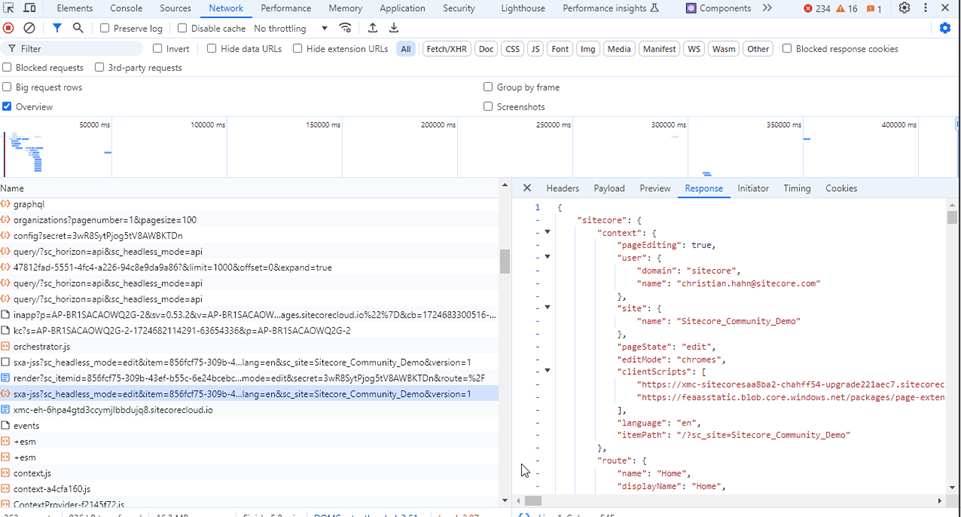
See above an example where in parallel the call towards Rendering Host with its 307 redirect is executed (and the actual redirected call to the current page) as well the call towards the layout service to grab additional chromes data, which are in the end hydrated back to Pages in the background.
Relative Paths Issues – Next Image?
As described initially, it might have happened also to you, that you had to deal with path resolution of paths coming from Rendering Host. Because in the past the IFrame’s Origin was pointing to CM rather than Rendering Host, all the relative paths were filled up with CM Server, which in most cases was incorrect. To overcome this issue, there was a helper getPublicUrl, which was used to manually build absolute paths. This was fine for most of the cases. But there was at least one case, where this was sometimes not enough. I had the case, that whenever I used next Image directly it produced relative Image paths, which in the end were broken for Pages Editing and Pages Preview cause of the IFrame origin. See below an example of the exact same content before and after doing the upgrade to the latest JSS version including moving from chromes to Metadata editing mode.
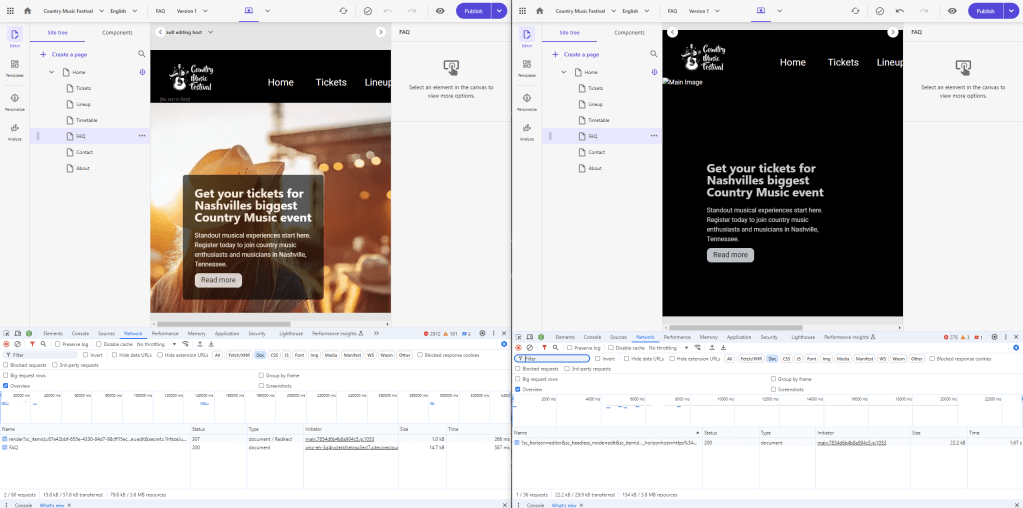
You can see that before, without dealing on my own, the image simply failed to render. (It was totally fine live as there was no IFrame) In the Metadata Editing Mode it turns out, that the image is working totally fine again, as the IFrame now points to Rendering Host, which is able to resolve the relative paths correctly. Usually I added some Editing check in my code which simply rendered next image live and a standard <img> in Editing and Preview, which solved the issue till now. Now I am able to remove all of that code to simplify by code base.
Simplified connection to localhost
With the latest Editor Flip, we can change the way how you can connect your pages to your local environment. Previously based on this documentation https://doc.sitecore.com/xmc/en/developers/xm-cloud/connect-xm-cloud-pages-to-your-local-xm-instance.html you had to connect the Pages to a local CM Server, which then is connected to a local Rendering Host. There is a critical need to spin up a local full blown XMC environment, which, as we know might be complicated and leads to potential high effort.
Now with the editor flip this process is much simpler as we can now connect directly to any local Rendering Host. There is no need to spin up a full blown XMC instance. Therefore, any developer if it is a backend architect or a head application developer, on a Windows, Mac or Linus machine can easily connect the local Rendering Host to the remote Pages and remote XMC instance.
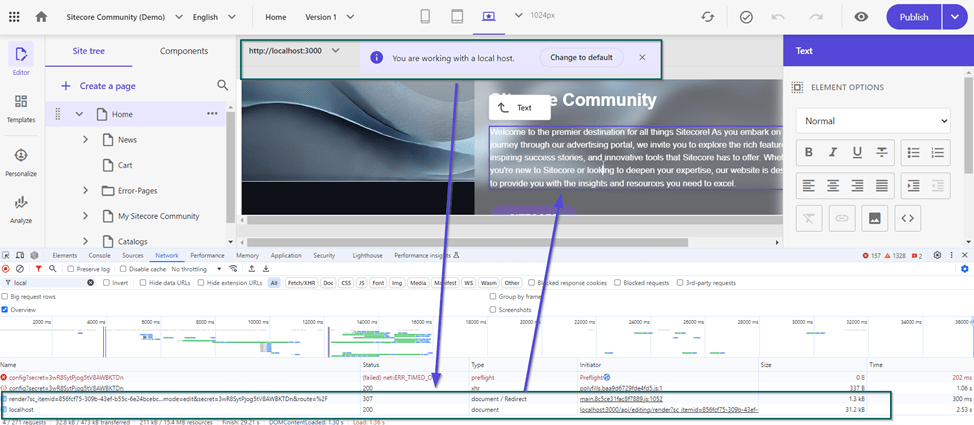
See the screen, where there is now even a little dialog to enter a proper URL to connect to. As an example I used http://localhost:3000 (Which is pretty standard) configured the JSS editing secret correctly and voila the Pages renders the Page based on my locally running Rendering Host with remote content from my XMC instance in the cloud by keeping all the editing capabilities.
Pages IFrame new origin
Additionally based on the Editing Flip and the fact that the Rendering Host is called to return the markup of the page, the used IFrame of Pages now finally points directly to the Rendering Host
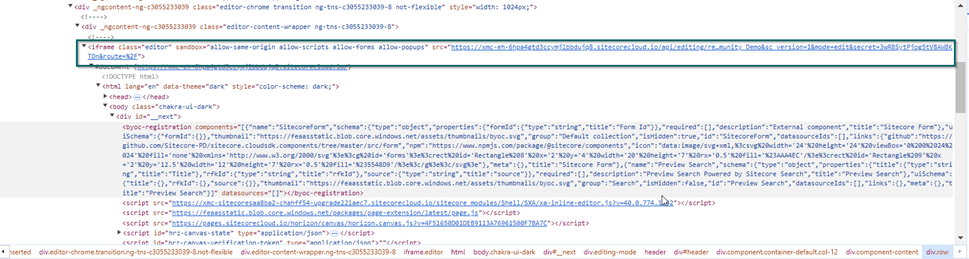
Previously, because the CM Role returned the markup to Pages, this IFrame had the CM Server as origin, which caused quite a lot of trouble or extra effort to overcome.
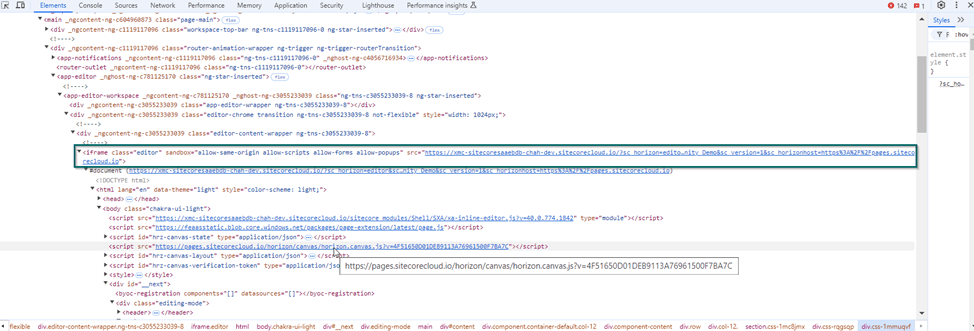
Based on the legacy approach, it was impossible to work with relative URLs, cause all of these were filled up by the browser to absolute URLs pointing to CM Server rather than Rendering Host. In most of the cases like Next/Image images or similar cases we wanted to point to Rendering Host. To overcome this issue there was a helper in the foundation.head, which gave us the Public URL (Rendering Host) to build the absolute URLs on our own. Also, CORS settings were much more complicated with the construct of having Pages IFrame pointing to CM Server using Rendering Host URLs. All that is now much more simplified.
A view under the hood
For all those who really want to understand what is happening technically under the hood, this chapter should give you some more detailed explanation of what is happening.
Editing Integration Flip
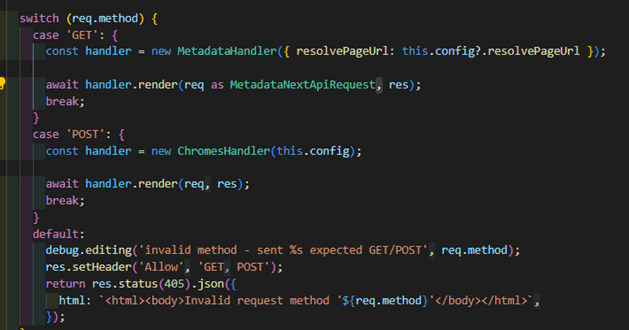
The most obvious changes based on this feature are the following. In Network tab you can now see an API call made directly to the Render Endpoint of the Head application as GET request. This GET request is important, because it tells the rendering host, that this feature is used. If it would be a POST request it would be an indicator that the CM triggered the call, and this would mean it should internally fall back / use the legacy way to render a page.
The differences are described in the beginning of the document and will not be explained in detail anymore.

Here you can see the call live and in action. This /editing/render endpoint itself just extracts all the needed data from the parameters and executes the redirect to the page which should be rendered.
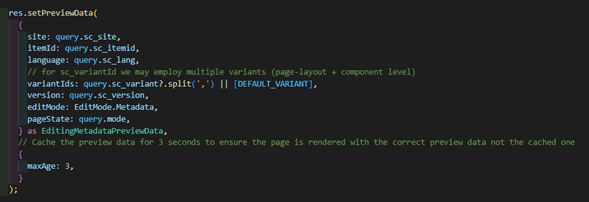
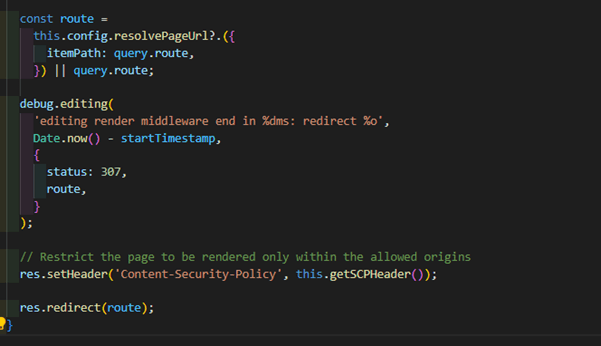
The result of that redirect is a call to the actual page, which is then rendered with the previously set preview data. That way the Rendering Host is fully responsible for building and returning the Page, which is rendered in the IFrame of Pages

Metadata Editing
Based on 5.1. and what was done there you notice additional changes, which support Metadata mode now. Without the Editor Flip Metadata editing approach would simply not work as it is dependent on that.
If we deep dive into the JSS code we notice, that if the Metadata Mode is used, JSS starts to render additional information in corresponding <code> elements. The trick is, that these are just the absolute minimal needed data to now unnecessarily blow up the response.
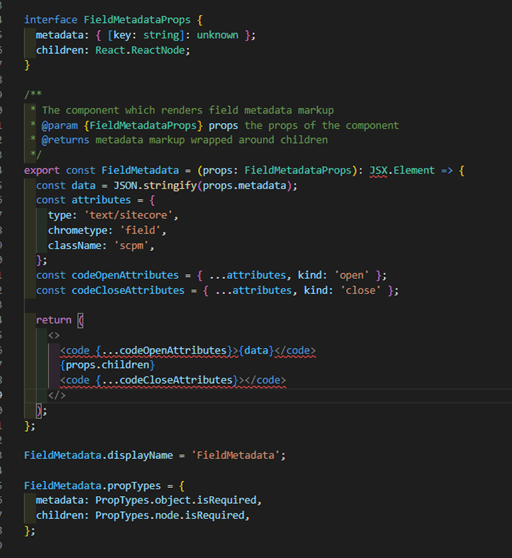
The result of the code blocks above varies depending on the fact if a rendering, a field, a placeholder, or something else is rendered. See below some examples of those code blocks in metadata mode for renderings or placeholder.

You notice that these are quite small compared to the previous code blocks in the legacy chromes approach. To see the difference even better I am using a little GIF, which shows how long we must scroll right to see the full code block in chromes mode from the exact same code blog as seen above.
This should give you an idea how much we can potentially save in terms of size and ultimately speed, when switching to Metadata approach.
For all the remaining data, which were not transmitted initially from Rendering Host, but are still needed now, there is this other call done in parallel to the CM Server grabbing all the “legacy” chromes-based data. This call is leveraging the already known layout service of CM. And as you can see it uses editing mode with Chromes, which means all the data as we know them are returned.
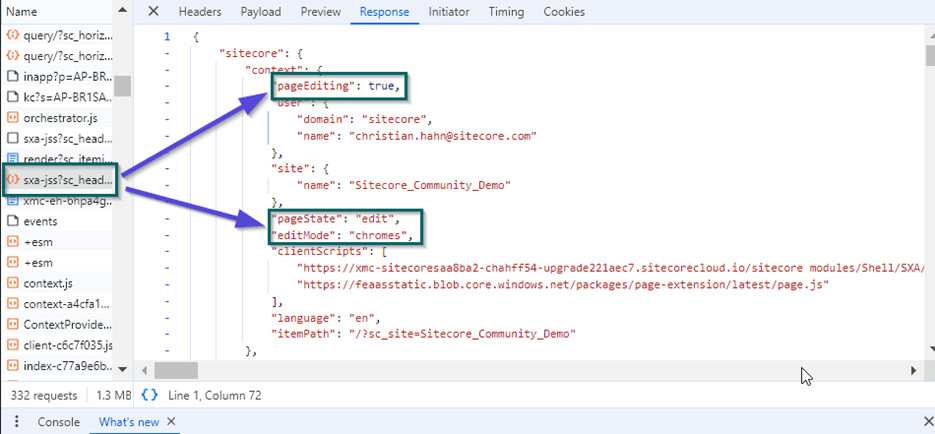
This response again is quite big. But the huge advantage is, that this call is done in parallel to the lightweight call towards Rendering Host. That way Pages can start rendering the page as soon as the first lightweight call responds and just rehydrates the output with all the missing information as soon as they arrive. For a marketer Pages now loads much faster as before with no negative visible effect. And this effect is even more impactful for larger sites when more and more renderings / fields / placeholder is rendered and therefore either way the lightweight blocks or the full-blown blocks are rendered.
Actively Opt-Out from Metadata Rendering
In case you do not want to use that new Metadata Rendering Mode. Maybe you are not ready, you would like to try it out properly in advance or you have any other reason, you can of course actively opt-out from that new feature. Keep in mind, when doing the upgrade to the latest foundation.head you would automatically use that new Metadata Rendering as this will be the standard way for Pages.
Note: Experience Editor would not be affected at all from any of those changes.
To actively opt-out you can easily go to api/editing/config endpoint and simply add the following line of code there
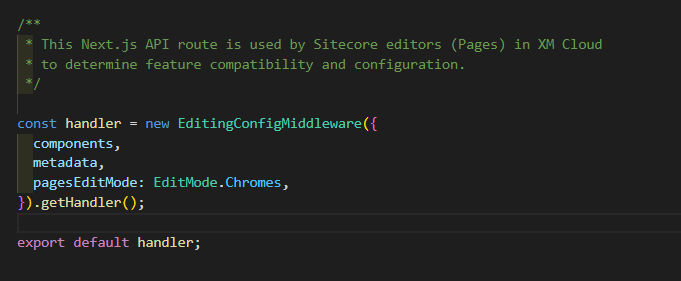
With the line pagesEditingMode: EditMode.Chromes you tell pages it should fallback to chromes based rendering mode.
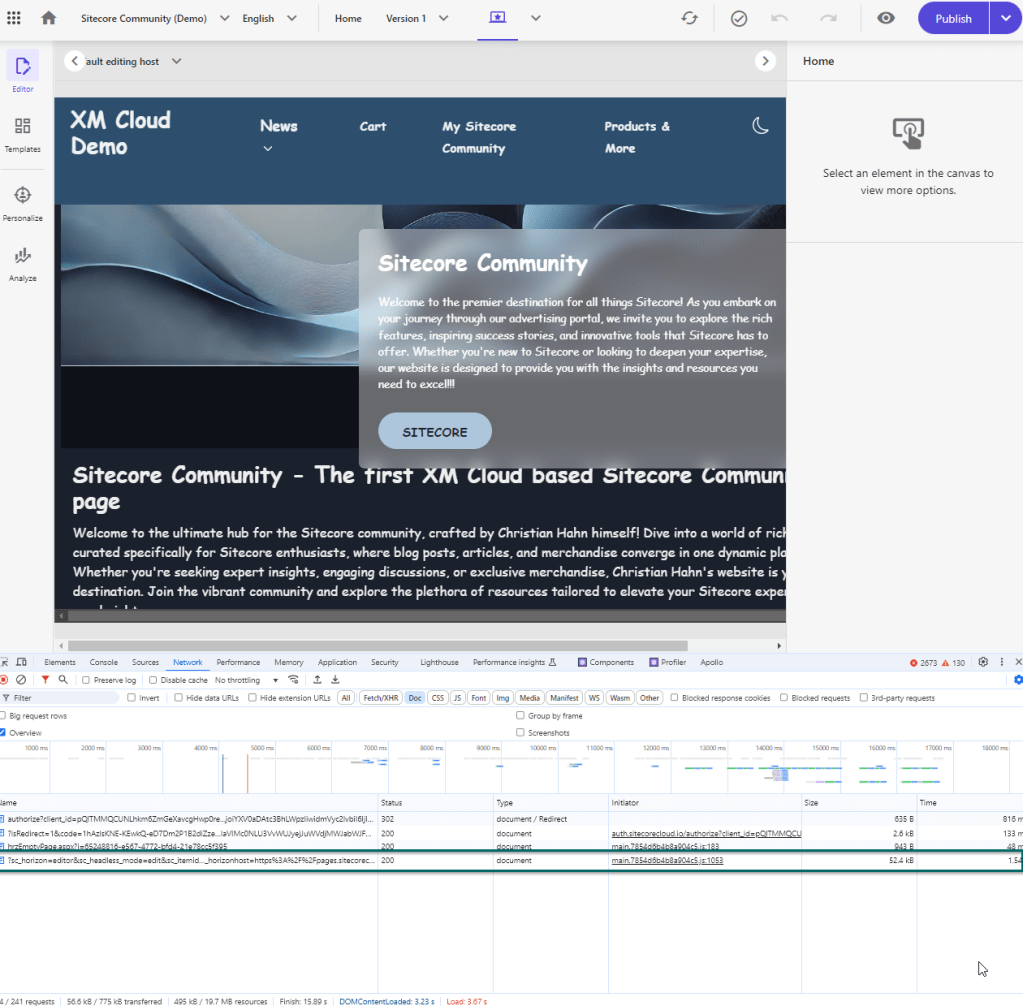
The result, when reloading the Pages now again after this code has been deployed, is that again you see the Layout Service calls purely made against CM Role rather then Rendering Host.
Further Improvements
Once you have opted-in into those new Pages features you can decide if you would like to simply your configuration even more. Read more about those bullets in the official documentation https://doc.sitecore.com/xmc/en/developers/jss/22/jss-xmc/optimize-performance-for-metadata-based-integration.html
Attention: In case you do not need Experience Editor support anymore you can do the following additional adaptions
Remove public URL references
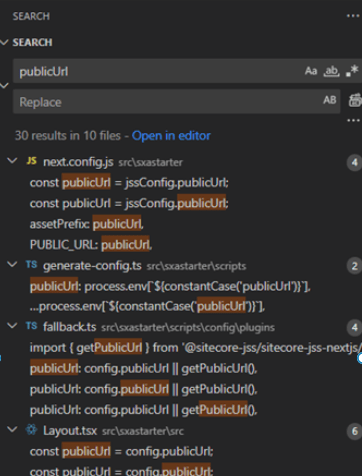
With the fact mentioned above, that the IFrame of Pages now points directly to Rendering Host, there is no need for having a supporting publicUrl / PUBLIC_URL or getPublicUrl() function or helper. You can now easily remove all the occurrences in your solution to cleanup the overall architecture. Just search in the solution for the term publicUrl, PUBLIC_URL and getPublicUrl and remove everything in standard, but also custom code and ensure the URLs are now relative ones.
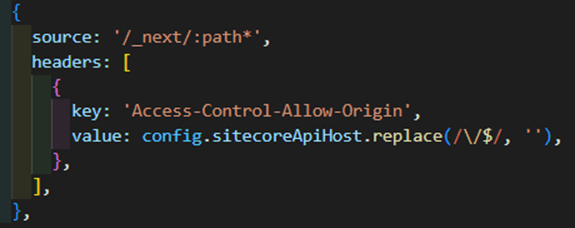
Simplify CORS settings
Additionally, you can go to lib/next-config/plugins/cors-header and remove the CORS entry there. This one was needed because of the structure of having CM Server in the middle of Pages and Rendering Host. As this is not the case anymore you can safely remove that setting.
Conclusion
Now let’s try to sum up, what we learned in the last 3 blog posts. With the latest release there was a new game changer introduced called Metadata Rendering Mode. This feature aims to simply the overall rendering architecture with simplification and proper distribution of responsibilities in the render process.
We saw a detailed and step by step upgrade, enable and test guide as well in case needed how to opt-out from all of that. The first tests proved that this simplifications and optimizations really have an impact on the Pages editing speed. In my case it is something around factor 2 faster, which is already amazing.
One thing, we should not forget and should mention is that with this simplification we can now pretty easy connect our Pages Editor DIRECTLY to a locally running rendering host, which makes the development X-times easier and faster.
Finally we saw, how we could even get one step further and cleanup our code solution by removing not needed pieces like CORS settings and references to public URLS. But Attention, when doing this you will loose compatibility to legacy Experience Editor, so that this will not work anymore.
Everything at all I would personally say, these are great steps forward into the right direction. And these changes are just the groundwork ones, which needed to be done, before even doing more and more optimizations. Stay tuned for more posts in the future.
- architecture
- sitecore-platform
- xm-cloud